How to Take an ECG on Withings ScanWatch 2
To take an ECG on Withings ScanWatch 2, open the ECG feature, place a finger on the top electrode, keep still, and wait for the recording to finish. The recording then syncs to the Withings app when the watch and phone connect.
On this page (8 sections)
- How do you activate ECG on Withings ScanWatch 2?
- How should you hold your hands during the recording?
- What happens after a Withings ScanWatch 2 ECG?
- Which replacement band suits a ScanWatch 2?
- Why does ScanWatch 2 show an inconclusive ECG?
- How do you access an old ScanWatch 2 ECG?
- What should you do with an abnormal ECG result?
- How do you take a Withings ScanWatch 2 ECG correctly?
To take an ECG on Withings ScanWatch 2, open the ECG feature, touch the top electrode with a finger from your other hand, and remain still until the recording ends. The result can sync to the Withings app after the watch connects to your phone.
An ECG, also called an EKG, records the electrical activity of your heart during the measurement. It can show a regular rhythm or an irregular pattern, but it isn't a diagnosis and doesn't replace medical care.
If the watch is new, complete the withings scanwatch 2 setup first. The ECG feature may also depend on your location, app version, account settings, and the watch software.
How do you activate ECG on Withings ScanWatch 2?
Start the ECG measurement from the watch's ECG feature. Use the crown or screen controls to move through the available measurements, then select ECG and follow the on-screen instructions.
Before recording, wear the watch snugly on your wrist. It should stay in place without being painfully tight.
A loose band can reduce skin contact as you move your arm.
If you need a replacement, compare a best Withings ScanWatch band that matches your watch's lug width and attachment system. A band should hold the watch steady during the recording.
Check that the watch has enough battery for the measurement and that the contacts are clean and dry. For expected runtime, see the ScanWatch 2 battery life guide.
The guide to how to charge a Withings ScanWatch covers the basic charging process.
How should you hold your hands during the recording?
Rest your arm and touch the top electrode with one finger from your opposite hand. Keep your finger in place for the full measurement and avoid talking or moving.
Sit down with your back supported if that helps you stay relaxed. Rest the arm wearing the watch on a table or your lap, while keeping the watch face upright.
Your opposite hand must make contact with the electrode without squeezing the watch. Keep the watch flat against your wrist and avoid lifting the case as you touch the contact.
Dry skin, cold fingers, motion, and a loose band can affect the signal. If the watch reports a poor or inconclusive recording, adjust the fit and try again after settling your hands.
For a broader guide, see How to Take an ECG Reading Correctly?. It explains the same basic ideas of stable contact, a relaxed posture, and avoiding movement.
What happens after a Withings ScanWatch 2 ECG?
The watch displays a result after the recording finishes, and the measurement can sync to the Withings app. Keep the app available on your phone and allow the watch time to connect.
Open the Withings app and look in the area for heart measurements or ECG records. Select the saved recording to review the result and any details the app provides.
Don't treat one result as a complete picture of your heart health. The recording reflects that measurement period, and a normal result doesn't explain every possible cause of chest discomfort, fainting, shortness of breath, or other symptoms.
If you have severe or sudden symptoms, seek urgent medical help. For repeated abnormal or inconclusive results, contact a qualified health professional rather than relying on repeated watch readings.
You can also review How Long Does It Take to Get ECG Results? for a general explanation of timing and what can delay a result.
How can a watch band affect ECG recording?
A band helps by keeping the watch case in steady contact with your wrist. It doesn't improve the ECG signal by itself, so the correct width, comfortable fit, and clean skin still matter.
The Picowe Watch Band Strap is a rubber replacement with 15 holes for adjustment and a screwdriver for installation. It is described as compatible with Suunto Ambit series watches, not as a ScanWatch-specific band, so check the attachment points before considering it.
The package includes 1 black watch band strap and 1 screwdriver. Screws aren't included, so keep usable original screws or choose another option if replacement screws are needed.
Which replacement band suits a ScanWatch 2?
Measure the watch's lug width and confirm the attachment style before choosing any replacement band. A band that sits securely can make it easier to keep the watch still during an ECG, but compatibility comes first.
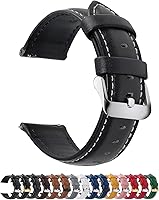
The Fullmosa 12/14/16/18/19/20/21/22/24mm Quick Release Leather Watch Band is available in those stated widths and has 11 precision-cut eyelets. Its 22mm version is described for several Samsung, Garmin, Huawei, Amazfit, Fossil, and other watches, but the product information does not identify Withings ScanWatch 2 as a compatible model.
This band includes 1 leather watch band, 1 spring bar tool, and 1 quality control card. The title identifies a black band with a silver buckle, while the product data describes genuine leather and a thickness of 0.16 inches.
The quick-release design can make band changes simpler, but it doesn't remove the need to check width. Measure where the band meets the watch case before ordering.
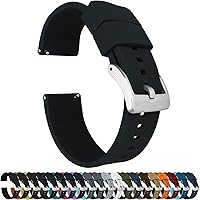
The BARTON Elite Silicone Watch Bands are available in 18mm, 20mm, 22mm, and 24mm widths, with a choice of strap color and buckle color. The product information describes quick-release spring bars, silicone, a 316L stainless steel buckle, two long-side lengths, and fit for wrists from 5 to 8 inches in circumference.
BARTON describes the band as compatible with traditional and smart watches that use the selected spring-bar width. Its stated compatible examples include several Samsung, Timex, Seiko, Swatch, and Amazfit models, but not Withings ScanWatch 2.
The band has a locking feature for the free end and tapers 2mm from the watch head to the buckle. Those details may help with everyday wear, but they don't confirm fit on your watch.
Why does ScanWatch 2 show an inconclusive ECG?
An inconclusive result often means the recording quality wasn't clear enough for the app to classify. Refit the watch, clean and dry the contact area, rest your arm, and repeat the recording once.
Keep your finger on the electrode without pressing hard. Don't move your wrist, tap the screen, speak, or change position during the measurement.
If repeated recordings remain inconclusive, check that the watch and app are updated. The guide to withings scanwatch 2 update can help you check for available software changes.
A band that is too loose can let the watch shift. A band that is too tight can be uncomfortable and make it harder to relax.
Adjust it so the watch stays in place while your wrist remains comfortable.
How do you access an old ScanWatch 2 ECG?
Open the Withings app after syncing and select the saved ECG measurement. Keep Bluetooth enabled and leave the watch near the phone while the app updates its records.
If the measurement doesn't appear, open the app and check whether the watch shows as connected. Confirm that you are using the same account paired with the watch.
Avoid deleting the app or resetting the watch as a first step because those actions can affect setup and stored data. If troubleshooting requires a reset, read withings scanwatch 2 reset first and follow Withings' instructions.
The app may show a result category and recording details. Read those details alongside your symptoms and medical history, not as a replacement for professional advice.
What should you do with an abnormal ECG result?
Follow the health guidance shown with the result and contact a health professional when the result concerns you. A wearable ECG can provide useful information, but it cannot diagnose every heart condition.
Seek urgent care for severe or sudden symptoms such as chest pain, trouble breathing, fainting, or new weakness. Don't delay emergency help while repeating watch readings.
For a non-urgent concern, save the recording if the app allows it and share the information with your clinician. Note when the measurement happened and what symptoms were present.
How do you take a Withings ScanWatch 2 ECG correctly?
The correct method for a Withings ScanWatch 2 ECG is simple: wear the watch snugly, select ECG, touch the top electrode with the opposite hand, and stay still until the measurement ends.
Pick the Picowe strap only if its attachment points fit your watch and you need its adjustable rubber design. Consider the Fullmosa band if you need a particular width and a leather style, or BARTON if you need a silicone quick-release band with two long-side lengths.
Keep the watch charged, the skin dry, and the app synced. For the related feature guide, read withings scanwatch ecg before your next recording.
Frequently asked questions
How do you take an ECG on Withings ScanWatch 2?
Open the ECG feature on Withings ScanWatch 2, place the watch firmly on your wrist, touch the top electrode with a finger from your opposite hand, and stay still until the recording ends. Keep your arm relaxed and make sure your skin contacts the electrodes.
How long does a Withings ScanWatch 2 ECG take?
A Withings ScanWatch 2 ECG recording takes about 30 seconds when the watch has good skin contact and you remain still. Movement, a loose fit, dry skin, or poor contact can interrupt the recording or produce an inconclusive result.
Where are Withings ScanWatch 2 ECG recordings saved?
Saved ECG recordings are available in the Withings app after the watch syncs with your phone. Open the health measurements area, select the ECG record, and review the result and recording details shown there.
Can Withings ScanWatch 2 diagnose a heart problem?
No. A ScanWatch 2 ECG is a single-lead recording that can help identify an irregular rhythm pattern, but it isn't a diagnosis.
Follow the app's guidance and contact a health professional about symptoms, concerning results, or repeated inconclusive recordings.