Can the Apple Watch Series 3 Record an EKG?
No, the Apple Watch Series 3 cannot record an EKG or ECG. ECG recording on Apple Watch started with Series 4, so a Series 3 can track heart rate and workouts but has no ECG sensor or ECG app.
On this page (8 sections)
- Why can the Apple Watch Series 3 not record an EKG?
- What can an Apple Watch Series 3 track for heart health?
- Can a software update or app add ECG to Series 3?
- Which newer Apple Watch models can record an ECG?
- What should Series 3 owners do if ECG matters to them?
- How can you get more from your Series 3 watch and band?
- What are the best cheap alternatives if you want ECG without a new Apple Watch?
- Final thoughts on apple watch series 3 ekg for current owners
No, the Apple Watch Series 3 cannot record an EKG or ECG. ECG recording on Apple Watch began with Series 4, which added the electrical heart sensor and the ECG app.
A Series 3 can still track heart rate, workouts, and daily activity, but it has no hardware for an ECG. You will not find an ECG app in the Health app on Series 3, and the crown will not start a reading.
This guide explains why, what Series 3 does track, and what to do if ECG is your priority.
Why can the Apple Watch Series 3 not record an EKG?
Series 3 cannot record an EKG because it lacks the ECG sensor introduced in Series 4. Apple added ECG as new hardware, not as a software update for older watches.
An ECG measures electrical signals that control your heartbeat. A watch needs electrodes and a circuit to pick those signals up from skin, and Series 3 has neither in its case or crown.
On ECG capable models, placing a finger on the Digital Crown completes a circuit for a single lead reading. On Series 3 the crown does not do that, so holding it will not start an ECG.
For the newer process, see How to Record an EKG on Apple Watch: Easy Guide, which assumes ECG hardware Series 3 does not have.
What can an Apple Watch Series 3 track for heart health?
Series 3 can track heart rate, resting heart rate, and trends over time. It also records heart rate during walks, runs, workouts, and recovery.
Its rear optical sensor uses light to detect blood flow in the wrist. That gives a pulse in beats per minute, not the electrical waveform an ECG shows.
In supported regions it can send high and low heart rate notifications. Those alerts can prompt you to rest or check how you feel, but they do not diagnose heart rhythm.
Many owners also use it for steps, distance, exercise minutes, stand hours, calories, and exercise heart rate zones. A resting pulse of 72 beats per minute is only a pulse measurement, not an ECG.
Does slow or fast heart rate on Series 3 mean the same as an ECG result?
No, a high or low heart rate alert is not the same as an ECG result. Heart rate shows how fast your pulse is now, while an ECG shows rhythm, timing, and electrical patterns.
An alert can occur during stress, illness, caffeine use, exercise recovery, or a loose band fit. It is a prompt to pay attention, not a diagnosis.
An ECG can show whether rhythm is regular and how signals travel through the heart, which is why clinicians request one when rhythm is the concern. If alerts repeat, or you feel palpitations, chest pain, shortness of breath, or dizziness, seek medical care promptly and note when symptoms start and how long they last.
Can a software update or app add ECG to Series 3?
No software update or app can add ECG recording to an Apple Watch Series 3. The missing part is hardware inside the watch, and downloads cannot create electrodes or sensing circuits.
Watch updates sometimes add faces, activity features, or health summaries. Those work only when the hardware already supports them, and ECG needs a sensor that Series 3 never had.
Third party apps face the same limit because they cannot measure electrical signals the watch cannot detect. Treat any app promising a full ECG on Series 3 with caution.
Some apps offer heart rhythm estimates based on pulse data, but an estimate is not an ECG. Keep Series 3 updated for security and bug fixes, though ECG will remain absent.
Which newer Apple Watch models can record an ECG?
Series 4 was the first Apple Watch that could record an ECG. Later models with ECG hardware include Series 5 through Series 10 and Apple Watch Ultra models, where supported.
Availability varies by country, as ECG is not offered in every region. Before buying a used watch, check support where you live and where you will use it.
Our guide to the apple watch series 4 ecg explains how Series 4 records a reading, and the apple watch series 5 ecg guide covers case size, battery life, and software support. The apple watch series 7 ekg guide covers a brighter display, a larger screen, and faster charging.
How do you check if a used Apple Watch supports ECG?
Check the model name and generation before you buy any used Apple Watch, since Series 4 or later is the minimum for ECG recording. The case size alone will not tell you the generation.
Open the Health app on a paired iPhone only after you confirm the model, because an ECG app should appear on an ECG capable watch in a supported region. If the app is missing, do not assume a reset will add it.
Ask the seller for a photo of the info screen that shows the model and watchOS version, as that is more reliable than a loose description. Also confirm the watch is not activation locked and that the battery holds a charge through a normal day.
What should Series 3 owners do if ECG matters to them?
If ECG matters to you, plan to upgrade to Series 4 or later or choose a device built for ECG recording. Keep using Series 3 for heart rate and fitness tracking meanwhile.
Decide what you need the ECG for, from occasional readings to share with a clinician to rhythm notifications and PDF exports. That reason will shape which model or device fits best.
Check region support before you spend money, since a watch bought in one country may not offer ECG in another. Confirm support for where you live and travel.
Talk with your clinician if you have a heart condition or ongoing symptoms, since a consumer watch ECG is not a substitute for medical care.
How can you get more from your Series 3 watch and band?
You can get more from Series 3 by keeping the fit secure and the sensor clean. A snug fit helps the optical sensor stay in contact during workouts and sleep.
Clean the back with a soft, lint free cloth, since sweat, lotion, and dust can interfere with readings. Dry your wrist before wearing the watch again after a workout or swim.
Set high and low heart rate notifications in the Heart Rate and Health apps to match your comfort level and any clinician guidance. Review resting heart rate trends weekly rather than reacting to one number.
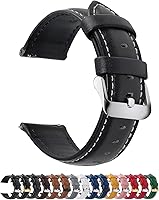
A band change can improve comfort and fit. The Fullmosa leather band comes in 12, 14, 16, 18, 19, 20, 21, 22, and 24 mm widths, with quick release and a black with silver buckle color.
Fullmosa says the band uses genuine leather with cross stitched collars and a reinforced lining. The package includes one leather band, one spring bar tool, and one quality control card.
Measure your lug width before you order, since the wrong width will not fit.
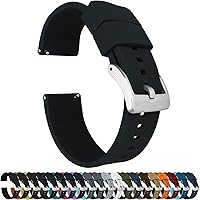
The BARTON Elite Silicone band comes in 18, 20, 22, and 24 mm widths. It uses quick release spring bars, includes two lengths of the long side, and fits wrists from 5 to 8 inches in circumference.
BARTON says the silicone is scent free and dust free, with a 316L stainless steel buckle.
Choose leather if you want a classic look for work or dress. Choose silicone if you want a band you can rinse after workouts and swap quickly.
Neither band adds ECG to Series 3, so treat them as comfort and style upgrades only.
What should you measure before you buy a replacement band?
Measure the lug width where the band meets the watch case before you buy a replacement band. That measurement, in millimeters, tells you which band width to select.
Series 3 owners should also check case size and band style. A 38 mm watch and a 42 mm watch use different band lengths.
Quick release pins make swaps faster, but they do not fix a wrong width.
Try the band for a full day before you judge it. A band that feels fine at your desk may rub during a run.
Check that the watch stays in place when you shake your wrist gently.
What are the best cheap alternatives if you want ECG without a new Apple Watch?
If you want ECG without a newer Apple Watch, consider a dedicated ECG device or other wearable with ECG hardware. That can cost less and lets you keep Series 3 for daily tracking.
Start with our guide to the Best Apple Watch Alternative For ECG, which compares devices for recording, storing, and sharing readings. For a lower cost path, see the Best Cheap Alternative To Apple Watch ECG, which focuses on price, recording method, and app support.
Check how each alternative records, since some use handheld electrodes, a chest strap, or a patch. Some record ECG only in certain regions or with a subscription.
Also check storage, sharing, phone compatibility, and any subscription cost before you buy. Keep using Series 3 for steps, workouts, and heart rate trends.
Final thoughts on apple watch series 3 ekg for current owners
The apple watch series 3 ekg question has a clear answer: Series 3 cannot record an ECG, and no update or app can change that. ECG recording starts with Series 4, so an upgrade or a dedicated ECG device is the path if you need that feature.
If you keep your Series 3, focus on what it does well. Track heart rate, review trends, keep the sensor clean, and note symptoms with dates and times to share with your clinician when they can help.
If you upgrade, compare Series 4, Series 5, and Series 7 based on ECG support, screen size, battery life, and software support. If you prefer not to upgrade your watch, compare dedicated ECG devices by recording method, app support, and total cost.
Frequently asked questions
Can the Apple Watch Series 3 record an EKG?
No. The Apple Watch Series 3 lacks the ECG sensor and app that arrived with Series 4.
You cannot enable ECG recording with a software update, a new band, or a third party app.
If ECG matters to you, you need a later model or another device made for that purpose.
What heart features does the Apple Watch Series 3 have?
Series 3 tracks heart rate through its optical sensor, records resting, walking, and workout heart rate, and can issue high and low heart rate notifications in supported regions. It also tracks steps, exercise minutes, and activity rings.
Those features are not the same as an ECG.
Which Apple Watch models can record an ECG?
ECG recording started with Apple Watch Series 4 and continued in later models with the feature in supported regions. Series 4, Series 5, Series 6, Series 7, Series 8, Series 9, Series 10, and Ultra models have included ECG capability, subject to region and software support.
Check your country and model before you buy.
Can a new band or app add ECG to Series 3?
No. A band cannot add a sensor that is not in the watch case, and an app cannot create an ECG reading without the hardware to measure it.
Apps may estimate heart rate from other signals, but that is not an ECG.
Do not rely on those estimates for heart rhythm questions.