How to Reset Withings ScanWatch 2
To reset Withings ScanWatch 2, start with a restart, then re-pair Bluetooth, and use a factory reset only as a last step. A restart keeps your data, while a factory reset erases settings and health history on the watch.
On this page (11 sections)
- How do I restart a Withings ScanWatch 2 without losing data?
- When should I re-pair Bluetooth instead of resetting the watch?
- How do I disconnect a ScanWatch 2 from my old phone?
- How do I factory reset a Withings ScanWatch 2?
- What data does a reset erase and what stays?
- How do I set up the watch again after a factory reset?
- What should I check if the watch still fails after a reset?
- How do I fix Bluetooth sync problems after a reset?
- When do I need a new strap or charger for a reset?
- How do I keep the ScanWatch 2 working after a reset?
- Which reset option should I choose for my problem?
To reset Withings ScanWatch 2, start with a restart, then re-pair Bluetooth, and use a factory reset only as a last step. A restart keeps your data, while a factory reset erases settings and health history on the watch.
This guide explains each option in order. You will learn which one fits a frozen screen, a sync problem, or a watch that needs a fresh start.
How do I restart a Withings ScanWatch 2 without losing data?
Press and hold the side button until the watch shows the power menu, then choose to restart or power off. Wait a few seconds, then press the button again to turn it on.
A restart is the safest withings scanwatch 2 reset for most problems. It clears temporary glitches and keeps your pairing, settings, and stored readings.
Use this step when the screen freezes, steps lag, or the watch stops responding to touches. It will not fix a worn strap, a flat battery, or a pairing that Bluetooth has dropped.
If the watch does not respond, charge it for at least 30 minutes. A dead battery can look like a frozen screen, and a restart will not work until the battery has charge.
When should I re-pair Bluetooth instead of resetting the watch?
Re-pair when the watch and phone stop syncing but the watch itself works fine. The watch often shows the correct time and records data, yet the app stays empty.
First, check that Bluetooth is on and the phone is not in airplane mode. Open the Withings app, bring the phone near the watch, and wait for a sync.
If sync still fails, remove the watch from the phone's Bluetooth list. Then open the app and add the watch again as a new device.
This step is different from the withings scanwatch 2 setup, which covers a first-time setup. Re-pairing keeps your account history, but the watch may ask you to confirm settings again.
How do I disconnect a ScanWatch 2 from my old phone?
Remove the watch from Bluetooth settings on the old phone, then forget it in the Withings app. The watch will stay usable, but it will not sync to that phone.
Do this before you pair with a new phone, or the old pairing can block the new one. Also sign out of the app account on the old phone if you are giving the phone away.
If the watch is tied to the wrong account, the app may ask you to reset it. That is a sign to use a full factory reset before setting it up under the correct account.
How do I factory reset a Withings ScanWatch 2?
Open the watch menu, find Settings, choose Reset or Factory Reset, and confirm the choice on screen. The watch will restart and return to its first-use state.
You can also read our guide on withings scanwatch factory reset for the full steps and warnings. A factory reset removes the Bluetooth pairing and erases on-watch data.
Make sure the battery is charged before you start. A reset that stops midway can leave the watch in a state that needs charging and a fresh setup.
After the reset, you must pair the watch again and restore your settings. Your account history on the phone stays, but readings stored only on the watch will be gone.
What data does a reset erase and what stays?
A restart and a re-pair keep your data, while a factory reset erases on-watch data and settings. Your Withings account history on the phone is not erased by a reset on the watch.
Data that can be lost includes unsynced activity, heart rate, and ECG readings stored only on the watch. It also includes Wi-Fi details, display settings, and alarm or goal settings you had set.
To protect your records, sync the watch in the app right before a reset. Open the app, pull down to refresh, and check that today's readings appear before you continue.
If you plan to sell or give away the watch, a factory reset is the right step. It removes your personal settings so the next owner starts clean.
How do I set up the watch again after a factory reset?
Turn on the watch, open the Withings app, tap Add Device, and follow the pairing prompts. Keep the phone close and the watch on its charger if the battery is low.
You will choose your language, set the time, and confirm your profile details. The app will then ask about Wi-Fi, notifications, and goals.
If you had trouble taking readings before the reset, check withings scanwatch 2 ecg after setup. A fresh pairing often fixes a reading that failed to start.
Also review withings scanwatch ecg for the general steps. Make sure the strap is snug and your arm is still before you test a reading.
What should I check if the watch still fails after a reset?
Check the battery, the strap fit, and the phone's Bluetooth and app permissions first. Many problems return because the cause was never a software glitch.
A loose strap can cause missed heart rate readings and failed ECG attempts. Tighten the band so the sensors stay in contact with your skin without feeling painful.
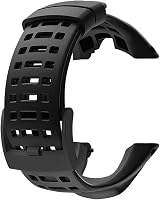
The Picowe Watch Band Strap is a soft rubber replacement band with a clasp closure and 15 adjustment holes. It fits Suunto Ambit models, so check your lug width and model before you consider it for another watch.
If the watch will not charge, the cable may be the issue. The TUSITA Charger Cable Compatible with Withings Scanwatch is a 1 m USB cable for ScanWatch 2 and ScanWatch Light, with ABS and PVC housing and copper wire inside.
Try a different wall adapter or USB port, since a weak power source can charge very slowly. Keep the charging contacts clean and dry, and do not force the cable into place.
How do I fix Bluetooth sync problems after a reset?
Restart the phone, toggle Bluetooth off and on, and open the Withings app in the foreground. Then bring the watch within a few feet of the phone and wait for the sync to finish.
Our guide on how to reset your Bluetooth heart monitor covers the same steps for other monitors. The key point is to remove old pairings and pair again through the app.
Walls, a metal phone case, and other nearby Bluetooth devices can weaken the link. Move to an open room and remove interference while the watch syncs.
If sync works only when the phone is awake, check your phone's battery settings. Some phones pause Bluetooth in the background to save power, which can stop the app from syncing on time.
When do I need a new strap or charger for a reset?
You need a new strap only if the old one is worn, stretched, or too loose for accurate readings. A reset cannot fix a band that slips during the day.
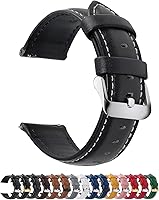
The Fullmosa 12/14/16/18/19/20/21/22/24mm Quick Release Leather Watch Band comes in sizes from 12 mm to 24 mm and includes a spring bar tool. It lists compatibility with several Samsung, Garmin, and Huawei watches, so check the width of your watch lugs first.
Leather suits dress use and feels soft, but it can absorb sweat. Rubber suits workouts and daily wear, so pick the material for how you use the watch most.
For charging, check the cable for fraying or bent pins before you buy a spare. A cable that only works at one angle can make a reset look like a battery fault.
How do I keep the ScanWatch 2 working after a reset?
Sync often, charge before the battery runs out, and clean the sensors weekly. These habits prevent most repeat problems.
Wipe the back of the watch with a soft, slightly damp cloth and dry it fully. Sweat and lotion can build up on the sensors and affect readings.
Update the watch and app when prompted. Our guide on withings scanwatch 2 update explains the update steps and why you should not interrupt one.
Keep the watch paired to one phone at a time. Multiple pairings can confuse sync, and each reset makes the watch forget the last phone it trusted.
Which reset option should I choose for my problem?
Choose a restart for a frozen screen, a re-pair for sync problems, and a factory reset for a fresh start. That order protects your data and fixes most issues with the least work.
If the watch is frozen, restart it first. If it works but will not sync, re-pair it through the app.
If settings are wrong or the watch is tied to another account, use a factory reset.
For a withings scanwatch 2 reset, always sync before you erase anything. Then confirm your readings on the phone, charge the watch, and set it up again with a snug strap.
Frequently asked questions
Does a ScanWatch 2 reset delete my health data?
A simple restart does not delete health data, and a Bluetooth re-pair usually keeps it too. A factory reset erases settings and on-watch history, so sync the watch in the app first and check that recent ECG, heart rate, and activity records appear on your phone.
What is the difference between restart and factory reset?
A restart turns the watch off and on and keeps your paired phone, settings, and stored data. A factory reset returns the watch to its first-use state, removes the pairing, and erases on-watch data, so you must set it up again from the start.
Why is my ScanWatch 2 not syncing after a reset?
Keep the phone nearby, turn Bluetooth on, and open the Withings app with location permission enabled. Charge the watch first if the battery is low, then remove the old pairing in phone settings and pair again through the app, not from Bluetooth settings alone.
Can I reset a ScanWatch 2 if the screen is frozen?
Yes, try a forced restart by pressing and holding the side button until the watch powers down, then turn it on again. If it stays frozen, connect it to a charger and wait a few minutes before trying the button again.