How Long Does the Withings ScanWatch 2 Battery Last?
Withings ScanWatch 2 battery life can reach up to 30 days, depending on how you use the watch and which features are active. Frequent health measurements, notifications, and workouts can shorten the time between charges.
On this page (13 sections)
- How long does the Withings ScanWatch 2 battery last?
- What affects ScanWatch 2 battery life?
- Do ECG measurements drain the battery?
- Which settings help extend battery time?
- How does power reserve change battery expectations?
- What should you do if ScanWatch 2 battery life seems short?
- Can a replacement band make charging easier?
- Is a leather band useful for daily ScanWatch 2 wear?
- Is a silicone band better for workouts?
- How does ScanWatch Light battery life compare?
- Can you replace the ScanWatch 2 battery?
- How often should you charge ScanWatch 2?
- What is the best way to think about ScanWatch 2 battery life?
Withings ScanWatch 2 battery life can reach up to 30 days, depending on how you use the watch and which features are active. Frequent health measurements, notifications, and workouts can shorten the time between charges.
That figure is best treated as a maximum expectation, not a promise for every routine. A watch used for regular health tracking and many alerts may need charging sooner than one used mainly for timekeeping and occasional activity checks.
How long does the Withings ScanWatch 2 battery last?
The ScanWatch 2 can run for up to 30 days before charging, with actual time shaped by settings and use. The watch also has a power reserve option for extending remaining battery when you need fewer active features.
The biggest difference is how often you use power-demanding functions. Workout tracking, repeated measurements, notifications, and frequent interaction all create more activity than simply wearing the watch and checking the time.
Withings describes battery life as dependent on use. You can check the manufacturer's current information through Withings support, especially after a software update or if your watch behaves differently from the expected range.
What affects ScanWatch 2 battery life?
Active health and activity features usually have more effect than the watch face alone. Notifications, measurements, workouts, and repeated screen use can all increase how often you need to charge.
A useful way to think about battery use is by daily demand:
- Occasional time checks use less power than frequent interaction.
- Regular workouts add tracking time.
- Repeated health measurements add more activity.
- Many phone notifications create more wake-ups.
- Frequent screen use increases daily interaction.
You don't need to turn off every feature to protect battery life. Start with the settings that provide little value to you, then keep the measurements and alerts that support your routine.
Do ECG measurements drain the battery?
Occasional ECG measurements are unlikely to define your entire charging routine, but repeated health features can reduce total battery time. The effect depends on how often you use them and how much other activity the watch records.
If you need an ECG, use the feature when appropriate instead of avoiding it only to save battery. Our guide to how to take an ECG on Withings ScanWatch 2 explains the basic process and what to consider before recording.
A battery that falls quickly after one measurement may have another cause, such as a poor charging connection, a recent update, or several active settings working together. Look at the pattern over several days before deciding that one feature is responsible.
Which settings help extend battery time?
Reduce unnecessary alerts and measurements first, then keep the features you use for health and activity tracking. This preserves useful functions without treating every setting as equally important.
Try these practical adjustments:
- Turn off notifications that you don't need on your wrist.
- Reduce repeated measurements that don't support your routine.
- Limit workouts that continue after the activity has ended.
- Avoid repeated screen checks when your phone is more convenient.
- Charge before long trips or days with several planned workouts.
- Keep the charging contacts clean and dry.
Your best settings depend on why you wear the watch. Someone focused on activity tracking may keep workout features active, while someone focused on basic timekeeping may prefer fewer alerts.
How does power reserve change battery expectations?
Power reserve mode is useful when preserving remaining battery matters more than full tracking. It can extend the time before a charge by reducing the watch's active demands.
Use it when you are away from a charger, traveling, or waiting until a more convenient time to charge. It is less suitable when you need continuous health or activity features.
Power reserve should be viewed as a backup approach, not the normal way to use every feature. If you regularly need it to finish the day, review alerts, measurements, workouts, and charging habits first.
What should you do if ScanWatch 2 battery life seems short?
Check the charger, contacts, settings, and recent changes before assuming the battery has failed. A charging problem can look like poor battery life when the watch never reaches a full charge.
Place the watch correctly on its charger and check that the charging connection stays stable. Clean and dry the contact area according to Withings' care guidance, and avoid charging when the contacts are wet.
Next, think about what changed. A new phone, software update, added notifications, more workouts, or increased health tracking can change daily battery use.
If the watch still loses charge unusually fast after these checks, contact Withings support. Don't open the case or attempt an internal battery repair yourself.
Can a replacement band make charging easier?
A replacement band can make the watch more comfortable to wear, but it doesn't increase battery capacity. It may still help you keep the watch on consistently, which matters if you rely on regular tracking.
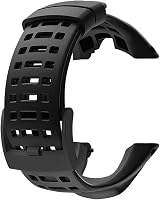
The Picowe Watch Band Strap uses soft rubber and has 15 holes for adjustment. It includes a screwdriver, but the package does not include screws, so check your existing hardware before starting a band change.
This band is described for Suunto Ambit models, so don't assume it fits a ScanWatch 2. Measure the watch's attachment points and confirm the band and hardware match before ordering.
Is a leather band useful for daily ScanWatch 2 wear?
A leather band may suit readers who want a traditional look and quick band changes, provided the width and attachment fit their watch. It won't change the ScanWatch 2 battery life, but comfort can affect whether you wear the watch consistently.
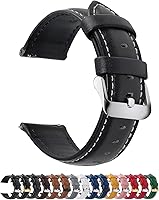
The Fullmosa 12/14/16/18/19/20/21/22/24mm Quick Release Leather Watch Band is a genuine leather band with quick release hardware. Its 22mm version has 11 adjustment holes and includes a spring bar tool.
Measure the watch lugs before choosing a width. The available sizes cover several watches, but a listed width alone doesn't prove compatibility with your ScanWatch 2.
Leather also needs different care from silicone or rubber. Keep it away from unnecessary moisture and choose it only if its feel and appearance suit how you wear the watch each day.
Is a silicone band better for workouts?
A silicone band is the more practical choice for readers who want quick changes and a workout-friendly material. It still won't extend battery life, but a secure, comfortable band can make regular activity tracking easier to maintain.
The BARTON Elite Silicone Watch Bands use quick-release spring bars and are available in 18mm, 20mm, 22mm, and 24mm widths. The band includes 2 long-side lengths, fits wrists from 5 in to 8 in in circumference, and uses a 316L stainless steel buckle.
Choose the exact lug width required by your watch. BARTON says the band must match the lug width so the spring bars fit correctly, but that does not confirm a ScanWatch 2 fit without measuring.
Clean the band after sweaty workouts and let it dry before putting the watch back on. Follow Withings' care instructions for the watch itself.
How does ScanWatch Light battery life compare?
ScanWatch Light has its own battery expectations, so don't use its runtime as a direct promise for ScanWatch 2. Different hardware, settings, and feature use can change the time between charges.
If you're comparing the two models, read how long the Withings ScanWatch Light battery lasts alongside the ScanWatch 2 specifications. Compare the features you need rather than choosing only by the largest battery figure.
The same practical rule applies to both watches: more active tracking and more alerts usually mean more charging. Your routine matters as much as the advertised maximum.
Can you replace the ScanWatch 2 battery?
Don't treat the ScanWatch 2 battery as a normal user-replaceable part. Opening the case can damage the watch and may create safety or water-resistance problems.
If the watch no longer holds enough charge for your routine, record how quickly the battery drops and check whether the charger reaches a full charge. Then ask Withings about service options.
Our guide to Can You Replace the Withings ScanWatch 2 Battery? covers the repair decision in more detail. You can also compare the role of long-lasting devices in Best ECG Monitor With Long Battery Life.
For general battery handling, How to Replace ECG Monitor Battery? explains why battery access differs between devices. Never use that general advice to open a sealed ScanWatch 2.
How often should you charge ScanWatch 2?
Charge ScanWatch 2 based on your routine rather than waiting for the battery to reach empty. A planned charge before travel, workouts, or a busy day can prevent gaps in tracking.
A consistent schedule is easier if you charge during a regular idle period. Review the battery level before bed, before a workout, or before leaving home, depending on when you use the watch most.
If your watch lasts far less than expected, compare several full charge cycles instead of judging one day. A single day with many workouts and notifications may not represent normal use.
What is the best way to think about ScanWatch 2 battery life?
Expect up to 30 days under light use, then adjust that expectation for health tracking, workouts, notifications, and screen interaction. Power reserve can help when you need extra time, while setting changes can reduce avoidable charging.
Keep the features that support your routine and remove alerts or measurements you don't need. Choose a replacement band for fit and comfort only after measuring the attachment width.
If your battery still drops quickly after checking the charger and settings, use Withings support and the battery replacement guide before attempting any repair.
Frequently asked questions
How long does the Withings ScanWatch 2 battery last?
Withings ScanWatch 2 battery life can reach up to 30 days, but your actual time depends on active features and daily use. Frequent workouts, health measurements, notifications, and screen interactions can require more charging.
The watch can also use a power reserve mode when you need to extend time before the next charge.
What reduces ScanWatch 2 battery life?
Frequent measurements, workout tracking, notifications, and repeated screen interactions can reduce ScanWatch 2 battery life. Bluetooth connection time and the number of alerts also affect charging needs.
Review the features you use most, then reduce nonessential alerts or measurements if the watch needs charging sooner than expected.
Does ScanWatch 2 have a power reserve mode?
Yes, ScanWatch 2 supports a power reserve approach that can extend the time before charging. It gives you a way to preserve remaining battery when you need basic timekeeping for longer.
Use normal health and activity features when you need them, then switch to a lower-use mode when battery time matters more.
Can you replace the Withings ScanWatch 2 battery?
ScanWatch 2 battery replacement isn't a routine user task because the battery is built into the watch. Don't open the case or try to remove the cell yourself.
If the watch no longer holds a charge, check Withings support and review our guide to Withings ScanWatch 2 battery replacement before choosing a repair option.