How to Read a Fingertip Pulse Oximeter Display
Fingertip pulse oximeter readings usually show SpO2, pulse rate, and a signal indicator. Warm your hand, keep still, and wait for a steady display before recording the numbers.
On this page (11 sections)
- What do fingertip pulse oximeter readings show?
- How do you take a fingertip pulse oximeter reading?
- Which finger should you use for fingertip pulse oximeter readings?
- What does SpO2 mean on the display?
- What does the pulse rate number mean?
- Which pulse oximeters make the display easier to read?
- What features help you track readings over time?
- Is a pulse oximeter the same as a blood pressure monitor?
- How should you interpret a changing display?
- When should you ask for medical help?
- What is the simplest way to read fingertip pulse oximeter readings?
Fingertip pulse oximeter readings usually show SpO2, pulse rate, and a signal indicator. Warm your hand, keep still, and wait for a steady display before recording the numbers.
A pulse oximeter is designed for a quick spot check. It does not replace medical advice, and the numbers should be read alongside symptoms and the instructions for your specific device.
What do fingertip pulse oximeter readings show?
SpO2 is the oxygen saturation percentage, while PR or pulse is your heart rate in beats per minute. A bar graph, waveform, or signal icon shows how strongly the device is detecting your pulse.
Common labels include:
- SpO2: Estimated blood oxygen saturation shown as a percentage.
- PR: Pulse rate, usually shown in beats per minute.
- PI: Perfusion index on some models, showing the detected pulse signal strength.
- Pulse bar: A moving bar that rises and falls with each detected pulse.
- Waveform: A visual trace that reflects the pulse signal.
- Battery icon: Remaining battery power.
Some screens show SpO2 on the left and pulse rate on the right. Others rotate the numbers or use different colors, so check the manual if a label is unclear.
For a broader explanation of the device itself, see the pulse oximeter device buying guide.
How do you take a fingertip pulse oximeter reading?
Place the device on a warm, relaxed finger, keep your hand below heart level, and stay still until the display settles. A rushed reading can be less useful than one taken after a short pause.
Use this basic method:
- Sit down and rest for a few minutes.
- Warm your hand if your fingers feel cold.
- Open the clip and place your finger fully into the chamber.
- Keep the nail facing upward if that matches the device design.
- Rest your hand on a flat surface.
- Avoid talking, shaking, or moving the finger.
- Wait until the SpO2 and pulse numbers stop changing quickly.
- Record the numbers only if the pulse signal looks steady.
Do not squeeze the fingertip or hold the device loosely. The sensor needs a clear path through the finger, and movement can make the display jump.
Which finger should you use for fingertip pulse oximeter readings?
Use a warm finger that fits comfortably in the chamber, often the index or middle finger. The best choice is the finger that sits securely in the sensor without pressure or gaps.
If the first finger gives an unstable result, try another finger after warming your hand. The guide to which finger should you use for a pulse oximeter explains placement choices in more detail.
Remove anything that may block the sensor, such as dark nail coverings or artificial nails, if the numbers stay inconsistent. Do not force a large finger into a small chamber.
What should the pulse signal look like?
The pulse signal should rise and fall in a regular pattern while the number remains reasonably steady. A moving bar or waveform that keeps disappearing may mean the device is not getting a clear signal.
A weak signal can result from cold fingers, movement, poor placement, or low battery power. Check the battery indicator and reposition your finger before drawing meaning from the numbers.
What does SpO2 mean on the display?
SpO2 is the device's estimate of oxygen saturation in the blood, expressed as a percentage. It is separate from pulse rate, which tells you how many beats per minute the device detects.
The number is not a diagnosis. FDA guidance explains that pulse oximeter results can be affected by factors such as circulation, skin pigmentation, temperature, movement, and other conditions.
Read the agency's pulse oximeter information for limitations and safety context.
Don't compare your reading with someone else's as if the numbers were interchangeable. Follow your clinician's instructions if you have been told to monitor oxygen at home.
Can a pulse oximeter read blood sugar?
No, a pulse oximeter cannot measure blood sugar. It is designed to estimate oxygen saturation and pulse rate, not glucose.
The article on a pulse oximeter that reads blood sugar explains why these measurements require different sensing methods. Use a blood glucose meter or another method recommended for glucose testing.
What does the pulse rate number mean?
The pulse rate number is the detected heart rate in beats per minute. It may change with activity, stress, temperature, posture, and movement during the measurement.
The pulse rate on a pulse oximeter is not the same as a full heart rhythm assessment. If you need to understand electrical heart recordings, read how to read an EKG reading at home and how to read an ECG strip.
A pulse oximeter can be useful for a quick pulse check, but it does not replace an ECG or a clinician's assessment when symptoms are concerning.
Which pulse oximeters make the display easier to read?
A large display, clear labels, and a visible signal indicator make fingertip pulse oximeter readings easier to follow. Choose a model that shows the measurements you need without forcing you to guess which number is which.
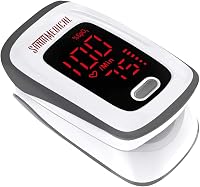
The Santamedical Fingertip Pulse Oximeter shows SpO2, pulse rate, and a pulse bar graph on a digital LED display. It is designed for quick spot checks and includes batteries, a case, a neck or wrist cord, and a user manual.
It is intended for sports and aviation use rather than medical use. Read the instructions before relying on any displayed measurement, and keep the device still until the reading settles.
For accuracy factors such as motion, cold hands, and placement, see how accurate is a fingertip pulse oximeter.
What features help you track readings over time?
A device with memory or adjustable alerts can help you notice changes across repeated checks, but it does not explain why a reading changed. Record the time, activity, symptoms, and measurement conditions if your clinician has asked you to monitor at home.
The Vibeat Fingertip Pulse Oximeter stores 12 sets of data and can show SpO2, pulse rate, perfusion index, and pulse waveform. It also includes adjustable thresholds that can make the reading flash and sound a buzzer when a value crosses a chosen limit.
Vibeat describes spot check and continuous modes, with the spot check result appearing after 30 seconds of stable measurement. It is intended for sports and aviation use and should not be used to diagnose or treat a medical condition.
Is a pulse oximeter the same as a blood pressure monitor?
No. A pulse oximeter estimates oxygen saturation and pulse rate, while a blood pressure monitor measures blood pressure.
They answer different questions and cannot substitute for each other.
Use the comparison of pulse oximeter vs blood pressure monitor if you are deciding which type of home monitor fits your goal. A pulse oximeter does not show systolic pressure, diastolic pressure, or a blood pressure category.
A heart rate monitor and a pulse oximeter also overlap only partly. The guide to heart rate monitor vs pulse oximeter explains which readings each device is built to provide.
How should you interpret a changing display?
Treat a changing display as a reason to improve the measurement conditions before interpreting the number. Warm your hand, stay still, reposition the finger, and wait for a stable pulse signal.
Check these common causes:
- Cold fingers or poor circulation.
- Talking, shaking, walking, or moving the finger.
- A loose or overly tight fit.
- Nail coverings that interfere with the sensor.
- Low battery power.
- Bright light reaching the sensor.
- A device that does not fit the finger well.
The terms pulse oximeter and SpO2 are related but not identical. Pulse oximeter vs SpO2 explains why one describes the device and the other describes a measurement.
Do not chase a single changing number by repeatedly moving the device. Take a calm reading under similar conditions, then follow your clinician's instructions if you have a monitoring plan.
When should you ask for medical help?
Seek medical help for severe or worsening symptoms, regardless of what a home display shows. Trouble breathing, chest pain, fainting, confusion, or blue or gray lips need prompt attention.
A pulse oximeter result can be wrong or incomplete, and a normal-looking number does not rule out every serious problem. If a reading concerns you, repeat it correctly and contact a health professional for guidance.
What is the simplest way to read fingertip pulse oximeter readings?
Read SpO2 as the oxygen percentage, PR as beats per minute, and the bar or waveform as a signal check. Use a warm finger, remain still, wait for stable numbers, and write down the conditions around the reading.
Choose the Santamedical for a simple display with SpO2, pulse rate, and a bar graph. Choose the Vibeat if stored readings, adjustable thresholds, and a waveform fit your tracking routine.
If you also need blood pressure information, the iHealth Track is a separate upper-arm monitor with reading storage and a heart rhythm disturbance alert. None of these devices should be used to diagnose a medical condition from one home reading.
Frequently asked questions
What do the numbers on a fingertip pulse oximeter mean?
The main numbers usually show SpO2, which is blood oxygen saturation, and PR, which is pulse rate in beats per minute. A bar, waveform, or signal indicator shows pulse strength or signal quality.
Check the labels and manual because screen layouts differ by model.
Which finger gives the best pulse oximeter reading?
Use a warm finger that fits comfortably in the device, often the index or middle finger. Keep the hand relaxed and still, remove dark nail coverings if they interfere, and compare another finger if the display stays unstable.
Follow the device instructions for placement.
Why does my pulse oximeter keep changing readings?
Readings can change when your hand is cold, moving, poorly positioned, or receiving a weak signal. Wait for the numbers to settle, keep the finger inside the chamber, and check the pulse indicator.
A single home reading should not be used to diagnose a condition.
Can a pulse oximeter read blood sugar?
No. A pulse oximeter measures oxygen saturation and pulse rate through the finger; it does not measure blood glucose.
Products that claim to provide blood sugar readings without a glucose-sensing method should be treated cautiously.
Use an appropriate glucose meter for blood sugar testing.