Does the Garmin Venu 4 Have ECG?
Yes. The Garmin Venu 4 supports ECG recording through Garmin's ECG app, but availability depends on your country and setup. The app records a short, user-started reading; it doesn't provide continuous ECG monitoring.
On this page (7 sections)
- Does the Garmin Venu 4 have ECG recording?
- How do you set up ECG on the Garmin Venu 4?
- How do you record an ECG on the Venu 4?
- How does Venu 4 ECG compare with other Garmin watches?
- Which watch band fits a Garmin Venu 4?
- Should you rely on a Venu 4 ECG result?
- Does the Garmin Venu 4 have ECG, and is it right for you?
Yes, the Garmin Venu 4 has ECG through Garmin's ECG app, where the feature is available. You start a reading on the watch and hold still while it records; this is an occasional spot check, not continuous ECG monitoring.
The short answer to “garmin venu 4 ecg” is yes, but the feature has setup and regional limits. Check that the ECG app is available in your country and follow Garmin Connect's instructions for your watch and phone.
Does the Garmin Venu 4 have ECG recording?
Yes, the Venu 4 is compatible with Garmin's ECG app. It records an electrical signal from your wrist during a short, user-started reading.
The app can look for signs that may be consistent with atrial fibrillation (AFib). A result is not a full heart assessment, and a normal reading doesn't rule out every heart problem.
Garmin's ECG app overview and compatible-device information explain supported features and availability. For context on the terms, see what is the difference between ECG and EKG; both refer to electrocardiography.
How do you set up ECG on the Garmin Venu 4?
Set up the ECG app in Garmin Connect, then follow the prompts to enable it on the watch. Learn more in our Garmin ECG app guide.
The exact steps can vary with your country, phone, and software version.
Start with these checks:
- Confirm that Garmin offers the ECG app in your country or region.
- Pair the Venu 4 with a compatible phone and Garmin Connect.
- Update the watch software and Garmin Connect app.
- Find the ECG app setup instructions in Garmin Connect and complete them.
- Open the ECG app on the watch and follow its on-screen directions.
If the app doesn't appear, confirm regional availability and that both devices are updated. Garmin's ECG app support page can help you check setup requirements.
Why might the ECG app be unavailable?
Country or region support is a key factor. ECG features may be restricted based on where you live, even if your watch model supports the app.
A missing app can also point to an incomplete setup or outdated software. Check Garmin Connect and Garmin's current support guidance before assuming the watch is defective.
For another supported model, see Garmin Epix Gen 2 ECG details.
How do you record an ECG on the Venu 4?
Open the ECG app, get into position, and stay still for the full recording. The watch guides you through the measurement.
For a steadier reading, sit down, rest your arms, and make sure the watch fits snugly on your wrist. Follow the app's instructions about touching the watch bezel or sensor area, and avoid talking or moving during the recording.
The result is a brief tracing with an app interpretation. Save or share it as directed if you want to discuss it with a health professional.
What can Garmin's ECG app tell you?
It can record a single-lead ECG and identify patterns that may suggest AFib. For a comparison, see Apple Watch SE AFib features.
It isn't designed to detect every rhythm or heart condition.
Treat the result as information to discuss, not a diagnosis. If you have ongoing concerns, symptoms, or a result you don't understand, contact a health professional.
Is Venu 4 ECG continuous?
No. You start each reading yourself.
The ECG app doesn't continuously record the heart's electrical activity throughout the day or during sleep.
That distinction matters if you are comparing ECG with other watch health features. A heart-rate sensor can track pulse trends, but pulse readings are not the same as an ECG tracing.
How does Venu 4 ECG compare with other Garmin watches?
The Venu 4 is one Garmin model with ECG app support, alongside select other models. For another smartwatch option, read our Fitbit Sense 2 ECG review.
Compatibility depends on the exact watch, software, and region.
For a model-by-model overview, see which Garmin watches have ECG. If you want device-specific steps, read our guides to Garmin Venu 3 ECG and Garmin Venu 2 EKG.
The Garmin Fenix E ECG guide covers another supported model. Compare with Garmin Fenix 7 Pro ECG instructions.
Confirm the exact model name and regional availability before choosing a watch for ECG use.
Which watch band fits a Garmin Venu 4?
Check the lug width for your exact Venu 4 size before buying a replacement band. A band must match the watch's attachment width to fit correctly.
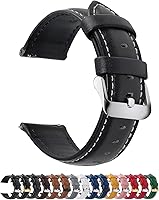
The Fullmosa leather band is described as compatible with the Venu 4 45 mm and uses a 22 mm width. Its quick-release pins let you change bands without a separate pin tool.
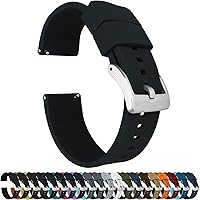
The BARTON Elite Silicone Watch Bands come in several widths and use quick-release spring bars. Choose the correct width for your watch, since the band must match its lugs.
Neither band adds ECG functions; the watch and Garmin's supported app provide those.
Should you rely on a Venu 4 ECG result?
Use the reading as a limited record to share with a health professional, not as a diagnosis. The app's result can't rule out all causes of symptoms.
Don't wait for a watch reading if you have severe chest pain, fainting, trouble breathing, or other sudden, serious symptoms. Seek urgent medical help.
If you are comparing watches because you want a simple way to capture occasional readings, consider whether ECG availability in your region and the manual recording process fit your needs. People who want a dedicated device can also compare options in our guide to the Best EKG Monitor For Seniors.
Does the Garmin Venu 4 have ECG, and is it right for you?
Yes, the Venu 4 can record ECG readings with Garmin's ECG app where the app is supported. Choose it for occasional, user-started readings if your region and setup qualify.
If you need continuous electrical heart monitoring or a medical diagnosis, the Venu 4 ECG app isn't a substitute. Compare which Garmin watches have ECG if you are still deciding among models.
Frequently asked questions
Does the Garmin Venu 4 have ECG?
Yes, Garmin lists the Venu 4 as compatible with its ECG app. The app records a short ECG when you start a reading and follow its prompts.
Availability depends on your country, and you need a compatible phone and Garmin Connect setup.
Can the Garmin Venu 4 record ECG continuously?
No. The ECG app records a short reading when you open it and stay still for the measurement.
It is not continuous ECG monitoring and does not replace a medical ECG or urgent care when you have concerning symptoms.
What do I need to set up ECG on a Garmin Venu 4?
You need the Venu 4, Garmin Connect on a compatible phone, an updated watch and app, and a supported country or region. Follow Garmin's in-app setup and eligibility instructions, since availability and requirements can vary by location.
Does Garmin ECG diagnose heart problems?
No. Garmin's ECG app can record a single-lead tracing and identify signs that may be consistent with atrial fibrillation, but it cannot diagnose every heart condition.
Share results with a health professional and seek urgent care for severe or sudden symptoms.