How to Use ECG on the Garmin Venu 3
The Garmin Venu 3 ECG app records a short, single-lead heart rhythm reading from the watch. Set it up in Garmin Connect, keep your fingers and wrist still, and treat the result as information to discuss with a clinician.
On this page (8 sections)
- Does the Garmin Venu 3 have ECG?
- What should you do before recording a Garmin Venu 3 ECG?
- How do you start an ECG on the Garmin Venu 3?
- How can you get a clearer Garmin Venu 3 ECG reading?
- What does a Garmin Venu 3 ECG result mean?
- Can Garmin Venu 3 ECG detect atrial fibrillation?
- When should you seek medical help?
- What is the best way to use Garmin Venu 3 ECG?
The Garmin Venu 3 ECG app records a short, single-lead heart rhythm reading from the watch. Set it up in Garmin Connect, keep your fingers and wrist still, and use the result as information to share with a health professional.
ECG and EKG mean the same thing. If you want the terminology explained first, read What Is the Difference Between ECG and EKG?.
Does the Garmin Venu 3 have ECG?
The Garmin Venu 3 supports ECG in supported regions and with compatible software. The feature is not necessarily available in every country, so check Garmin's current support information and your Garmin Connect settings before troubleshooting the watch.
For another regional example, see OnePlus Watch 3 ECG availability in the US.
Garmin's Venu 3 support page is the best place to check current software and regional guidance. The ECG app may also require the watch and phone to be set up under the same Garmin account.
The ECG feature is different from general heart-rate tracking. For another platform, see the Samsung Watch ECG guide.
A heart-rate sensor estimates beats over time, while an ECG records electrical activity through contact between your body and the watch.
For a wider comparison, see which Garmin watches have ECG. Garmin adds ECG support by model and region, so don't assume that another Garmin watch has the same feature.
What should you do before recording a Garmin Venu 3 ECG?
Charge the watch, update its software, and wear it snugly on a clean, dry wrist. Remove thick clothing from between the watch and your skin, and sit somewhere you can keep your arm relaxed.
Before starting:
- Confirm that the watch is paired with Garmin Connect.
- Install available watch and phone updates.
- Clean and dry the watch back and the skin beneath it.
- Sit with your forearm supported.
- Avoid moving, talking, or touching other electronics during the reading.
A loose strap can interrupt contact. A strap that is too tight can be uncomfortable and may make it harder to stay relaxed.
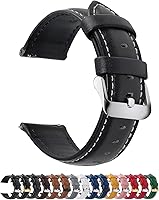
If you change bands, confirm that the replacement matches the watch lug width. The Fullmosa band below lists Garmin Venu 3 compatibility and uses a quick-release design, but measure your watch lugs before ordering.
Can a replacement band help with ECG recording?
A replacement band can help you keep the Garmin Venu 3 secure during a reading, but the electrical recording comes from the watch and your finger contact, not from the band. Choose a band that fits correctly and lets the watch sit flat against your wrist.
The Fullmosa 12/14/16/18/19/20/21/22/24mm Quick Release Leather Watch Band is genuine leather, has 11 adjustment eyelets, and includes a spring bar tool and quality control card. Its 22mm version lists compatibility with the Garmin Venu 3.
Choose it if you prefer a leather band and want quick changes between bands. Keep the leather dry and check that the watch does not shift during recording.
Skip it if you need a silicone band for frequent workouts, sweat, or water exposure. The correct lug width matters more than the band material.
How do you start an ECG on the Garmin Venu 3?
Open the ECG app on the watch and follow the prompts for finger placement. The watch will guide you through the contact needed for the recording.
The exact menu path can change with software updates, but the process generally follows this order:
- Open the ECG app from the watch's apps or activities list.
- Sit still and rest your arm on a stable surface.
- Place the fingers requested by the on-screen instructions on the watch bezel.
- Keep contact steady for the full recording.
- Review the result when the watch finishes.
Do not press hard on the bezel. Firm, steady contact is more useful than force.
If the app cannot begin, check the strap fit, dry your skin, clean the contact area, and try again while seated. Movement, poor contact, or touching another object can affect the signal.
How can you get a clearer Garmin Venu 3 ECG reading?
Stay still, keep the watch flat against your skin, and avoid recording immediately after activity. A quiet room and supported arm can make it easier to maintain steady contact.
Common steps that may help include:
- Rest for a few minutes before recording.
- Keep your wrist relaxed and your fingers still.
- Do not talk during the reading.
- Wipe away sweat or moisture.
- Keep the watch snug without cutting into your skin.
- Repeat the recording only as the app directs.
A failed or inconclusive reading does not automatically mean something is wrong with your heart. It can mean the watch did not receive a clean enough signal.
If repeated attempts fail, check Garmin's support instructions and software requirements. Do not keep tightening the band or press harder to force a result.
Would a silicone band suit active users better?
A silicone band may suit you better if you record after exercise or want easier cleaning. The band still needs the correct width and a secure fit, and it cannot improve an electrical signal if your finger contact or wrist position is poor.
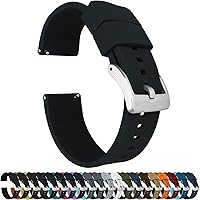
BARTON Elite Silicone Watch Bands use quick-release spring bars, come in 18mm, 20mm, 22mm, and 24mm widths, and include 2 lengths of the long side of the strap. The band has a 316L stainless steel buckle and a locking feature for the free end.
Choose it if you want a silicone strap that can move between exercise and work settings. Measure the space between the watch lugs before selecting a width.
Skip it if you specifically want leather or if the chosen width does not match your watch. A band that is too wide or narrow will not fit correctly.
What does a Garmin Venu 3 ECG result mean?
The result is a screening aid, not a complete diagnosis. A normal-looking result does not rule out every heart condition, and an inconclusive result does not prove that a heart problem is present.
The app may classify the recording in simple terms, such as a rhythm that appears normal or a result that needs attention. Read the full message shown by the watch or Garmin Connect rather than relying on a short label.
Save the result if the app allows it, especially if you plan to discuss symptoms with a clinician. Note what you were doing, how you felt, and when the reading was taken.
The watch is not a replacement for a clinical ECG. A clinician may need a 12-lead ECG, examination, medical history, or other tests to understand symptoms.
Can Garmin Venu 3 ECG detect atrial fibrillation?
A Garmin Venu 3 ECG may identify a rhythm pattern that suggests atrial fibrillation, but it cannot diagnose every rhythm problem. A clinician should review concerning or repeated results alongside your symptoms and medical history.
A single reading is only a short sample. Intermittent rhythm changes may not occur during that recording, while movement or poor contact can affect the signal.
If you receive an unexpected result, sit quietly and follow the app's guidance. Contact a health professional for advice instead of repeatedly recording for reassurance.
For related Garmin features, read Does the Garmin Venu 4 Have ECG? and How to Use ECG on the Garmin Fenix 8. If you are comparing older models, Can Garmin Venu 2 or Venu 2S Record an ECG? covers that question.
When should you seek medical help?
Get urgent medical help for chest pain, severe shortness of breath, fainting, sudden weakness, or other serious symptoms, regardless of what the watch displays. Do not wait for another ECG recording if you feel seriously unwell.
For less urgent concerns, share repeated abnormal or inconclusive readings with a clinician. Bring the time of the reading, your symptoms, and any saved report.
A smartwatch can help you notice a pattern, but it cannot replace medical care. You can also compare dedicated devices in Best EKG Monitor For Seniors if you are helping someone choose a home monitor.
What is the best way to use Garmin Venu 3 ECG?
Use the Garmin Venu 3 ECG when you are rested, seated, and able to keep the watch and fingers still. Keep the watch software current, maintain a snug fit, and treat each result as one piece of information.
Choose the Fullmosa band if you want genuine leather, 11 adjustment eyelets, and a quick-release 22mm option listed for the Venu 3. Choose the BARTON band if you prefer silicone, quick release, 2 long-side lengths, and width choices that require careful lug measurement.
The main decision rule is simple: use the watch to record a clean sample, use Garmin Connect to review it, and involve a clinician when results repeat or symptoms concern you.
Frequently asked questions
Does the Garmin Venu 3 have ECG?
Yes, the Garmin Venu 3 supports ECG recording in supported regions and with compatible software. The feature records a short single-lead heart rhythm reading through the watch.
Availability can depend on local approval, account settings, and the watch's software version.
How do you start an ECG on the Garmin Venu 3?
Open the ECG app on the Garmin Venu 3, follow the on-screen instructions, and place your fingers on the watch bezel as directed. Keep your arm still and remain quiet during the recording.
The app then displays the reading and may let you save or review it in Garmin Connect.
Can the Garmin Venu 3 detect a heart attack?
No. A Garmin Venu 3 ECG is not a heart attack test and does not rule out every heart problem.
Seek urgent medical help for chest pain, trouble breathing, fainting, or other severe symptoms, even if a watch reading appears normal.
Is Garmin Venu 3 ECG the same as an EKG?
ECG and EKG are two names for electrocardiogram. A Garmin Venu 3 ECG is a consumer single-lead recording, while a clinical evaluation may use more leads, other tests, and a health professional's interpretation.