How to Take an EKG on the Apple Watch Series 7
To take an EKG on Apple Watch Series 7, open the ECG app, rest your arm, and touch the Digital Crown with a finger from your opposite hand. Hold still for 30 seconds, then review and save the result in the Health app.
On this page (9 sections)
- What do you need before recording an Apple Watch Series 7 EKG?
- How do you set up the ECG app on Apple Watch Series 7?
- How do you take an EKG on Apple Watch Series 7?
- What do the Apple Watch Series 7 EKG results mean?
- How do you save and share an Apple Watch Series 7 EKG?
- What should you do if the ECG app won't record?
- Which band material suits EKG setup and daily wear?
- How does Series 7 compare with other Apple Watch EKG models?
- What is the safest way to use the Apple Watch Series 7 EKG?
To take an EKG on Apple Watch Series 7, open the ECG app, rest your arm, and touch the Digital Crown with a finger from your opposite hand. Hold still for 30 seconds, then review the result and save it in the Health app.
The recording is a single-lead heart rhythm check. It can help you capture information to discuss with a health care professional, but it isn't a replacement for medical care or a full clinical EKG.
What do you need before recording an Apple Watch Series 7 EKG?
You need an Apple Watch Series 7 with the ECG app available in your region, the watch worn on your wrist, and the paired iPhone ready for setup and result review. For an earlier model without this feature, see Series 3 ECG availability.
The watch should fit securely enough for the back of the case to maintain contact with your skin.
Apple's electrocardiogram app guidance explains regional availability, setup, and the types of results the app can report. Follow the instructions shown on your watch and iPhone because menus can change with software updates.
If the watch band is too loose, adjust it before starting. A band should keep the watch in place without making your wrist uncomfortable.
How do you set up the ECG app on Apple Watch Series 7?
Set up the ECG app in the Health app on your paired iPhone before trying to record. Open the Health app, follow the prompts for the ECG feature, and complete the health information requested during setup.
After setup, find the ECG app on the Apple Watch Series 7. If the app isn't available, check the region setting, supported software, and whether the feature is enabled for your device.
Setup asks for information used with the health feature. Enter it carefully, and read the on-screen instructions before beginning your first recording.
How do you take an EKG on Apple Watch Series 7?
Sit down, rest your arm, and keep the finger from your opposite hand on the Digital Crown for 30 seconds. The contact completes the electrical path used by the watch during the recording.
- Wear the Apple Watch Series 7 on the wrist selected during setup.
- Open the ECG app.
- Rest the arm wearing the watch on a table or in your lap.
- Place a finger from your opposite hand on the Digital Crown.
- Keep still and avoid talking until the countdown ends.
- Read the result when the recording finishes.
Don't press hard on the Digital Crown. Your finger needs steady contact, not force.
A dry wrist, movement, or an uneven fit can interrupt the recording. If the app asks you to retry, adjust your position and try again when your hand and watch are still.
Which Apple Watch band helps during an Apple Watch Series 7 EKG?
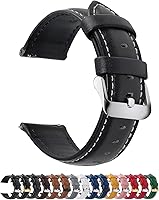
A band that keeps the watch stable can make it easier to hold your arm still. The Fullmosa 12/14/16/18/19/20/21/22/24mm Quick Release Leather Watch Band has quick release, genuine leather, 11 precision-cut eyelets, and a spring bar tool.
This band comes in the 22mm option with a black and silver buckle combination. Measure the watch lugs before choosing a width, since the band range includes several sizes and the wrong width won't fit correctly.
The Fullmosa band is a practical match for readers who want leather and quick replacement. Its leather material may not suit you if you prefer silicone for workouts or frequent exposure to water.
What do the Apple Watch Series 7 EKG results mean?
The ECG app may classify the recording as sinus rhythm, atrial fibrillation, inconclusive, or poor recording. Read the full result in the Health app and consider the result alongside your symptoms and medical history.
Sinus rhythm means the recording shows a regular pattern. It doesn't prove that every part of your heart is healthy or that no problem is present at another time.
Atrial fibrillation, often called AFib, is an irregular rhythm classification. To set up related Apple Watch notifications, see Apple Watch AFib detection setup.
Save the recording and contact your health care professional for advice about what to do next.
An inconclusive result can happen when the recording doesn't fit the app's available classifications. A poor recording may reflect movement, poor contact, a loose fit, or interference.
Don't use a watch result to delay urgent care. Call emergency services for severe chest pain, fainting, severe breathing trouble, or other sudden serious symptoms.
How do you save and share an Apple Watch Series 7 EKG?
Open the ECG recording in the Health app and export its PDF when you need to share it. The PDF can give a health care professional the waveform and the classification connected to that recording.
Open the Health app on the paired iPhone, find the heart or ECG section, and select the recording you want to review. Use the sharing or export option shown for that recording.
Keep the date and time with any notes about symptoms. A recording is easier to discuss when you can explain why you took it and what you felt at the time.
The Apple Watch Series 7 records a moment, not a continuous diagnosis. If symptoms continue or return, follow medical advice even if one recording looks normal.
What should you do if the ECG app won't record?
Start by checking contact, fit, stillness, and setup. The watch should sit against your skin, your finger should touch the Digital Crown, and both arms should remain relaxed.
Try these checks:
- Rest both arms on a stable surface.
- Tighten the band enough to keep the watch in place.
- Keep the watch and fingers clean and dry.
- Touch the Digital Crown with one finger only.
- Move away from devices or surfaces that may cause interference.
- Restart the watch and iPhone if the app still fails.
- Check for software updates and setup prompts.
Don't record while walking or exercising. The movement makes it harder to capture a clear tracing and may produce an inconclusive or poor recording.
Which band material suits EKG setup and daily wear?
Choose leather for a traditional feel, or silicone for quick changes and active routines. The important point during an EKG is a stable fit that keeps the watch back against your wrist.
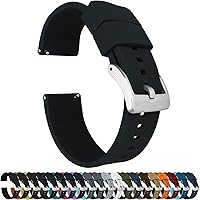
The BARTON Elite Silicone Watch Bands come in 18mm, 20mm, 22mm, and 24mm widths, with quick-release spring bars and a 316L stainless steel buckle. The bands fit wrists from 5 in to 8 in in circumference, and 2 lengths are included for the long side.
Choose the exact lug width for your watch. BARTON lists the 20mm version as compatible with Samsung Galaxy Watch models and other watches, but that does not guarantee compatibility with every Apple Watch case.
This band suits readers who want silicone, quick changes, and a wrist range from 5 in to 8 in. Its material may be less appealing if you prefer the look and feel of genuine leather.
How does Series 7 compare with other Apple Watch EKG models?
The recording process is similar across supported Apple Watch models, but the controls and setup screens can vary by software version. If you also use another generation, compare the instructions for how to take an ECG on the Apple Watch Series 5 and how to take an ECG on the Apple Watch Series 4.
For a general walkthrough, see How to Record an EKG on Apple Watch: Easy Guide. If you're considering a newer model, how to take an ECG on the Apple Watch Series 8 covers that generation.
An Apple Watch may not be the right choice for every reader. Compare a Best Apple Watch Alternative For ECG or a Best Cheap Alternative To Apple Watch ECG if cost, phone compatibility, or another wearable design matters more.
What is the safest way to use the Apple Watch Series 7 EKG?
Use the Apple Watch Series 7 EKG to record a moment and organize information for a health care discussion, not to diagnose yourself. For a guide to a newer model, see Series 9 ECG steps.
Set up the ECG app, keep the watch steady, hold the Digital Crown for 30 seconds, and save unusual results.
Pick the Fullmosa band if you want a genuine leather strap with many width options and quick release. Pick the BARTON band if you want silicone, 2 long-side lengths, and a fit range from 5 in to 8 in.
If you need help interpreting a result, contact a health care professional. For urgent symptoms, seek emergency care rather than repeating the watch recording.
Frequently asked questions
Can the Apple Watch Series 7 take an EKG?
Yes, the Apple Watch Series 7 can record an electrocardiogram through the ECG app when the feature is available in your region and set up on a compatible iPhone. Open the app, rest your arm, touch the Digital Crown with a finger from your opposite hand, and hold still for 30 seconds.
How long does an Apple Watch Series 7 EKG take?
An Apple Watch Series 7 EKG recording takes about 30 seconds once the ECG app begins recording. Keep your arm on a table or in your lap, avoid talking or moving, and maintain contact with the Digital Crown until the recording finishes.
Where do Apple Watch Series 7 EKG results go?
Your Apple Watch Series 7 EKG result appears in the ECG app and is saved in the Health app on the paired iPhone. You can review the recording, see its classification, and export a PDF from the Health app when you need to share the result with a health care professional.
Can an Apple Watch EKG diagnose a heart problem?
An Apple Watch EKG can record a single-lead heart rhythm and classify that recording, but it doesn't rule out every heart problem. Treat symptoms such as chest pain, fainting, severe shortness of breath, or sudden weakness as urgent and seek medical care instead of relying on the watch.