How to Take an ECG on the Apple Watch Series 8
To take an Apple Watch Series 8 ECG, open the ECG app, rest your arm, and hold a finger on the Digital Crown for 30 seconds. The watch then saves the recording in the Health app for review.
On this page (8 sections)
- What do you need before taking an Apple Watch Series 8 ECG?
- How do you set up the ECG app?
- How do you record an ECG on Apple Watch Series 8?
- What should you do if the ECG recording fails?
- What do Apple Watch Series 8 ECG results mean?
- Can a silicone band make daily ECG use easier?
- How do you view and share an ECG recording?
- Should you buy an Apple Watch alternative for ECG readings?
To take an Apple Watch Series 8 ECG, open the ECG app, rest your arm on a table or in your lap, and hold a finger on the Digital Crown for 30 seconds. The watch records the electrical signals between your wrist and the finger touching the crown.
The result is saved in the Health app on your paired iPhone. For another smartwatch ECG option, read how to use ECG on a Samsung Watch.
An ECG can help you document a rhythm reading, but it isn't a replacement for medical care or a full clinical electrocardiogram.
What do you need before taking an Apple Watch Series 8 ECG?
You need an Apple Watch Series 8 with the ECG app available in your region, a paired iPhone, and a snug fit that keeps the watch's back sensors against your skin. Complete the ECG app setup in the Watch app or Health app before trying to record.
Keep both the watch and your skin clean and dry. Water, lotion, loose contact, and movement can make the recording fail or produce an inconclusive result.
Apple's official guide to recording an ECG with Apple Watch explains the setup and recording process. Follow the instructions shown on your devices if they differ from a general description.
How do you set up the ECG app?
Set up the ECG app in the Health app on your iPhone before opening it on the watch. The setup may ask for your birth date and other health information needed for the feature.
Open the Health app and look for the Heart section. Select the ECG option, then follow the prompts to complete setup.
After setup, the ECG app should appear on the Apple Watch.
If you can't find the feature, check your Apple Watch model, watchOS version, iPhone software, region, and age requirements. Availability can vary by country or region.
If you use an older Apple Watch, compare the setup steps in how to take an ECG on the Apple Watch Series 5 or the guide to how to take an EKG on the Apple Watch Series 7.
How do you record an ECG on Apple Watch Series 8?
Open the ECG app, place your arm on a stable surface, and touch the Digital Crown with a finger from your opposite hand. Keep the contact steady until the 30-second countdown ends.
Follow these steps:
- Wear the Apple Watch on the wrist selected during setup.
- Open the ECG app on the watch.
- Rest your arm on a table or your lap.
- Place a finger from your opposite hand on the Digital Crown.
- Keep still and avoid talking during the recording.
- Wait for the countdown to finish.
- Review the result on the watch or in the Health app.
You don't need to press the Digital Crown. A light, steady touch is enough.
Keep the finger in place for the entire recording, and don't lift your wrist while the timer runs.
The recording uses contact between the watch's back and your wrist, plus contact between your finger and the Digital Crown. A loose band can make that connection less stable, while an overly tight band may be uncomfortable.
Would a replacement band help with ECG recording?
A replacement band may help you keep the watch positioned comfortably during a reading, but the band doesn't create or improve the ECG signal. Measure the watch's lug width before choosing any replacement band.
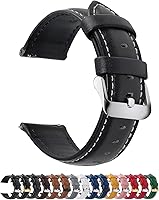
The Fullmosa 12/14/16/18/19/20/21/22/24mm Quick Release Leather Watch Band comes in multiple widths, including 22mm, and has a quick release function. Its title identifies it as a leather band with a black and silver buckle option.
Fullmosa describes 11 precision-cut eyelets for adjustment and gives a stated wrist range based on dial length. The package includes 1 leather watch band, 1 spring bar tool, and 1 quality control card.
Check your watch's lug width before ordering. The 22mm version is described as compatible with several Samsung, Garmin, Huawei, Amazfit, Fossil, and other watches, but the Apple Watch Series 8 is not named in the supplied compatibility details.
What should you do if the ECG recording fails?
If the recording fails, clean and dry the watch and your skin, adjust the fit, and try again while keeping your arm still. For more troubleshooting steps, see Series 7 ECG troubleshooting.
Avoid recording immediately after exercise if your movement or breathing makes it difficult to stay steady.
Common causes include:
- The watch is loose against the wrist.
- Your finger isn't touching the Digital Crown continuously.
- Your skin or watch is wet.
- You are moving or speaking.
- The watch is worn on the wrong wrist for the setup.
- Electrical interference affects the signal.
Don't force the band tighter to solve every failed recording. The goal is steady skin contact without discomfort.
If repeated attempts fail, restart the watch and check for software updates. Contact Apple Support if the ECG app remains unavailable after the feature and device requirements are met.
What do Apple Watch Series 8 ECG results mean?
The ECG app may classify a recording as sinus rhythm, atrial fibrillation, inconclusive, or poor recording. These labels describe the recording pattern detected by the app and do not provide a complete diagnosis.
A sinus rhythm result means the recording did not show the irregular pattern the app is designed to identify. It doesn't prove that your heart is always normal or that symptoms are harmless.
An atrial fibrillation result means the recording detected a pattern that may be consistent with AFib. For setup guidance, see how to set up AFib detection on Apple Watch.
Save the recording and contact a health care professional for advice, especially if this is new for you.
An inconclusive result can happen when the signal doesn't fit a classification or the heart rate is outside the app's expected range. A poor recording points more directly to contact or signal quality.
Do not use the ECG app during an emergency. Seek urgent help for chest pain, severe shortness of breath, fainting, sudden weakness, or other serious symptoms.
Can a silicone band make daily ECG use easier?
A silicone band can suit readers who want a quick-release strap for exercise, work, and everyday wear. It may also be easier to wipe clean than leather, but the Apple Watch Series 8 compatibility still depends on the band width and connector design.
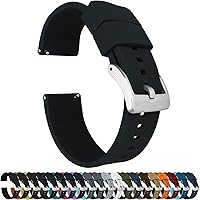
The BARTON Elite Silicone Watch Bands - Quick Release - Choose Strap Color & Buckle Color (Stainless Steel, Black PVD or Gunmetal Grey) - 18mm, 20mm, 22mm & 24mm Watch Straps is offered in several widths and buckle color choices.
BARTON describes quick-release spring bars, 2mm tapering from the watch head to the buckle, a locking feature for the free end, and a solid tang 316L stainless steel buckle. It also states that each band comes with 2 lengths of the long side and fits wrists from 5 to 8 in circumference.
Measure the lug width where the band meets the watch case. The supplied compatibility examples include several traditional watches, Samsung Galaxy Watch models, and Amazfit Bip, but they do not name the Apple Watch Series 8.
How do you view and share an ECG recording?
Open the Health app on the paired iPhone, find the ECG records, and select the reading you want to review or share. The app can create a PDF that you may show to a health care professional.
Add notes about what you felt and when you recorded the ECG. A timestamped recording can be more useful during a medical discussion when paired with symptoms, activity, medication changes, or other relevant context.
Keep in mind that a single ECG captures a short period. A normal reading between symptoms doesn't explain every episode of palpitations, dizziness, or fainting.
For older Apple Watch instructions, see how to take an ECG on the Apple Watch Series 4. If you want a broader walkthrough, read How to Record an EKG on Apple Watch: Easy Guide.
Should you buy an Apple Watch alternative for ECG readings?
An Apple Watch alternative may suit you if you want a different watch platform, a lower-cost path, or a device with another set of health features. Compare two options in Amazfit Balance vs Balance 2.
Confirm that the exact model supports ECG recording in your region before buying.
Our guides to the best Apple Watch alternative for ECG and the best cheap alternative to Apple Watch ECG can help you compare options by feature and use case.
The key decision is simple: use the Apple Watch Series 8 ECG app for a short rhythm recording when the feature is available and set up correctly. For the next model’s recording steps, see Series 9 ECG steps.
Save unusual results, discuss them with a health care professional, and call emergency services for serious symptoms regardless of the watch reading.
Frequently asked questions
Can the Apple Watch Series 8 take an ECG?
Yes, the Apple Watch Series 8 can record a single-lead ECG through its ECG app when the feature is available in your region and set up on your iPhone. The reading takes 30 seconds.
It can classify the result, but it cannot replace a clinical ECG or diagnose every heart problem.
How long does an Apple Watch Series 8 ECG take?
An Apple Watch Series 8 ECG recording takes 30 seconds once the ECG app is open and your finger is touching the Digital Crown. Sit still, rest your arm, and avoid speaking during the recording so movement and contact changes are less likely to interrupt it.
Where can you find Apple Watch ECG results?
You can review saved ECG recordings in the Health app on the paired iPhone. Open Health, find the heart or electrocardiogram section, and select a recording to view its classification or share a PDF with a health care professional.
Does an Apple Watch ECG detect a heart attack?
No. The Apple Watch ECG app is not designed to detect a heart attack, stroke, blood clots, or every abnormal heart rhythm.
Call emergency services for chest pain, trouble breathing, fainting, or other urgent symptoms, even if the watch gives a reassuring result.