How to Take an ECG on the Apple Watch Series 5
To take an ECG on Apple Watch Series 5, open the ECG app, rest your arm, place a finger on the Digital Crown, and stay still for 30 seconds. Set up the Health app first and follow up on concerning symptoms with a medical professional.
On this page (8 sections)
- How do you set up ECG on Apple Watch Series 5?
- How do you take an ECG on Apple Watch Series 5?
- What does the Apple Watch Series 5 ECG result mean?
- Can you share an Apple Watch Series 5 ECG with a doctor?
- What should you do if the ECG will not record?
- Is Apple Watch Series 5 ECG the same as an EKG?
- What are the limits of an Apple Watch Series 5 ECG?
- What is the simplest way to take an Apple Watch Series 5 ECG?
To take an ECG on Apple Watch Series 5, open the ECG app, rest your arm, touch the Digital Crown with a finger from your other hand, and stay still for 30 seconds. For the earlier Series 3 model, see Series 3 ECG availability.
The watch then classifies the recording in the Health app, where you can review or share it.
The ECG app needs to be set up before you try to record. Your Apple Watch must also be worn correctly, and the feature must be available for your region and eligibility requirements.
How do you set up ECG on Apple Watch Series 5?
Set up the ECG app in the iPhone Health app before recording your first Apple Watch Series 5 ECG. Open Health, follow the ECG setup prompts, and enter the requested information.
Keep your iPhone and Apple Watch updated according to Apple's instructions. Requirements can change by region, so check Apple's official ECG app support guidance if you can't find the app or setup screen.
The ECG app is designed for adults who meet Apple's stated requirements. It isn't a replacement for a doctor's evaluation, and completing setup doesn't mean the watch can detect every heart problem.
If you want a broader overview before using the app, this easy guide to recording an EKG on Apple Watch explains the same basic recording process in simpler steps.
How do you take an ECG on Apple Watch Series 5?
Sit down, rest your arm, open the ECG app, and touch the Digital Crown with the finger of your opposite hand. Keep contact for the full 30-second recording.
Follow these steps:
- Wear the Apple Watch Series 5 snugly on the wrist you selected during setup.
- Open the ECG app on the watch.
- Rest the arm wearing the watch on a table or in your lap.
- Place a finger from your other hand on the Digital Crown.
- Keep still and avoid talking while the recording runs.
- Wait for the result and save it in the Health app.
You don't need to press the Digital Crown. Light contact is enough to complete the circuit through your body.
If the recording stops, dry your skin, adjust the fit, and try again while keeping both arms relaxed.
A loose band can make the recording harder to complete. Measure your watch lugs before changing bands, since the correct width matters for a secure fit.
Which Apple Watch Series 5 ECG band helps with fit?
A band can help you keep the watch sensor against your wrist during an ECG, but it doesn't improve the medical reading by itself. Choose a band that fits securely without being uncomfortably tight.
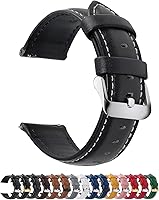
The Fullmosa 12/14/16/18/19/20/21/22/24mm Quick Release Leather Watch Band has 11 adjustment holes and is available in several widths, including 22mm. Its title identifies it as a genuine leather band with quick release, and the package includes 1 band, 1 spring bar tool, and 1 quality control card.
Measure the breadth of your watch lugs before choosing a width. The 22mm version is described for several Samsung, Garmin, Huawei, Amazfit, Fossil, and other watches, but the Apple Watch Series 5 isn't named in its compatibility details.
What does the Apple Watch Series 5 ECG result mean?
The ECG app may classify a recording as sinus rhythm, atrial fibrillation, inconclusive, or poor recording. Read the result together with how you feel, not as a diagnosis by itself.
Sinus rhythm means the recording did not show atrial fibrillation during that reading. It doesn't prove that your heart is always in a normal rhythm or rule out another condition.
A result that suggests atrial fibrillation can be useful information to discuss with a health professional. Save the recording and share the PDF through the Health app if your clinician asks for it.
An inconclusive result can happen because of movement, a poor connection, a heart rate outside the app's range, or another factor. Repeat the reading when you are settled, then seek medical advice if the result stays unclear or your symptoms continue.
A poor recording usually points to contact or movement problems. Make sure the watch back touches your skin, your finger contacts the Digital Crown, and your arm stays supported.
Can you share an Apple Watch Series 5 ECG with a doctor?
Yes, you can export an ECG recording as a PDF from the Health app and share it with a doctor. Open the ECG section in Health, select the recording, and use the sharing option shown on your iPhone.
Add the date and your symptoms when you speak with a clinician. A recording is more useful when the person reviewing it knows whether you felt palpitations, dizziness, chest discomfort, or another change at the same time.
Don't send a watch result instead of seeking urgent care. Call emergency services for severe chest pain, trouble breathing, fainting, sudden weakness, or other serious symptoms.
What should you do if the ECG will not record?
Check skin contact, watch fit, finger placement, and movement first. For troubleshooting on a later model, see Series 7 ECG troubleshooting.
These are the main parts of the recording setup that you can change safely.
Try the following:
- Clean and dry the back of the watch and your skin.
- Wear the watch snugly, with the sensor touching your wrist.
- Rest your arm on a table or in your lap.
- Touch the Digital Crown with the opposite hand.
- Keep your finger in place for 30 seconds.
- Avoid talking or moving during the reading.
- Try again when your hands are warm and relaxed.
If the ECG app is missing, return to the Health app setup and confirm the feature is available in your region. Apple Watch Series 5 ECG support can also depend on software and eligibility requirements.
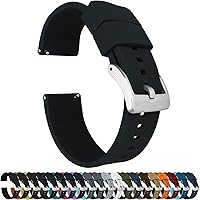
A silicone band may suit people who want a different material for daily wear. The BARTON Elite Silicone Watch Bands come in 18mm, 20mm, 22mm, and 24mm widths, with quick-release spring bars and two lengths of the long side of the strap.
Choose the exact lug width rather than guessing from the watch's case size. BARTON states that its bands fit wrists from 5 in to 8 in in circumference, although watch geometry can affect the fit.
The band's title includes stainless steel, black PVD, and gunmetal grey buckle choices. Its listed features include a locking feature, a 316L stainless steel buckle, and a 2mm taper from the watch head to the buckle.
Is Apple Watch Series 5 ECG the same as an EKG?
ECG and EKG refer to the same type of heart electrical recording. The difference is mainly the abbreviation used, not a different Apple Watch function.
Apple Watch Series 5 records a single-lead ECG through the watch and your finger contact with the Digital Crown. A clinical electrocardiogram can use more leads and remains a different test performed in a medical setting.
You may see both terms in health information. For a newer Apple Watch comparison, read about Apple Watch Series 10 ECG, Apple Watch Series 8 ECG, or Apple Watch Series 7 EKG.
What are the limits of an Apple Watch Series 5 ECG?
An Apple Watch ECG can record some rhythm information, but it cannot diagnose every heart condition or replace medical care. For setup steps, see how to enable AFib detection on Apple Watch.
A normal result doesn't rule out a problem that wasn't present during the 30-second recording.
The app isn't designed to detect heart attacks, blood clots, strokes, or high blood pressure. It also can't tell you why a rhythm changed.
Use symptoms as part of your decision. Contact a medical professional for repeated abnormal results or ongoing palpitations.
Get urgent help for serious symptoms, even if a watch reading appears normal.
If you're comparing other devices, our guide to the best Apple Watch alternative for ECG covers different ways to approach ECG tracking. Readers on a tighter budget can also review the best cheap alternative to Apple Watch ECG.
What is the simplest way to take an Apple Watch Series 5 ECG?
Set up the ECG app, wear the watch snugly, support your arm, touch the Digital Crown, and remain still for 30 seconds. For the same process on a newer model, see Series 9 ECG steps.
Save the result in Health and share it with a clinician when needed.
Pick the Fullmosa band if you want genuine leather, quick release, and 11 adjustment holes, after confirming the width fits your watch lugs. Pick the BARTON band if you prefer silicone, quick release, two long-side lengths, and a choice of buckle colors.
The watch can help you capture a rhythm record, but it cannot replace a clinical evaluation. Treat the recording as one piece of information and get medical help when symptoms or repeated results concern you.
Frequently asked questions
Can Apple Watch Series 5 take an ECG?
Yes, Apple Watch Series 5 can record a single-lead ECG through its ECG app when the feature is available in your region and the watch meets Apple's requirements. You must complete setup in the Health app, wear the watch correctly, and keep your finger on the Digital Crown for 30 seconds during each recording.
Why is the ECG app missing on Apple Watch Series 5?
The ECG app may be unavailable because of region restrictions, an unsupported age, incomplete Health app setup, or watch software requirements. Check Apple's current support guidance, update the paired iPhone and watch if appropriate, and confirm that the ECG feature is approved where you live.
How long does an Apple Watch Series 5 ECG take?
An Apple Watch Series 5 ECG recording takes 30 seconds once you start the ECG app and touch the Digital Crown. Keep your arm on a table or in your lap, stay relaxed, and avoid talking or moving until the recording finishes.
Can an Apple Watch ECG diagnose a heart attack?
No. The Apple Watch ECG is not a complete medical test and cannot detect every heart condition or diagnose a heart attack.
Seek emergency help for chest pain, trouble breathing, fainting, or other urgent symptoms, even if the watch shows a normal result.