How to Use ECG on Apple Watch Series 10
To use ECG on Apple Watch Series 10, set up the ECG app on your iPhone, then open the app on your watch and rest a finger on the Digital Crown for 30 seconds. The recording can help identify signs of an irregular heart rhythm, but it does not replace medical care.
On this page (7 sections)
- How do you set up ECG on Apple Watch Series 10?
- How do you take an ECG on Apple Watch Series 10?
- What do the ECG results mean?
- When should you seek medical care?
- Does the Series 10 ECG work like older Apple Watch models?
- Can a different watch band help during an ECG?
- What should you remember about Apple Watch Series 10 ECG?
To use ECG on Apple Watch Series 10, set up the ECG app on your iPhone, open it on the watch, and hold a finger on the Digital Crown for 30 seconds. The app records a single-lead ECG that can help identify signs of an irregular heart rhythm.
The reading is a health feature, not a diagnosis or emergency check. A normal result cannot rule out every heart problem, and the watch cannot detect a heart attack.
How do you set up ECG on Apple Watch Series 10?
Set up ECG in the Health app on your iPhone before you try to record on the watch. Availability depends on your region, age, device, and software.
Open the Health app, go to the heart section, and choose the ECG setup option. Follow the on-screen instructions, which may ask for your date of birth and explain what the app can and cannot detect.
If ECG setup does not appear, check that your Apple Watch and iPhone are updated and that ECG is supported where you live. Apple's current ECG app instructions explain the setup and use steps.
How do you take an ECG on Apple Watch Series 10?
Sit down, open the ECG app, and keep still while you touch the Digital Crown for 30 seconds. The app needs steady skin contact to record the electrical signals it uses.
- Wear the watch snugly on the wrist you selected in its settings.
- Open the ECG app on Apple Watch Series 10.
- Rest your arms on a table or your lap.
- Place a finger from your opposite hand on the Digital Crown.
- Keep your finger there without pressing the crown until the timer ends.
The recording finishes after 30 seconds. You'll see a result on the watch, and the recording is saved in the Health app on your iPhone.
For a broader walkthrough, see our How to Record an EKG on Apple Watch: Easy Guide. ECG and EKG refer to the same type of heart electrical recording.
What can interrupt a recording?
Movement and poor contact can make a recording harder to classify. Sit comfortably, relax your arms, and avoid talking until the timer ends.
Make sure the watch back and your wrist are clean and dry. Avoid pressing the Digital Crown; a light fingertip touch is enough.
If the app gives an inconclusive result, wait a few minutes and try again while resting. Repeated inconclusive readings or symptoms are reasons to ask a health professional for guidance.
What do the ECG results mean?
The app may label a recording as sinus rhythm, atrial fibrillation, inconclusive, or poor recording. Each label describes what the app found in that short reading, not your overall heart health.
A sinus rhythm result means the app did not detect signs of atrial fibrillation in that recording. It does not mean you have no heart condition.
An atrial fibrillation result means the recording showed an irregular rhythm that may be consistent with AFib. Save the result and discuss it with a health professional, especially if this is a new finding.
An inconclusive result means the app could not classify the recording. A poor recording may reflect movement, a loose watch, or other signal issues.
For more context on what a watch reading can tell you, read How Accurate Is an Apple Watch ECG?. Don't use one result to change medicine or delay care.
When should you seek medical care?
Get urgent help for serious symptoms, even if the ECG result looks normal. The ECG app is not intended to detect a heart attack or replace emergency care.
Call emergency services for chest pain, pressure, shortness of breath, fainting, or sudden weakness. If you have a new or repeated irregular rhythm result, contact your clinician for advice.
The watch records a short period while you are still. It may not capture an intermittent rhythm that happens at another time, so share symptoms and saved readings with your health professional.
Does the Series 10 ECG work like older Apple Watch models?
The basic recording steps are similar across Apple Watch models with the ECG app. Open the app, rest a finger on the Digital Crown, and stay still until the recording is complete.
The screen layout and setup prompts may differ with watchOS versions. Our guides cover Apple Watch Series 5 ECG and Apple Watch Series 8 ECG if you're helping someone with an older watch.
Can a different watch band help during an ECG?
A band that fits securely can help keep the watch in steady contact with your wrist. Check the band width and compatibility for your exact watch before choosing a replacement.
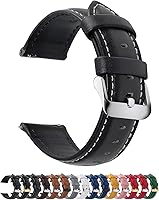
The Fullmosa leather band is offered in several widths, including 20mm and 22mm, with quick-release pins. Confirm the required lug width for your watch before buying.
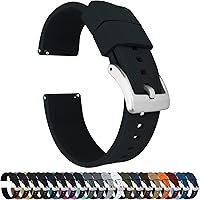
The BARTON Elite Silicone band uses quick-release spring bars and includes two lengths of the long strap side. Its stated wrist range is 5 to 8 inches, though watch geometry can affect fit.
Neither band adds ECG functions or changes what the app can detect. If you are comparing devices, see our Best Apple Watch Alternative For ECG and Best Cheap Alternative To Apple Watch ECG guides.
What should you remember about Apple Watch Series 10 ECG?
Use the ECG app for a 30-second reading when you are seated and still, then treat the result as information to discuss with a health professional. Setup begins in the iPhone Health app, and readings are saved there for later review.
If you're deciding whether an Apple Watch ECG suits your needs, consider what the app can record and its limits. Ask a clinician about symptoms or unexpected results, and seek urgent care for emergency symptoms regardless of the reading.
Frequently asked questions
How do I set up ECG on Apple Watch Series 10?
Open the Health app on your iPhone, choose the ECG setup option, and follow the prompts. The ECG app must be available in your region, and your watch and iPhone need compatible software.
If you don't see setup, check Apple's current support instructions and your device settings.
How do I record an ECG on Apple Watch Series 10?
Open the ECG app on the watch, rest your arms on a table or your lap, and hold a finger from your opposite hand on the Digital Crown without pressing it. Keep still for 30 seconds, then review the result in the Health app.
Can Apple Watch Series 10 detect a heart attack?
No. An Apple Watch ECG cannot detect a heart attack, and a normal result does not rule one out.
If you have chest pain, shortness of breath, fainting, or another urgent symptom, contact emergency services instead of waiting for a watch reading.
What does an inconclusive Apple Watch ECG mean?
An inconclusive result means the app could not classify that recording. It can happen for several reasons, including a heart rate outside the app's range or a recording affected by movement or poor contact.
Try again after resting, and contact a health professional if you have concerns.