How to Charge Fitbit Sense 2
Fitbit Sense 2 charging uses the included magnetic charging cable, attached to the contacts on the watch's back. Keep the contacts clean, let the watch charge on a dry surface, and check the battery icon before wearing it.
On this page (10 sections)
- How to Charge Fitbit Sense 2
- Where do you place the Fitbit Sense 2 charger?
- What is the best Fitbit Sense 2 charging routine?
- How do you clean the charging contacts?
- Can a new band make charging easier?
- Should you use a silicone band for charging routines?
- What should you do if Fitbit Sense 2 will not charge?
- Can you wear Fitbit Sense 2 while it charges?
- How does charging affect ECG and health tracking?
- What charging accessories should you choose?
How to Charge Fitbit Sense 2
Fitbit Sense 2 charging uses the magnetic cable aligned with the contacts on the back of the watch.
Connect the cable to a powered USB source, keep the watch and contacts dry, and confirm that the battery indicator appears.
This simple setup suits most owners because it needs no separate charging dock or special adapter beyond a powered USB source.
You do need the correct magnetic cable for Sense 2, since a cable for another Fitbit model may not align with these contacts.
Charge the watch before the battery reaches zero if you rely on it for sleep tracking, activity tracking, notifications, or health features.
Those features all depend on the watch staying on your wrist and staying powered, so a flat battery can interrupt a whole night or a planned workout.
Building a regular routine helps you avoid that gap.
Many owners charge while showering, getting ready for bed, or while the watch is already off for cleaning.
A regular charging routine also gives you a chance to clean the contacts and inspect the cable.
Wiping the contacts with a soft dry cloth is quick, and checking for bent pins or a loose connector can prevent a weak connection later.
Keep the watch on a dry surface during charging and avoid placing it near water, even if the watch is designed for daily wear.
Once the indicator shows a healthy level, you can put the watch back on and resume normal use.
Where do you place the Fitbit Sense 2 charger?
Place the magnetic charger against the metal contacts on the back of Fitbit Sense 2. The connector should sit flat and stay attached without pressure from your hand.
Remove the watch from your wrist before charging. Set it on a dry, stable surface where the cable won't pull the watch away from the contacts.
Look for the charging symbol or battery percentage on the screen. If nothing appears, lift the connector, rotate or realign it, and attach it again.
Fitbit's official Sense 2 support information can help you confirm the current charging and troubleshooting steps for your device.
What is the best Fitbit Sense 2 charging routine?
Charge Fitbit Sense 2 during a predictable gap in your day, such as while showering or getting ready for bed. The right routine is the one that gives the watch enough power without interrupting the tracking you value most.
A short routine may work if you only need enough power for the next part of the day. A longer session makes more sense when the battery is low or you want to start sleep tracking with a full charge.
Keep the cable in one regular location. Avoid leaving it under clothing, beside a sink, or where the connector can be bent or pulled.
If you use Sense 2 for heart-related features, you may also want to read which Fitbit has ECG function before choosing how to manage charging gaps.
How do you clean the charging contacts?
Clean the watch contacts and charger connection gently, then let both dry fully before charging. Dust, skin oils, moisture, or residue can prevent a stable connection.
Disconnect the cable from power before inspecting it. Wipe the contact areas with a soft, dry cloth, and avoid scraping the metal surfaces with a sharp object.
Do not charge the watch while it is wet. If the watch or cable has recently been exposed to water, dry the outside and give the contact area time to air-dry.
Check the cable for cuts, exposed wiring, bent parts, or a loose connector. Replace a damaged cable instead of trying to hold it in place during charging.
Can a new band make charging easier?
A properly fitted band can make it easier to remove the watch and place it flat for charging. The band does not replace the Sense 2 charger, but it can affect how easily you take the watch off and put it back on.
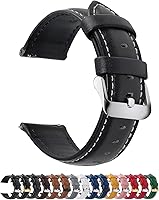
The Fullmosa band is a quick-release leather watch band offered in 12, 14, 16, 18, 19, 20, 21, 22, and 24mm widths. Its title identifies genuine leather, 11 adjustment eyelets, a spring bar tool, and a quality control card.
Measure the watch lug width before choosing a band. The band should not press against the charger or make it difficult to set the watch flat.
Leather can suit a daily office routine, but it may be less convenient if your charging area is often exposed to water. Keep the band dry and follow its care needs.
Should you use a silicone band for charging routines?
Choose a silicone band if your charging routine includes frequent removal, exercise, or regular contact with moisture. You still need to remove the watch and attach the correct charger, but a simple band can make that routine quicker.
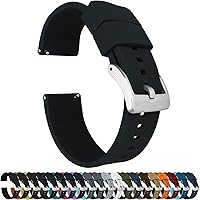
BARTON Elite Silicone Watch Bands use quick-release spring bars and come in 18, 20, 22, and 24mm widths. The title also identifies stainless steel, black PVD, or gunmetal grey buckle options, plus 2 length options for the long side.
Measure the lug width exactly before ordering. A band that is too wide or too narrow will not fit the watch correctly.
BARTON describes its silicone bands as scent free and dust free, with a 316L stainless steel buckle and a 2mm taper from watch head to buckle. Those details may suit readers who want a simpler band for active daily wear.
What should you do if Fitbit Sense 2 will not charge?
Start with the contacts, cable alignment, and power source. Most basic checks take only a few minutes and can show whether the problem is connection-related.
- Remove the watch from your wrist.
- Disconnect the charging cable from its power source.
- Wipe the watch and cable contacts with a soft, dry cloth.
- Reattach the cable so the magnetic connector sits flat.
- Try another powered USB source.
- Leave the watch connected long enough to check whether the battery level rises.
- Restart the watch if the screen remains unresponsive.
Don't bend the cable, press hard on the connector, or charge through visible damage. If these steps do not help, follow Fitbit's support process.
For a broader troubleshooting guide, read why is your Fitbit Sense not charging.
Can you wear Fitbit Sense 2 while it charges?
No, charging requires the watch to be removed from your wrist.
Place it on a clean, dry surface with the charging connector attached.
The magnetic connector needs the watch to sit flat and stay still, which is hard to manage while the watch is being worn.
Wearing it during charging could also move the cable, weaken the connection, and slow or interrupt charging.
Use charging time to wash and dry the area beneath the watch.
Skin moisture, soap residue, and trapped sweat can build up under the strap during the day.
Giving that area a gentle wash and letting it dry can make the watch more comfortable when you put it back on.
It also gives you a chance to check whether the strap is clean and whether the fit still feels right.
Before putting it back on, check that the watch and band are dry and that the fit is comfortable.
A damp band or a watch case that is still wet may feel uncomfortable and can leave moisture against the skin.
A charging break can also be useful when you need to clean the band.
Avoid placing the watch on a wet counter or near loose metal objects that could pull on the magnetic connector.
A stable dry spot near your usual charging cable is the safest choice for most routines.
How does charging affect ECG and health tracking?
Charging pauses wrist-based tracking because the watch is off your wrist. Plan the charge during a time when you do not need continuous readings or notifications.
Charging does not replace careful use of health features. For example, if you are learning how to take an ECG on the Fitbit Charge 6, follow the instructions for that specific device rather than assuming every Fitbit model works the same way.
For ECG questions, Fitbit Charge 6 ECG accuracy is a separate topic from Sense 2 charging. Seek medical advice for symptoms or concerns instead of relying on a watch reading alone.
What charging accessories should you choose?
The correct Fitbit Sense 2 charging cable matters more than changing the watch band. A replacement band can improve comfort or make removal easier, but it does not charge the watch.
Choose the Fullmosa band if you want leather and need to compare several width options. Choose BARTON if you prefer silicone, quick-release spring bars, multiple buckle finishes, and 2 long-side lengths.
If you are comparing other wearable health devices, the best ECG monitor Fitbit Sense alternative may help with the device decision. For a general charging overview, see how to charge an ECG monitor.
The simple rule is to charge Sense 2 on a dry surface, keep the contacts clean, and check the battery indicator before wearing it. Pick the band that makes your own remove-and-charge routine easiest, then follow the device-specific instructions for any health feature.
Frequently asked questions
How do you charge a Fitbit Sense 2?
Attach the magnetic charging cable to the contacts on the back of the Fitbit Sense 2, then connect the cable to a powered USB source. The watch should show a charging indicator.
Keep the contacts aligned and the watch dry while charging.
Can you charge Fitbit Sense 2 overnight?
You can leave Fitbit Sense 2 connected overnight if the watch, cable, and charging area remain dry and undamaged. Charging overnight can fit a routine, but check the battery before bed and remove the watch once it has enough power for your next day.
Why is my Fitbit Sense 2 not charging?
A Fitbit Sense 2 may fail to charge because the contacts are dirty, the cable is misaligned, the power source is unsuitable, or the cable is damaged. Clean and dry the contacts, reconnect the cable, try another powered USB source, and restart the watch if needed.
How long does Fitbit Sense 2 charging take?
Fitbit Sense 2 charging time depends on the battery level, power source, and cable condition. Allow the watch to remain connected until the charging indicator shows a full battery.
If the level does not rise after a reasonable period, inspect the contacts and cable.