Blood Pressure Monitors: The Complete Buying Guide
The best blood pressure monitor for most home users is an automatic upper-arm model with the right cuff size and clear records. Choose based on fit, validation, ease of use, memory, power, and whether you want app tracking.
On this page (14 sections)
- What should you look for in the best blood pressure monitor?
- Which type of blood pressure monitor is right for you?
- Why does cuff size matter so much?
- Are validated blood pressure monitors worth choosing?
- What features help with daily tracking?
- Which power source is easiest?
- Four products that fit different home routines
- How should you use a cuff blood pressure monitor?
- Which brand or product style should you compare next?
- Can a blood pressure monitor work with other health tools?
- What should you choose for travel or clinical-style use?
- How do you maintain a blood pressure monitor?
- Explore blood pressure monitors by topic
- Which best blood pressure monitor should you choose?
The best blood pressure monitor for most people is an automatic upper-arm device with a correctly sized cuff, a clear display, and a record system that fits your routine. It removes the need for a stethoscope and gives a result you can write down or review later.
A wrist model can make sense for travel or portability, but it requires careful positioning. The wrist must stay at heart level, and even small movements can make comparisons harder over time.
A home monitor does not replace medical care. It gives you readings to discuss with a healthcare professional, so repeatable technique matters as much as the device itself.
That repeatable technique starts before you press start. Rest quietly, sit supported, and keep the same routine for each session.
Cuff fit is the first choice to get right. Measure the upper arm where the cuff will sit, then compare that number with the range stated for the cuff.
A cuff that is too small can push readings higher than expected. A cuff that is too large or poorly aligned can also make results less consistent from day to day.
Once fit is settled, consider how you want to keep records. Some households are happy with memory on the device and a paper log.
Others want readings on a phone for trends, sharing, or backup. Neither approach is automatically better, and the best option is the one you will use consistently.
Power is a smaller detail that still matters in daily use. Batteries keep a monitor portable, while an adapter suits a device that stays in one place.
Validation is worth checking when you can, because it speaks to how a model was assessed. It does not excuse rushed setup or a poor cuff fit.
This guide explains the main monitor types, cuff fit, validation, memory, power, app features, and daily setup. It also explains why position and rest time can change the numbers you see.
We also compare 4 products that suit different home-monitoring needs. Each one has a different balance of cuff design, storage, connectivity, and portability.
Use the comparison to match the device to your arm, your home routine, and your record habits. A simple model used correctly every week is often more useful than a complex model used rarely.
If readings are repeatedly unusual, or if symptoms concern you, seek professional advice promptly. A home monitor is a tool for information, not a substitute for care.
What should you look for in the best blood pressure monitor?
The best blood pressure monitor should match your arm or wrist, your reading routine, and the way you plan to record results. Start with cuff fit and measurement position, then compare validation, controls, memory, power, and connectivity.
A useful buying checklist includes:
- Automatic inflation
- A cuff that fits your measured arm or wrist
- Clear numbers and simple controls
- Memory for one or more users
- A validated model when available
- Battery life or an adapter that suits your location
- Bluetooth or app support only if you will use it
- A case or compact design if you travel
The most advanced feature is not useful if the cuff does not fit or if the monitor stays in a drawer. Choose the simplest device you can use consistently.
Which type of blood pressure monitor is right for you?
An automatic upper-arm monitor is the usual starting point for home use. Wrist, wearable, talking, and hospital-style models serve more specific needs.
Automatic upper-arm monitors
Automatic upper-arm monitors inflate the cuff and display the result without a stethoscope. They are often the easiest type to use at home because the arm can rest on a table with the cuff near heart level.
If you want a straightforward kit, the best automatic blood pressure monitor options are a useful place to compare. For a home setup, also see the best upper arm blood pressure monitors for home use guide.
Wrist blood pressure monitors
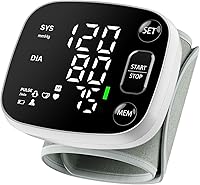
Wrist models are small and easy to carry. They can suit people who need a compact device or have difficulty fitting an upper-arm cuff, but the wrist must be held at heart level during measurement.
The best wrist blood pressure monitor guide covers the trade-offs. A wrist device should not be treated as automatically better just because it is smaller.
Wearable blood pressure monitors
Wearable models may appeal to people who want a device that stays on the body. Before choosing one, check how it measures blood pressure, how it is positioned, and how results are recorded.
Our guide explains how to choose a wearable blood pressure monitor and why convenience does not remove the need for correct measurement.
Talking monitors
A talking monitor reads results aloud, which can help people who have difficulty reading a display. Check the controls, volume, language options, and cuff fit before buying.
See best talking blood pressure monitor choices for this specific need.
Why does cuff size matter so much?
Cuff size matters because the bladder must fit around the limb correctly to measure pressure consistently. Measure the upper arm or wrist where the cuff will sit, then compare that measurement with the cuff range.
A cuff that is too small may produce readings that are higher than expected. A cuff that is too large or poorly positioned can also reduce consistency.
Keep these habits consistent:
- Use the same arm when possible.
- Place the cuff on bare skin.
- Align the artery mark as directed.
- Keep the lower edge in the position shown in the instructions.
- Support the arm at heart level.
- Sit quietly before measuring.
- Avoid talking or moving during the reading.
- Wait at least 3 minutes between repeated readings.
If several people use one device, confirm that the cuff works for each person. Some models allow additional cuff sizes, while others include a wide-range cuff.
When the original cuff wears out, compare best blood pressure monitor replacement cuff options for the exact model.
Are validated blood pressure monitors worth choosing?
Validated blood pressure monitors are worth prioritizing because validation gives you more evidence that a model has been checked against an accepted measurement standard. That evidence helps you separate a tested design from a model that only looks similar on a shelf.
Validation does not make poor technique harmless, but it helps narrow the choice. A validated model still needs a correct cuff, a supported arm, and a calm few minutes before measurement.
Use a recognized validation resource and confirm that the exact model and cuff combination is covered. The brand name alone is not enough, because cuff size and model variants can differ.
Look for the full model number rather than a general series name. Keep that number written down, since it makes later checks with a clinician or support team much simpler.
Ask what standard was used and whether the listing applies to the cuff range you need. A model validated with one cuff may not carry the same status with another size.
Our guide to validated blood pressure monitors explains what to check before ordering. It can help you read a listing with more care and spot missing details.
Keep the model number available if you ask a clinician to compare your home device with an office reading. A same-day comparison is far more useful when both devices are set up carefully.
Bring your cuff and your usual routine to that comparison when possible. That way the clinician can see how you position the arm, which arm you use, and how the cuff sits.
Do not treat validation as a promise that every reading will be perfect. Blood pressure changes with activity, stress, posture, caffeine, and time of day, even when the device is sound.
The value of validation is in confidence over time. It supports steadier comparisons between mornings, evenings, and visits, as long as your technique stays the same.
Watch for vague claims that use words such as accurate without clear backing. Ask for the exact model evidence and read the fine print on cuff compatibility.
If a listing is unclear, choose a model with clearer documentation instead. Clear records of model, cuff, and test status make a later conversation with a professional more productive.
What features help with daily tracking?
The most useful tracking features are the ones you will use every time. A large display, simple buttons, stored readings, averaging, and an app can all help, but each adds a different kind of convenience.
A basic memory can work well if you record readings at a regular time. Two-user memory is useful when people in the same household share a device, as long as each person selects the correct profile.
Bluetooth can help if you want unlimited app records, trend views, or reports to share. For devices that sync readings with Apple Health, see blood pressure monitors for Apple Health.
It also adds setup steps and device requirements.
Compare the best Bluetooth home blood pressure monitor options if app tracking is central to your routine.
Some monitors flag irregular pulse patterns. That alert is a reason to review the reading and seek appropriate advice, not a diagnosis.
Blood pressure and heart rhythm are related but different measurements. Read using EKG to monitor high blood pressure and can an ECG monitor detect high blood pressure? to understand what ECG tools can and cannot show.
Which power source is easiest?
Battery power suits portable use and keeps the monitor working during a power outage. For built-in battery options, compare rechargeable blood pressure monitors.
An adapter can reduce battery changes when the device stays in one place.
Check whether the monitor uses AA or AAA batteries, whether batteries are included, and whether an adapter is included or sold separately. Keep spare batteries with a travel device, but remove them during long storage if the instructions advise it.
If you use an Omron model near an outlet, compare Omron blood pressure monitor plug-in options and confirm the correct adapter for the exact model.
Four products that fit different home routines
We compared the stated features, cuff details, memory, power, and app support of these 4 products. The right choice depends on whether you want a simple kit, smartphone records, a wrist design, or a compact upper-arm model.
Greater Goods Upper Arm Blood Pressure Monitor
The Greater Goods model suits households that want both plug-in and portable power without app connectivity. Its kit includes the monitor, an upper-arm cuff, a wall adapter, 4 AAA batteries, and a travel case.
The built-in two-user memory keeps readings on the device, so you do not need a phone to review your history. That makes it a practical fit for people who prefer a self-contained monitor.
The cuff should fit snugly and follow the printed alignment guide. Additional smaller or larger cuff sizes are available through Greater Goods support, which may help when household users have different arm sizes.
Choose this model if you want a straightforward home monitor with flexible power and no Bluetooth setup. If phone tracking is essential, choose a model with app support instead.
iHealth Track Smart Upper Arm Blood Pressure
The iHealth Track suits users who want a clear display and a path from on-device records to app history. Its cuff fits upper arms from 8.7–16.5 in, so measure before choosing it.
The display uses large numbers and green, yellow, and red color bands to show where a reading falls within its stated range. The monitor stores up to 99 readings, while the iHealth app supports unlimited readings on compatible iOS and Android devices with Bluetooth 4.0 or later.
It includes 4 AAA batteries and uses two-button operation. The device also identifies and alerts you to heart rhythm disturbances during a measurement.
Choose it if wide cuff coverage and smartphone tracking matter more than a travel case or wall adapter. Read the instructions before first use and keep your phone requirements in mind.
OMRON 7 Series Wireless Wrist Blood Pressure
The OMRON 7 Series suits users who value a small wireless monitor for travel or limited storage. To compare other OMRON lines, see Platinum vs 10 Series.
Its attached wrist cuff fits wrists from 5.3–8.5 in, so measure the wrist rather than assuming the fit.
Advanced Averaging Technology can average up to 3 readings taken within a 10-minute period. The monitor stores up to 90 readings, and the OMRON connect app can store unlimited readings and share reports with a doctor.
Wrist positioning is the key trade-off. You must hold the wrist at heart level and follow the setup instructions closely.
The monitor includes a storage case, instruction manual, quick start guide, and 2 batteries.
Choose it when portability and wrist access are more important than the simpler positioning of an upper-arm device. For a direct comparison with another Withings model, see Withings BPM Connect vs Vision.
OMRON Evolv Wireless Blood Pressure Monitor
The OMRON Evolv suits users who want an upper-arm design with a compact one-piece form. Its attached ComFit cuff fits arms from 9–17 in, so measure the arm before ordering.
The monitor stores up to 100 readings and connects to the OMRON connect app for unlimited records, trend tracking, and reports. It works with Apple Health and Google Fit.
Irregular heartbeat detection can flag an irregular pattern during a routine measurement. That signal can help you decide when to review a result with a healthcare professional, but it does not diagnose a condition.
Choose the Evolv if you want upper-arm positioning with app tracking and a compact design. Its attached cuff is convenient, but replacing the cuff may require checking model-specific accessories.
How should you use a cuff blood pressure monitor?
Use a cuff blood pressure monitor while seated, rested, and supported, with the cuff positioned correctly on bare skin. Good technique makes your readings easier to compare over time.
Before measuring:
- Avoid exercise, caffeine, smoking, and stressful activity for about 30 minutes when possible.
- Empty your bladder.
- Sit with your back supported and feet flat.
- Rest quietly for several minutes.
- Place the cuff as directed.
- Support the arm at heart level.
- Stay silent and still during inflation.
- Record the result and the time.
Read how to use a cuff blood pressure monitor for a fuller setup guide. Use the same routine each time, especially if you are tracking a pattern for a clinician.
A single reading is only one measurement at one moment. Do not change medication based on a monitor result without medical advice.
Which brand or product style should you compare next?
Brand comparisons can help when you already know the type and cuff size you need. They should not replace checking the exact model, included cuff, power source, and validation status.
For brand-specific research, compare:
- Best A&D blood pressure monitor
- Best Braun blood pressure monitor
- Best Joytech blood pressure monitor
- Best Konquest blood pressure monitor
- Best Drive blood pressure monitor
- Best Equate blood pressure monitor
- Best Greater Goods blood pressure monitor
- Best SmartHeart blood pressure monitors
- Best Omron blood pressure monitor
The best brand for you is the one with a model that fits your limb, supports your reading routine, and offers the records or power options you will actually use.
Can a blood pressure monitor work with other health tools?
A blood pressure monitor can be part of a broader home-health routine, but each device measures something different. An ECG records electrical heart activity, while a blood pressure monitor measures pressure and pulse during the cuff cycle.
That difference matters when you build a home station. One tool cannot answer every question, and using each tool for its stated purpose keeps the results easier to interpret.
A pill organizer can help you keep medication times separate from measurement times. See the pill organizer box buying guide if you are building a home-monitoring station.
Clear timing helps when you review a pattern. It is easier to note whether a reading came before or after a dose, a meal, or a period of rest.
Keep a simple log that matches the routine you actually follow. Note the time, the arm used, and whether you rested first, using the same short format each time.
Do not assume a smartwatch, ECG, or wearable device replaces a validated blood pressure monitor. Match each tool to the measurement it is designed to take.
A wearable may be convenient for recording other signals, but convenience does not change what it measures. Check the stated method before you treat its output as blood pressure.
An ECG tool may show heart rhythm information, yet it does not measure pressure in the arteries. Those are related topics, not interchangeable readings.
When tools are used together, keep the devices in their proper roles. Use the cuff monitor for blood pressure, and use other tools only for the signals they are built to record.
Store the monitor and its records where you can find them quickly. A tidy station makes it more likely that you will measure at the same time each day.
If a reading from one tool seems to conflict with another, do not try to average them. Ask a healthcare professional which measurement matters for the question you are asking.
A home routine works best when it stays simple enough to repeat. Fewer tools used well can give clearer information than many tools used in a rushed and inconsistent way.
What should you choose for travel or clinical-style use?
Travel users should prioritize a compact case, simple power, and a cuff that fits. The best blood pressure monitor for travel guide focuses on portability and setup.
Pack the device so the cuff and tubing are not folded sharply. A case helps protect seals and connectors during transit.
A hospital-grade label needs careful interpretation. A device used in a clinic may have different validation, durability, and workflow requirements than a home monitor.
Read how to choose a hospital grade blood pressure monitor before buying for professional use. Professional settings often need checks and records that a home kit does not provide.
For most home users, an automatic upper-arm model remains the easier starting point. A wrist model is more portable, while a talking model may improve access for people who cannot read a small screen.
How do you maintain a blood pressure monitor?
Store the monitor in a dry place, protect the cuff and tubing from sharp bends, and wipe the parts according to the instructions. Do not immerse the monitor or pull the tubing to move it.
Keep the device away from damp bathrooms and hot surfaces when you can. Heat and moisture can wear fabric, seals, and electronic parts over time.
Check the cuff before each reading. Look for cracks, loose connectors, worn fabric, or a poor seal.
Run a finger along the tubing as well, since small splits can affect inflation. If the cuff no longer holds its shape, the fit may already be changing.
Replace damaged parts rather than continuing to trust inconsistent readings. A worn cuff can make results hard to compare, even if the main unit still works.
Keep batteries fresh and remove them for long storage if the instructions call for it. Old batteries can cause weak inflation or error messages at the wrong moment.
Label the storage spot with the cuff size and model number. That small note helps when you check replacements or ask for support later.
Clean the cuff only in the way the manual allows. Harsh cleaners or soaking can damage materials that are meant to flex and seal.
If readings suddenly change, repeat the setup check before assuming your health or the device has changed. Confirm the arm, cuff position, rest time, and battery state first.
Keep the manual and any quick start guide with the device. They hold the alignment marks and care steps that are easy to forget.
Make storage part of the routine, not an afterthought. Putting the monitor away the same way each time protects the cuff and keeps the next reading easier to set up.
Explore blood pressure monitors by topic
Use these topic guides after you have checked cuff fit and measurement position. They help you compare home-use models and understand when an ECG feature fits your needs.
Which best blood pressure monitor should you choose?
Choose the Greater Goods Upper Arm Blood Pressure Monitor if you want a self-contained kit with a wall adapter, 4 AAA batteries, a travel case, and two-user memory. Choose the iHealth Track Smart Upper Arm Blood Pressure if a wide-range cuff and smartphone records matter.
Choose the OMRON 7 Series Wireless Wrist Blood Pressure for compact wrist portability, and choose the OMRON Evolv Wireless Blood Pressure Monitor for a compact upper-arm design with Bluetooth tracking.
Your final decision should follow this order: confirm cuff fit, choose the monitor position you can use correctly, check validation, then select memory, power, and app features. If readings are repeatedly unusual or symptoms concern you, contact a healthcare professional.
Frequently asked questions
What is the best blood pressure monitor for home use?
The best blood pressure monitor for home use is usually an automatic upper-arm model with a cuff that fits correctly, clear results, and a record system you will use. Compare validation, cuff range, memory, power options, and app support before choosing.
Ask a clinician which arm and schedule to use if you are monitoring a health condition.
Are upper-arm or wrist blood pressure monitors better?
Upper-arm blood pressure monitors are generally the first choice for home readings because the cuff sits closer to heart level when positioned correctly. Wrist monitors can be useful for portability or when an upper-arm cuff is difficult to fit, but positioning becomes especially important.
Follow the instructions and compare the device with a clinician when possible.
How tight should a blood pressure cuff be?
A blood pressure cuff should feel snug without pinching, with enough room to slide one finger underneath. Place it on bare skin, align it as directed, and keep the arm supported at heart level.
A cuff that is too small or too loose can make the reading less useful.
Can a blood pressure monitor detect heart problems?
A blood pressure monitor measures blood pressure and pulse, and some models flag irregular pulse patterns during a reading. That alert is not a diagnosis.
Repeated unusual readings, severe symptoms, or concerns about your heart should be discussed with a qualified healthcare professional.
How often should I replace a blood pressure monitor cuff?
Replace a blood pressure monitor cuff when it no longer fits, the fabric or tubing is damaged, the connector leaks, or readings become inconsistent after correct setup. Check whether a replacement cuff is available for the exact model.
Keep the cuff clean, dry, and stored without sharp bends.