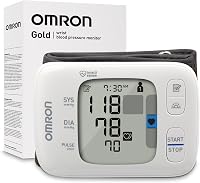
How to Choose an Omron Monitor Power Source
An Omron blood pressure monitor can use batteries or an AC adapter only when the monitor supports that power method and the adapter matches its requirements. Check the exact model manual, connector and voltage before plugging it in.
On this page (7 sections)
- Can an Omron blood pressure monitor plug in?
- Are batteries a better choice for an Omron monitor?
- What does rechargeable mean for a blood pressure monitor?
- Which power options should you compare before buying?
- What can these blood pressure monitor examples teach you?
- How should you set up a plug-in or battery monitor?
- Which power source is right for you?
An Omron blood pressure monitor plug in setup is safe only when the monitor supports an AC adapter and the adapter matches the exact model requirements. A similar looking plug is not enough to prove that a power supply belongs to that monitor.
If your monitor uses batteries only, do not connect a generic charger or power supply just because the connector looks similar. The wrong output can damage the unit, or it can create a setup that the manufacturer never approved for home use.
Power choice affects where you can take readings and how the monitor fits into a daily routine. A fixed adapter suits one measuring spot, while batteries give more freedom to move between rooms.
Power choice also affects how often you manage supplies and how simple the monitor is to store. Batteries need checking and replacement, while an adapter keeps a cord in place but reduces portability.
Start with the model number on the monitor, then check its manual for approved power options. That manual should explain the adapter model, connector, electrical needs and battery arrangement.
For an Omron monitor, confirm the details for the exact unit rather than relying on the brand name alone. Different models in the same range can use different parts and different power methods.
If you are still comparing monitor types, our best blood pressure monitor guide explains the main features to compare before you focus on power. Cuff fit, controls and display should be considered alongside the power source.
Think about where readings will normally happen before you choose. A bedside table with a nearby outlet points one way, while travel and several rooms point another way.
The safest starting point is always the written instructions for your exact model. Once the approved power method is clear, the rest of the setup becomes much simpler.
Can an Omron blood pressure monitor plug in?
Some Omron monitors can run from an AC adapter, but the answer depends on the exact model. The brand name alone does not confirm adapter support because different monitors can use different connectors, voltage requirements and battery arrangements.
Look for these details in the manual or on the monitor:
- Whether AC adapter use is supported
- The approved adapter model or electrical output
- The connector shape and polarity
- Whether batteries must be removed before adapter use
- Whether the adapter is included or sold separately
A plug-in setup can suit a monitor that stays on a bedside table or home desk. It keeps the unit near a wall outlet, but it is less convenient if you want to measure in several rooms.
For a broader comparison, see our guide to the best blood pressure monitor with power adapter.
How to check Omron blood pressure monitor adapter compatibility
Match the adapter to the model, not just the plug. Confirm the model number, required output and connector details before connecting power.
Do not use an adapter from another monitor unless the manufacturer confirms it is approved for your model. Do not use batteries and an AC adapter together unless the manual specifically allows that setup.
If you cannot find the manual, check the monitor body for a model number and contact the manufacturer with that number. This is safer than guessing from a product photo or choosing an adapter based only on physical fit.
Are batteries a better choice for an Omron monitor?
Batteries are usually the simplest option when you need portability or do not want a cable on the table. They let you move the monitor between rooms without looking for an outlet first.
That freedom suits people who measure in more than one place at home. It also suits a monitor that may be carried to another house, a holiday home or a care setting.
Battery power does require a little routine care. You need to keep suitable replacements available and notice any low battery warning shown by the monitor.
Battery-powered monitors can be useful for:
- Occasional readings
- Travel between home and another location
- Rooms without a nearby outlet
- A backup monitor during a power interruption
Occasional use is often the easiest match for batteries because replacements are less frequent. A spare set stored with the monitor can prevent an interruption when a reading is due.
Travel is another common reason to choose battery power. A monitor without a cord is easier to pack, carry and use in a room that was not arranged as a measuring station.
A battery model can also serve as a backup when mains power is unavailable. That matters during an outage, or when the usual measuring spot is not convenient for a short period.
Check the battery type and quantity for your model before buying replacements. The manual or battery compartment should state what the monitor needs, and those details should be followed.
Replace batteries when the monitor shows a low-battery warning or when the manual directs you to do so. Do not mix old and new batteries unless the instructions allow that combination.
Remove old batteries if the monitor will sit unused for a long period. This follows the care advice for the specific unit and helps avoid leakage during storage.
Store the monitor in a dry place and keep the cuff from sharp bends or heavy pressure. Follow the care directions for the specific unit, including any guidance on cleaning and storage.
Batteries suit anyone who values a clean table and flexible placement. The trade-off is the need to check power levels and keep replacements within reach.
What does rechargeable mean for a blood pressure monitor?
A rechargeable blood pressure monitor has a built-in battery that is charged through its approved charging connection. That is different from a monitor that merely accepts replaceable rechargeable batteries.
The distinction matters because the charging method, storage and routine are different. A built-in battery is part of the monitor design, while replaceable cells can be swapped when they run low.
Built-in charging can suit you if:
- The monitor stays in one main location
- You can charge it between readings
- You want fewer disposable batteries
- You prefer a simple charging routine
A fixed location makes charging easier to plan. The monitor can be returned to the same charging point after use, rather than relying on a fresh set of batteries in a drawer.
Regular charging fits a steady routine better than an occasional one. If readings are taken at set times, charging between those sessions can become a simple habit.
Fewer disposable batteries may appeal to anyone who dislikes frequent changes. The trade-off is that a built-in battery must be charged in time, and the monitor design controls how that happens.
Replaceable batteries may be more practical if you want to carry spares or avoid waiting for a built-in battery to charge. A spare set gives a quicker route back to use in many cases.
A rechargeable monitor is not automatically better, so compare charging support, battery access and storage needs. Look for clear instructions that describe the approved charging method for the exact model.
Our best blood pressure monitor with USB charging guide covers monitors designed around USB power. You can also compare the best rechargeable blood pressure monitor options if built-in charging is your main priority.
Before choosing, think about where the monitor will live most of the time. A charging point near the usual measuring spot makes built-in power more practical.
Also think about how you will react to a low battery warning. Some people prefer a simple swap, while others prefer a charging routine that does not use disposable cells.
The right choice depends on habit rather than a general claim about rechargeable models. Match the power method to the place, frequency and storage routine you actually use.
Which power options should you compare before buying?
Choose the power method that matches your measuring routine, then confirm cuff fit and operation. Power is only one part of a usable home monitor.
| Power choice | Best fit | Main trade-off |
|---|---|---|
| Approved AC adapter | One fixed measuring spot near an outlet | Less convenient to move |
| Replaceable batteries | Travel, backup use and flexible placement | Batteries need checking and replacement |
| Built-in rechargeable battery | Regular use with access to charging | Charging depends on the monitor's design |
| Replaceable rechargeable batteries | A battery routine with reusable cells | Compatibility must be confirmed first |
A monitor that works well on batteries may still be a poor fit if its cuff does not match your arm. Power should never be the only detail considered before buying.
Measure your upper-arm circumference and compare it with the cuff range before choosing. A cuff that is too small or too large can make the monitor hard to use correctly.
The cuff range is printed or listed for the model, so check that number against your own measurement. This step applies whether the monitor uses batteries, an adapter or a rechargeable design.
Daily use also depends on controls, display and memory. Large numbers, simple buttons and clear prompts can matter as much as the power source.
Setup should feel manageable in the room where readings will happen. A monitor that is easy to position, read and store is more likely to be used consistently.
The examples below show how product power details can affect daily use. They are not Omron models, so use them as comparisons for battery, adapter and portability decisions.
Read each example for its cuff range, battery type and any adapter support. Those details show why model specific information matters more than a general power category.
Use the comparisons to judge your own routine rather than copying a power choice from another monitor. The best fit is the one that matches your arm, your rooms and your habits.
What can these blood pressure monitor examples teach you?
The iHealth Track Smart Upper Arm Blood Pressure uses 4 included AAA batteries and has a wide-range cuff for upper arms measuring 8.7 to 16.5 in. Its two-button operation and large backlit display suit readers who want simple controls and clear numbers.
The iHealth model stores up to 99 readings on the monitor and supports unlimited readings through its free iOS and Android applications. It also identifies heart rhythm disturbances and displays a warning symbol after the measurement when one is detected.
Its power setup is straightforward for home or travel use because the box includes 4 AAA batteries. If you prefer an adapter or USB charging, compare the monitor's power design before choosing it.
The Paramed Blood Pressure Monitor includes batteries and can also operate with an approved AC adapter, but the adapter is not included. Its cuff fits arms from 8.7 to 16.5 in, and the monitor stores up to 120 readings across 2 user profiles.
This is the clearest example here of a monitor that can support both portable battery use and a fixed plug-in setup. Use only the approved AC adapter, and do not use batteries and the adapter at the same time.
The voice broadcast can be turned off if you prefer silent readings. The included carrying bag may also suit buyers who move the monitor between locations.
The Alcedo Blood Pressure Monitor for Home Use uses 4 included AAA batteries and has a one-button design. Its cuff fits arms from 8.7 to 16.5 in, while 2-user mode stores up to 120 readings for each user.
The Alcedo averages 3 values and provides cuff-position and movement symbols during measurement. Its adjustable voice broadcast can help users who prefer spoken readings, while the LCD display shows the measurement values.
The product information also identifies an AC adapter, but confirm the exact power instructions before relying on plug-in use. If you need a rechargeable monitor, look for explicit built-in charging support rather than assuming that an adapter reference means rechargeable operation.
For related heart rhythm equipment, see Best ECG Monitor With Rechargeable Battery. Blood pressure and ECG devices measure different things, so one does not replace the other.
How should you set up a plug-in or battery monitor?
Place the monitor on a stable surface and use the power method approved for that model. Sit quietly, follow the cuff instructions and keep the cable or batteries from interfering with the measurement.
Before the first reading:
- Confirm the model number and power instructions.
- Install the correct batteries, or connect the approved adapter.
- Check that the cuff range matches your arm.
- Sit with your back supported and your feet on the floor.
- Keep your arm supported as directed by the manual.
- Stay still and avoid talking during the reading.
A power source does not correct a loose cuff, movement or poor sitting position. If readings seem unusual, repeat the measurement according to the manual and discuss repeated concerns with a health professional.
Keep the adapter cable away from walkways and remove batteries that show leakage. Store the monitor and cuff where they will stay dry and protected from pressure.
Which power source is right for you?
Choose an approved AC adapter if the monitor will stay in one place, batteries if you need flexible placement, and a built-in rechargeable model if regular charging fits your routine. For an Omron monitor, the exact model manual decides which option is safe.
Pick a monitor with clear adapter support when you want a permanent bedside setup. The measuring spot should be close to an outlet, and the cable should not cross a walkway.
Pick battery power when you travel or measure in different rooms. Keep the correct spare batteries available so a low battery warning does not stop a reading.
Pick rechargeable operation only when the monitor clearly supports that design. built-in charging is different from using replaceable rechargeable batteries, so read the instructions closely.
For any power method, check the cuff range against your upper arm before buying. A suitable power source cannot correct a cuff that does not fit.
If you are using an ECG device as part of a wider heart-monitoring routine, read Using EKG to Monitor High Blood Pressure for the distinction between these types of readings. Blood pressure and ECG devices measure different things, so one does not replace the other.
Keep batteries, adapters and charging parts approved for the exact unit. Do not use batteries and an adapter together unless the manual allows that setup.
Store the monitor in a dry place and follow the care directions for the cuff and unit. Remove batteries that show leakage and keep the cable away from walkways.
The safest decision rule is simple: identify the model, verify the approved power source, match the cuff to your arm and follow the operating instructions every time. Once those points are clear, the power choice becomes a practical fit for daily use.
Frequently asked questions
Can an Omron blood pressure monitor plug into the wall?
Some Omron blood pressure monitors support an AC adapter, while others use batteries only. Check your exact model manual for the approved adapter, connector and electrical requirements.
Never assume that an adapter from another monitor is safe just because the plug fits.
Can I use rechargeable batteries in an Omron blood pressure monitor?
Rechargeable batteries may fit some battery-powered Omron monitors, but compatibility and performance depend on the battery type and the monitor instructions. Check the manual before using them.
If you want built-in charging, choose a monitor specifically described as rechargeable rather than adding an unapproved power source.
Is a rechargeable blood pressure monitor better than a plug-in model?
A rechargeable blood pressure monitor can reduce disposable battery changes and suit a desk or travel routine with regular access to charging. A plug-in model can work well in one fixed location.
Choose based on the exact power method, storage habits and whether the monitor can also run on batteries.
Can I use any AC adapter with a blood pressure monitor?
No. Use only the approved adapter for the monitor model, with matching voltage, connector and polarity.
An adapter that physically fits can still damage the unit or create an unsafe setup.
If the adapter is missing, contact the brand or check the model manual before buying a replacement.