9 Best Blood Pressure Monitors for Seniors (November 2026)
The best blood pressure monitors for seniors include the iHealth Track Smart Upper Arm Blood Pressure for clear everyday readings, the OMRON Platinum Blood Pressure Monitor & Upper for advanced heart tracking, and the Greater Goods Bluetooth Blood Pressure Monitor for app-based record keeping.
On this page (6 sections)
- The best blood pressure monitor for seniors by need
- How should seniors choose between upper-arm and wrist monitors?
- Which display and control features matter most?
- How should seniors use a blood pressure monitor?
- Can an ECG monitor measure high blood pressure?
- Final verdict on the best blood pressure monitor for seniors
The best blood pressure monitor for seniors is the iHealth Track Smart Upper Arm Blood Pressure Monitor because it combines a large multi-color backlit display, two-button operation and a wide-range cuff. OMRON is the stronger choice for AFib screening and two-user tracking, while voice models help when reading a screen is difficult.
We compared the stated controls, display size, cuff range, memory, voice options and power choices across these 9 picks. The best choice depends on whether you value simple visual readings, spoken results, app records, rechargeable power or a compact wrist design.
If you need readings throughout the day rather than occasional cuff checks, see our guide to choosing a continuous blood pressure monitor.
For portable OMRON models, see Omron blood pressure monitors for travel.
If you want broader buying advice first, read our guide to the best blood pressure monitor. For voice-focused options, see the best talking blood pressure monitor.
Our picks at a glance
-
1
 Best for clear everyday readings
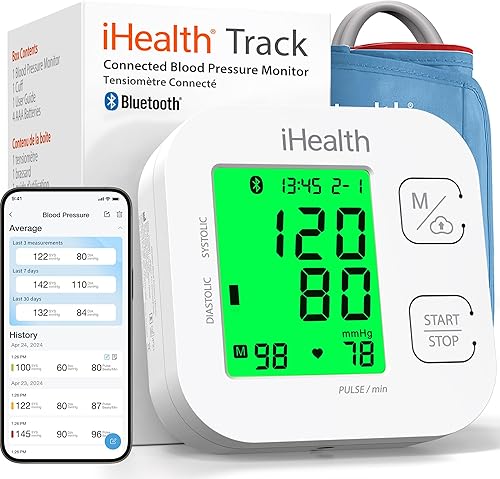
iHealth Track Smart Upper Arm Blood Pressure
9.7/10 our score
See it on Amazon -
2
 Best for advanced heart tracking
OMRON Platinum Blood Pressure Monitor & Upper
9.7/10 our score
See it on Amazon -
3
 Best for app-based record keeping
Greater Goods Bluetooth Blood Pressure Monitor
9.6/10 our score
See it on Amazon
- 4
 Check it
Paramed Blood Pressure Monitor
Best for voice and large buttons - 5
 Check it
MMIZOO Wrist Blood Pressure Monitor BP Machine
Best for compact travel - 6
 Check it
Alcedo Blood Pressure Monitor for Home Use
Best for automatic averaging - 7
 Check it
Oklar Wrist Blood Pressure Monitor
Best for rechargeable voice readings - 8
 Best for spoken upper-arm guidanceCheck it
- 9
 Check it
Sinocare Blood Pressure Monitor
Best for two-user simplicity
The best blood pressure monitor for seniors by need
The iHealth Track is the strongest simple visual choice, while OMRON is better for advanced tracking and Paramed is better when spoken readings matter. Wrist models save space, but they require more careful positioning.
A fixed setup may suit some households; see wall-mounted blood pressure monitors.
Our score weighs specs, features and buyer feedback against what seniors commonly need: readable results, simple controls, manageable cuffs and easy record keeping. For complete at-home sets, compare blood pressure monitor kits.
iHealth Track Smart Upper Arm Blood Pressure: Best for clear everyday readings
- Two-button operation
- Large multi-color backlit display
- Wide-range 8.7–16.5 in cuff
- Stores up to 99 readings
The large backlit display, simple controls and wide-range cuff make this a strong everyday choice for seniors who want readable results without complicated setup.
Pros
- Large color display
- Two-button operation
- Bluetooth app support
- Wide-range cuff
Cons
- Upper-arm design needs a suitable table or chair setup
- App requires a compatible iOS or Android device
The iHealth Track is the best starting point for seniors who want a clear screen and few controls. Its large multi-color backlit display uses oversized numbers, while the green, yellow and red display helps show the reading category at a glance.
Two-button operation keeps the process simple. The wide-range cuff fits upper arms from 8.7 to 16.5 inches, so measure the arm before choosing it.
The monitor stores up to 99 readings, and Bluetooth support lets the iHealth app store unlimited readings on compatible iOS and Android devices. For iPhone-specific options, see Bluetooth blood pressure monitors for iPhone.
That gives a family member another way to review records if the senior wants help managing them.
It also identifies heart rhythm disturbances and shows a warning symbol after the measurement. That symbol is not a diagnosis, so discuss repeated concerns with a health professional.
Choose this model when visual clarity and simple controls matter most. Its upper-arm format needs a stable place to sit and support the arm during a reading.
OMRON Platinum Blood Pressure Monitor & Upper: Best for advanced heart tracking
- AFib detection
- High Morning Average Indicator
- Dual-user memory with 100 readings each
- Bluetooth app support
OMRON combines a wide upper-arm cuff with dual-user memory, AFib screening and app tracking for seniors who want more information from regular checks.
Pros
- AFib detection
- Two user profiles
- AC adapter included
- Storage case included
Cons
- Larger and heavier than several simpler picks
- More features may take longer to learn
OMRON Platinum is the best blood pressure monitor for seniors who want more tracking features in one upper-arm unit. It screens for AFib with every blood pressure measurement and includes a High Morning Average Indicator for reviewing morning readings.
Its wide-range D-ring cuff fits 9 to 17-inch arms. The device stores up to 100 readings for each of 2 users, which suits couples or a senior and caregiver sharing one monitor.
Bluetooth connects the monitor with the OMRON connect app for unlimited storage, trends and reports. Compatibility with Apple Health and Google Fit may also help families keep health records together.
The package includes an AC adapter, four AA batteries, a storage case, an instruction manual and a quick start guide. It is larger and heavier than several simpler models here, at 7.5 x 4.6 x 3.3 inches and 1.37 pounds.
Choose OMRON if you want AFib screening, dual-user memory and app-based records. If spoken output is the main need, compare it with an OMRON talking blood pressure monitor.
Greater Goods Bluetooth Blood Pressure Monitor: Best for app-based record keeping
- Large backlit display
- One-touch operation
- Irregular heartbeat detection
- 60 readings per user, 120 total
The one-touch design and large display suit routine checks, while Bluetooth and the Balance Health app help families organize readings and share reports.
Pros
- One-touch operation
- Backlit display
- App and built-in memory
- AC adapter included
Cons
- Bluetooth is optional rather than necessary
- Different cuff sizes require contacting Greater Goods support
Greater Goods suits seniors who want one-touch operation and app-based record keeping without giving up a readable display. Its large backlit screen uses bold numbers, and the adjustable upper-arm cuff includes an artery alignment guide.
The cuff fits 8.7 to 16.5 inches. Built-in memory stores 60 readings per user, or 120 total, while the Balance Health app can store unlimited readings, show trends, export reports and share results.
Bluetooth is optional because the monitor can work from its built-in memory. That gives you a simple path for occasional checks and a digital record option when a caregiver or doctor needs more history.
The monitor includes four AAA batteries, an AC adapter, a travel case and the adjustable cuff. Greater Goods also offers smaller or larger cuff options through its support team.
Choose this model for a balance of simple controls and connected record keeping. Its irregular heartbeat indicator can flag an irregular pulse pattern during a reading, but it does not diagnose a heart condition.
Paramed Blood Pressure Monitor: Best for voice and large buttons
- Large LCD and buttons
- Voice broadcast with silent mode
- Two user profiles
- 120 readings total
Large buttons and optional voice broadcast make this upper-arm model useful for seniors who want spoken results or a simple screen layout.
Pros
- Voice broadcast can be turned off
- Large buttons
- Two-user memory
- Carrying bag included
Cons
- AC adapter is not included
- Battery information differs between the title and specifications
Paramed is the best fit for seniors who want large physical buttons and spoken results. Its large LCD uses oversized numbers, and the voice broadcast can be turned off when silent operation is preferred.
The upper-arm cuff fits 8.7 to 16.5 inches and includes a self-check feature to help with placement. Two user profiles can store up to 120 readings, which is useful when two people share the device.
A low-battery display and date display add basic tracking information. The carrying bag supports storage and transport, while the included batteries let you begin without finding a separate power source.
The product information describes four AAA batteries as required, while the title says batteries are included. Check the package details before relying on a spare set being present.
Choose Paramed when voice output and large buttons are more important than app connectivity. For low vision needs, compare it with our guide to the best talking blood pressure monitor for the blind.
MMIZOO Wrist Blood Pressure Monitor BP Machine: Best for compact travel
- Large LCD display
- Voice broadcast
- Two users with 99 readings each
- Carrying case included
This compact wrist monitor is easier to carry than an upper-arm unit and adds spoken readings, but it requires careful wrist placement at heart level.
Pros
- Compact design
- Voice broadcast
- Two-user memory
- Carrying case included
Cons
- Batteries are not included
- Wrist position must stay at heart level
MMIZOO is the most compact choice for seniors who want a wrist monitor with spoken output. The large LCD and voice broadcast can provide readings within about 45 seconds, according to the product information.
It supports 2 users with 99 measurements each, so a couple can keep separate records. The carrying case also makes it easier to store the monitor between checks or take it along when space is limited.
The trade-off is wrist positioning. Wear it on the left wrist as directed, keep the cuff about 1 cm from the hand and hold the wrist at heart level during the measurement.
The monitor requires 2 AAA batteries, and batteries are not included. Measure and practice the wrist position before relying on results for comparisons.
Choose MMIZOO when portability matters more than upper-arm simplicity. See our guide to the best talking blood pressure wrist monitor for more wrist-focused options.
Alcedo Blood Pressure Monitor for Home Use: Best for automatic averaging
- One-push operation
- Automatic average of 3 values
- Adjustable voice volume
- 120 readings per user
Alcedo pairs one-button operation with an automatic three-value average, voice output and two-user memory for straightforward home monitoring.
Pros
- One-button operation
- Voice volume adjustment
- Two-user memory
- Self-checking cuff
Cons
- Upper-arm setup takes more space than a wrist model
- The supplied product data does not specify whether an AC adapter is included
Alcedo is a useful choice for seniors who prefer one-button operation and automatic averaging. It averages 3 values and shows the result, which can make a routine check easier to review.
Its upper-arm cuff fits 8.7 to 16.5 inches and includes self-checking cuff positioning and movement detection symbols. Two users can keep separate records, with 120 readings for each user.
The voice broadcast has an adjustable volume, so it can support users who have difficulty reading the LCD. You can still use the screen when spoken output is not needed.
The product information identifies four AAA batteries as included. It does not clearly establish an included AC adapter, so confirm the power setup if wall power is important to you.
Choose Alcedo for automatic three-reading averages, voice volume control and large memory. It is a better fit for a fixed home setup than for a small travel bag.
Oklar Wrist Blood Pressure Monitor: Best for rechargeable voice readings
- Voice broadcast
- Large LED backlit display
- 240 readings for 2 users
- Built-in rechargeable battery
The rechargeable battery, large LED display and adjustable voice output make Oklar a portable option for seniors who prefer spoken or high-contrast readings.
Pros
- Rechargeable battery
- Voice volume can be adjusted
- Large LED display
- 240-reading memory
Cons
- Charging adapter is not included
- Wrist placement needs consistent attention
Oklar is a strong wrist option for seniors who want rechargeable power and room to keep a longer history of readings. Its built-in rechargeable battery helps avoid regular battery replacement, and the Type-C cable supports convenient charging, although the charging adapter is not included.
The large LED backlit display keeps numbers clear in low light, which can help when a reading is taken early in the morning or in a dim room. Voice broadcast can read results aloud for people who prefer not to rely on the screen alone.
Two users can store up to 240 readings in total, so a couple can keep separate records on one device without clearing it as often. The adjustable wrist cuff fits wrists from 4.92 to 8.46 inches, so measuring the wrist first will help confirm the fit.
A reading takes about 35 seconds, and the device turns off automatically after 60 seconds of inactivity. For consistent comparisons, use the same wrist each time, keep the cuff at heart level and stay still and silent while it measures.
Choose Oklar when rechargeable power, spoken output and a large memory matter most. It may be less suitable if you find upper arm positioning easier to repeat or if you do not want to manage charging at home.
yuwell Blood Pressure Monitor: Best for spoken upper-arm guidance
- One-button operation
- Voice broadcast
- 99-reading memory
- Latest 3-reading average
The yuwell model combines one-button operation, spoken guidance, a wide cuff and posture reminders for seniors who prefer upper-arm measurement.
Pros
- Wide cuff range
- Voice broadcast
- Posture and movement reminders
- Power adapter included
Cons
- Memory is smaller than several two-user models
- Voice output may not suit every quiet household
yuwell is the best upper-arm choice for seniors who want spoken guidance and a very wide cuff range. Its cuff fits 8.7 to 17.7 inches, which is the broadest upper-arm range in this group.
One-button operation starts the process, while voice broadcast follows the measurement and gives an intelligent diagnosis reminder about whether the blood pressure is normal. It also includes movement and posture reminders.
The device stores 99 readings and can show the average of the latest 3 measurements. An irregular heartbeat alert and hypertension indicator add more information after a reading.
The package includes the host, arm cuff, power adapter, manual, storage bag and packing box. Its upper-arm format offers a repeatable setup, but it takes more room than a wrist monitor.
Choose yuwell when cuff range and spoken guidance matter most. It is especially worth considering when another family member may also use the monitor.
Sinocare Blood Pressure Monitor: Best for two-user simplicity
- One-button operation
- 3.6-inch screen
- Two user profiles
- 99 readings per user
Sinocare keeps the controls simple while adding a large screen, posture detection, color indicators and separate memory for two users.
Pros
- One-button operation
- Large 3.6-inch screen
- Two-user memory
- Battery or Type-C power
Cons
- Type-C cable is not included
- The smallest score in this roundup reflects fewer stated access features than the higher-ranked picks
Sinocare keeps operation simple with one button and a 3.6-inch screen. Its upper-arm cuff fits 8.6 to 16.5 inches, and separate profiles let 2 users store up to 99 readings each.
The monitor detects incorrect posture, uses color-coded indicators to classify blood pressure levels and alerts you to irregular heartbeats. Those features can help you notice when the setup needs correction before comparing results.
Power comes from four AAA batteries or a Type-C connection. The cable is not included, so batteries are the easiest ready-to-use option unless you already have a compatible power setup.
Sinocare is a practical choice for a senior who wants a large screen and family memory without app pairing. It has fewer stated accessibility features than the voice-enabled picks above.
Choose it for basic two-user monitoring and flexible power. Confirm the cuff fit around the upper arm before ordering.
How should seniors choose between upper-arm and wrist monitors?
Upper arm monitors are often easier to use consistently when you can sit at a table and support the measuring arm in the same place each time. They also tend to offer wider cuff ranges in this group, while wrist models are smaller and lighter for travel or storage in a drawer.
Choose an upper arm model if:
- You want a larger cuff range.
- You prefer a table based routine.
- You want posture or cuff alignment reminders.
- More than one person will use the monitor.
Choose a wrist model if:
- Carrying space is limited.
- You want voice output in a compact device.
- You prefer rechargeable power.
- You can keep the wrist at heart level every time.
The choice often comes down to routine rather than size alone. An upper arm cuff can feel more predictable because the arm rests on a table and the cuff sits above the elbow, while a wrist unit asks you to hold the wrist steady at heart level for the whole measurement.
For wrist options, Oklar has the largest stated memory in this group and a rechargeable battery, with a Type-C cable included but no charging adapter. MMIZOO has a carrying case and voice broadcast, but batteries are not included, so you will need to supply 2 AAA batteries.
Think about where each reading will happen at home. If you usually sit in the same chair with a side table nearby, an upper arm model may fit that habit well.
If you travel, visit family or have very limited storage, a wrist model may be easier to carry and put away.
Also consider who will help with the readings. A caregiver may find a shared table setup easier to repeat, while a senior who prefers a small device may feel more comfortable with a wrist unit.
Measure the arm or wrist before ordering, since a good fit matters more than extra features.
Try the position a few times before relying on the numbers for comparisons. Practice helps you learn where the arm should rest, how snug the cuff should feel and how to stay still without talking during the reading.
Which display and control features matter most?
A large backlit or LED display helps when room lighting is poor, while large buttons reduce the effort needed to press the right control. Voice broadcast adds another access option when screen text is hard to see, and it can also help when you want to hear the result without turning the device toward your eyes.
The iHealth Track, Greater Goods and Oklar emphasize large backlit displays for everyday reading. Paramed adds large buttons for simple handling, while Alcedo, yuwell, MMIZOO, Oklar and Paramed include voice options for spoken results.
Control layout matters just as much as screen size. A one button or two button design can make the start of a reading straightforward, but it does not automatically give you a full health record to share later.
Memory is the next detail to check when more than one person uses the same monitor. Separate user profiles help keep readings apart, and a larger memory gives you more time before older readings need to be reviewed or cleared.
App support can help when a caregiver or doctor needs to see trends over time. Bluetooth models can move readings to a phone or tablet, where they are easier to organize than a list on a small screen.
That does not mean every senior needs an app. If readings are checked only for personal awareness, clear numbers and simple controls may be enough.
If family members help manage care from another room or another home, connected records may be more useful.
Volume control is also worth noting for voice models. Some households prefer spoken output at a low level, while others may want the sound turned off completely when the room is quiet.
Look at the whole routine, not only the display. Ask whether you can read the numbers comfortably, start the reading without help, keep the cuff in place and find past results when needed.
A model that suits your eyes, hands and daily routine is usually the better choice, even if another option has more features on paper. Consistency over many weeks will matter more than a long list of controls.
How should seniors use a blood pressure monitor?
Use the same setup each time: sit quietly, keep your feet flat, support the arm or wrist at heart level and avoid talking during the measurement. Read the manual before the first use, and wait before repeating a reading if the device instructions require it.
For an upper-arm monitor, measure the arm circumference and place the cuff according to its alignment guide. For a wrist monitor, keep the cuff in the stated position and do not let the wrist drop below heart level.
Take readings under similar conditions when you want to compare them. Blood pressure can vary with activity, posture, stress and other factors, so one result does not explain every change.
An irregular heartbeat symbol or high reading is not a diagnosis. Contact a health professional if readings are repeatedly concerning or if symptoms occur.
Can an ECG monitor measure high blood pressure?
No. An ECG or EKG monitor records electrical signals from the heart, while a blood pressure monitor measures pressure in the arteries as the heart pumps blood through the body.
The two devices answer different questions, so one cannot stand in for the other in routine home monitoring.
Read Using EKG to Monitor High Blood Pressure for the difference between these measurements and for clarity on what each device does and does not show.
An ECG monitor cannot replace a blood pressure cuff. It may provide information about heart rhythm, but it does not give the systolic and diastolic numbers that a cuff based monitor is designed to measure.
Our guide on whether an ECG monitor can detect high blood pressure explains why the two tools answer different health questions and why results should not be mixed up when planning home checks.
Smartwatches can also have limits for this purpose. A watch may track activity, sleep or heart rate, but those measurements are not the same as a cuff reading taken with the arm supported at heart level.
If you are considering one for this purpose, see whether the Galaxy Watch Ultra can measure blood pressure in the US.
For seniors, the practical point is to choose the tool that matches the question you want answered each day. If you want regular blood pressure numbers for comparison over time, use a blood pressure monitor and follow its instructions for positioning and timing.
Keep records under similar conditions when you can, and note the time, arm or wrist used and any factors that may affect the reading. That context can make later conversations with a health professional more useful than a single number on its own.
Do not use an ECG reading, a watch reading or a pulse reading as a substitute for a cuff measurement when blood pressure is the concern. Clear separation between devices makes home monitoring easier to follow and easier to review.
If readings are repeatedly high, irregular or worrying, seek medical advice rather than changing how you interpret the device. A monitor can support regular checks, but it cannot diagnose a condition or replace professional care.
Final verdict on the best blood pressure monitor for seniors
The iHealth Track is the best blood pressure monitor for seniors who want a clear display, simple controls and a wide upper arm cuff for everyday checks. Choose OMRON Platinum for AFib screening, two user records and app tracking when you want more detail from each reading.
Pick Paramed or yuwell when voice broadcast is central to your routine and spoken results will make readings easier to follow. Pick Oklar or MMIZOO when a compact wrist design matters more than the easier repeatability of an upper arm cuff.
Before you buy, measure the arm or wrist and check that the cuff range covers your size with room to spare. Note whether you prefer a table setup at home or a small device that is easy to carry and store.
Decide whether spoken output is useful, or whether a large readable screen will be enough for your daily routine. Also choose the memory or app setup that matches how you will review readings, whether that means a simple list on the device or records shared with family.
Consider power as well, since some models use replaceable batteries and others need charging. A power option you can maintain without frustration will help you keep a regular schedule.
The best choice is the one you can use correctly and consistently most days. Simple controls, a comfortable cuff and a clear way to review past readings will matter more over time than extra features you may rarely use.
Start with the same position, arm or wrist and time of day when possible, and keep the device manual nearby for the first few readings. That steady routine will make comparisons more meaningful and help you spot patterns over weeks.
Our top 3 picks at a glance
-
1
Best for clear everyday readings
iHealth Track Smart Upper Arm Blood Pressure
9.7/10 our score
See it on Amazon -
2
Best for advanced heart tracking
OMRON Platinum Blood Pressure Monitor & Upper
9.7/10 our score
See it on Amazon -
3
Best for app-based record keeping
Greater Goods Bluetooth Blood Pressure Monitor
9.6/10 our score
See it on Amazon
Frequently asked questions
What is the best blood pressure monitor for seniors?
The iHealth Track Smart Upper Arm Blood Pressure Monitor is the best blood pressure monitor for seniors who want a large display, simple two-button operation and a wide-range cuff. OMRON adds AFib screening and dual-user tracking, while Paramed, Alcedo, yuwell and Oklar add voice broadcast options.
Is an upper-arm or wrist blood pressure monitor better for seniors?
An upper-arm monitor is usually easier to standardize because the cuff sits above the elbow and the models here include alignment or positioning guidance. A wrist monitor can be easier to carry, but you must keep the wrist at heart level and use the same position each time.
What cuff size should an older adult use?
Measure around the middle of the upper arm and choose a cuff that covers that circumference. Most upper-arm picks here fit about 8.7–16.5 inches, while OMRON fits 9–17 inches and yuwell fits 8.7–17.7 inches.
Are talking blood pressure monitors useful for seniors with low vision?
Yes. Voice broadcast can read results aloud when screen text is difficult to see.
Paramed, MMIZOO, Alcedo, Oklar and yuwell include voice features, and some let you turn the sound off or adjust its volume.
How can seniors get more consistent readings?
Sit quietly, keep your feet flat and support the measuring arm at heart level. Use the same arm or wrist each time, keep the cuff snug, avoid talking during measurement and follow the device manual before comparing readings over several days.



