9 Best Bluetooth Blood Pressure Monitors for iPhone (November 2026)
The best Bluetooth blood pressure monitors for iPhone include the iHealth Track Smart Upper Arm Blood Pressure for simple iPhone tracking, the Greater Goods Bluetooth Blood Pressure Monitor for shared household records, and the OMRON Evolv Wireless Blood Pressure Monitor for compact upper arm use.
On this page (4 sections)
The iHealth Track Smart Upper Arm Blood Pressure Monitor is the best Bluetooth blood pressure monitor for iPhone for most people. It combines a wide-range upper arm cuff, two-button operation, a large color backlit display and unlimited smartphone storage through the iHealth iOS app.
That mix matters because daily blood pressure tracking only works if the routine feels simple. Two buttons leave little to learn, and the large numbers reduce squinting when you check a reading at home in the morning or before bed.
The color backlit display also gives quick context without opening an app. Green, yellow and red zones help you see at a glance how the result compares with the device zones, while the phone record keeps the longer history in one place.
The best choice depends on how you plan to track readings. Upper arm models give you a familiar cuff format, while wrist models reduce bulk.
An upper arm cuff is often easier to position the same way each time, especially if you already use a cuff at a clinic. A wrist model may suit travel or smaller storage, but it asks for careful heart level placement on every reading.
App support also differs, so choose a monitor whose iPhone app fits the way you want to save, review and share readings.
Some people want readings saved on the phone as a backup to device memory. Others want trends, averages or reports they can show at an appointment, so check the app features before you settle on a model.
If you want a broader overview, start with our best blood pressure monitor buying guide. For another home-focused comparison, see the best bluetooth home blood pressure monitor.
Measuring your arm and checking app requirements first will save time later. A cuff that fits well and an app you will actually open are more useful than extra features you never use.
Our picks at a glance
-
1
 Best for simple iPhone tracking
iHealth Track Smart Upper Arm Blood Pressure
9.7/10 our score
See it on Amazon -
2
 Best for shared household records
Greater Goods Bluetooth Blood Pressure Monitor
9.6/10 our score
See it on Amazon -
3
 Best for compact upper arm use
OMRON Evolv Wireless Blood Pressure Monitor
9.5/10 our score
See it on Amazon
- 4
 Check it
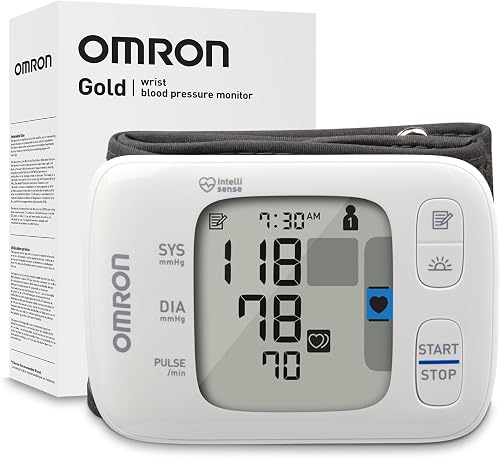
OMRON Gold Wireless Wrist Blood Pressure Monitor
Best for a portable wrist design - 5
 Check it
Oklar Wrist Blood Pressure Monitor
Best for rechargeable wrist use - 6
 Check it
Etekcity Bluetooth Blood Pressure Monitor for Home
Best for Apple Health syncing - 7
 Check it
Meraw Blood Pressure Monitor Home Use
Best for app trend reports - 8
 Check it
RENPHO Smart Blood Pressure Monitor
Best for long-term app history - 9
 Check it
Checkme BP2A Blood Pressure Monitor for Home
Best for fast rechargeable readings
The best Bluetooth blood pressure monitors for iPhone
The best Bluetooth blood pressure monitors for iPhone are the ones that match your cuff fit, app preference and record-keeping needs. We compared the stated features, memory, power options and iOS support for these 9 picks.
Cuff fit should come first because a poor fit affects comfort and consistency. Measure your upper arm or wrist, then compare that number with the range listed for each model before you look at display size or battery type.
App preference comes next for iPhone users. A monitor may work well on the device itself, yet the app determines how readings are stored, reviewed and shared over months of daily use.
Our score weighs specs, features and buyer feedback against what you're shopping for. It does not replace medical advice or confirm a diagnosis.
Power choice also deserves a thought rather than a habit. Some models use replaceable batteries, while others recharge, so consider which option fits your home, travel and spare battery routine.
Use this comparison as a shortlist, then check the manual requirements for your chosen model. The right pick is the one you can position correctly and use consistently.
| Product | Best for | Cuff range | Monitor memory | Power | Our score |
|---|---|---|---|---|---|
| iHealth Track Smart Upper Arm Blood Pressure | simple iPhone tracking | 8.7–16.5 in (22–42 cm) | Up to 99 readings | 4 AAA batteries included | 9.7 |
| Greater Goods Bluetooth Blood Pressure Monitor | shared household records | 8.7–16.5 in (22–42 cm) | 4 AAA batteries and AC adapter | 9.6 | |
| OMRON Evolv Wireless Blood Pressure Monitor | compact upper arm use | 9–17 in | 4 AA batteries included | 9.5 | |
| OMRON Gold Wireless Wrist Blood Pressure Monitor | a portable wrist design | 2 AAA batteries included | 9.5 | ||
| Oklar Wrist Blood Pressure Monitor | rechargeable wrist use | 9.5 | |||
| Etekcity Bluetooth Blood Pressure Monitor for Home | Apple Health syncing | 8.6–16.5 in (22–42 cm) | 4 AAA batteries included | 9.4 | |
| Meraw Blood Pressure Monitor Home Use | app trend reports | 8.7–16.5 in (22–42 cm) | 4 AAA batteries included | 8.9 | |
| RENPHO Smart Blood Pressure Monitor | long-term app history | 8.75–16.5 in (22–42 cm) | 4 AAA batteries required | 8.7 | |
| Checkme BP2A Blood Pressure Monitor for Home | fast rechargeable readings | 8.6–16.5 in (22–42 cm) | Rechargeable lithium polymer battery | 8.3 |
iHealth Track Smart Upper Arm Blood Pressure: Best for simple iPhone tracking
- iHealth iOS app
- Up to 99 readings on the monitor
- Unlimited readings on smartphone
- Wide-range 8.7–16.5 in cuff
Two-button operation, a large color backlit display and iOS app support make this a clear starting point for iPhone users.
Pros
- Wide-range upper arm cuff
- Stores readings on the monitor and phone
- Heart rhythm disturbance alert
Cons
- Uses 4 AAA batteries
- App requires iOS 12.0 or later and Bluetooth 4.0 or later
The iHealth Track is the easiest starting point for many iPhone users. Its two-button operation keeps setup simple, while the large multi-color backlit display uses green, yellow and red zones to make the result easier to read.
That display is useful when you want a result without opening your phone. Oversized numbers help in dim light, and the color zones give a quick visual cue after each measurement finishes.
The wide-range cuff fits upper arms from 8.7 to 16.5 inches, covering the same broad size range used by several other picks here. The monitor stores up to 99 readings, and the iHealth app stores unlimited readings on an iPhone.
Device memory helps when your phone is in another room. Once you sync, the phone becomes the long term record, which makes it easier to keep weeks of readings for review.
The app requires iOS 12.0 or later and Bluetooth 4.0 or later. Four AAA batteries, the wide-range cuff and an instruction manual are included, and the monitor meets ESH 2010 performance standards in the listed contents.
Heart rhythm disturbance alerts are another stated feature. If a disturbance is detected, a warning symbol appears after the measurement, so you can note it for your clinician rather than treating the symbol as a diagnosis.
Choose it if you want a straightforward upper arm monitor with clear phone storage. Read the instructions before the first measurement and keep cuff placement consistent.
Greater Goods Bluetooth Blood Pressure Monitor: Best for shared household records
- Balance Health app for iOS
- Up to 60 readings per user
- 120 total monitor readings
- Apple Health integration
This upper arm monitor suits households that want separate memory, app trends and report sharing.
Pros
- Apple Health integration
- Two-user memory
- Battery and AC power
Cons
- Other cuff sizes require support
- More setup choices than a basic monitor
Greater Goods is the strongest choice for a shared household that needs separate records. Its built-in memory stores up to 60 readings per user, or 120 total, while the Balance Health app stores unlimited readings, trends and reports.
Separate memory matters when two people measure on the same device. It reduces the chance of mixing readings, and the app can keep averages and trends clearer for each person over time.
The adjustable upper arm cuff fits 8.7 to 16.5 inches and includes an artery alignment guide. A large backlit display and one-touch operation make the monitor easier to use in different lighting.
The alignment guide helps with repeatable placement. Put the cuff on the same arm, snug but comfortable, and follow the guide rather than guessing where the sensor should sit.
The package includes the monitor, cuff, travel case, 4 AAA batteries and an AC adapter. The app works with iOS and can integrate with Apple Health, so you can choose battery power for travel or AC power at home.
That power flexibility suits different routines. Batteries make the monitor portable, while the adapter removes worry about battery life during regular daily measurements.
Choose it when two people need app-based records or when you want both battery and AC power. If the standard cuff does not fit, Greater Goods offers other cuff sizes through support.
OMRON Evolv Wireless Blood Pressure Monitor: Best for compact upper arm use
- OMRON connect app
- Up to 100 readings
- Apple Health and Google Fit compatibility
- One-piece design
The one-piece design keeps the monitor compact while Bluetooth connects it to OMRON connect for trends and sharing.
Pros
- Compact upper arm format
- Wide 9–17 in cuff
- Apple Health compatibility
Cons
- Monitor memory is smaller than some two-user picks
- Uses 4 AA batteries
The OMRON Evolv is the best compact upper arm option in this group. Its one-piece design combines the monitor and attached ComFit cuff, so there is less equipment to keep together.
That design can suit a smaller drawer or a bedside table. You are not managing a separate monitor and tube, though you should still store it where the cuff will not be pinched or kinked.
The cuff fits arms from 9 to 17 inches, and the monitor stores up to 100 readings. Bluetooth connects it to the OMRON connect app, which stores unlimited readings, tracks trends and shares reports.
The 9 to 17 inch range is slightly wider on the top end than many 16.5 inch cuffs. Measure your arm first, since a cuff that is too large or too small can make positioning harder.
The app is compatible with Apple Health and Google Fit. Four AA batteries are included, so check the battery type before setting up your supply, because these are AA rather than the AAA cells used by many other picks.
Irregular heartbeat detection is included during routine measurements. The feature can flag a pattern for discussion with your doctor, but it does not diagnose a heart condition on its own.
Choose the Evolv if you want an upper arm format with a compact design. For more OMRON options, compare the best omron bluetooth blood pressure monitor picks.
OMRON Gold Wireless Wrist Blood Pressure Monitor: Best for a portable wrist design
- OMRON connect app
- 200 readings per user
- High Morning Average Indicator
- Apple Health and Google Fit compatibility
This wrist model is a strong fit when portability and large two-user memory matter more than an upper arm cuff.
Pros
- Stores 200 readings per user
- Small wrist format
- Morning average indicator
Cons
- Wrist placement needs careful consistency
- Uses 2 AAA batteries
The OMRON Gold is the best wrist pick for high memory capacity. It stores 200 readings for each of 2 users, then connects to OMRON connect for unlimited app storage, trends and report sharing.
That memory depth suits a couple who measure often and want a long device history. Even without the phone nearby, each person has substantial space before older readings need the app to preserve them.
Its wrist cuff fits 5.3 to 8.5 inches. The High Morning Average Indicator is designed to help you review morning readings, while irregular heartbeat detection works during routine blood pressure measurements.
Morning readings can matter in a routine, so an indicator that draws attention to them may help you keep a consistent schedule. Use the same wrist and time of day when you can, and note sleep, medication time or stress if your clinician asks.
The package includes the monitor with attached wrist cuff, storage case, instruction materials and 2 AAA batteries. Apple Health and Google Fit compatibility add options for organizing health data in the OMRON connect app.
A wrist monitor is portable, but placement needs care. Keep the wrist at heart level, support the arm and stay still, or readings may vary more than they would with an upper arm cuff.
Choose it if a wrist form is easier for you to carry and position. Keep the wrist at heart level and use the same wrist for comparable readings.
Oklar Wrist Blood Pressure Monitor: Best for rechargeable wrist use
- Built-in rechargeable battery
- Voice broadcast
- 240 readings for two users
- 35-second measurement
The rechargeable battery, voice broadcast and large display suit users who want a wrist monitor without regular battery replacement.
Pros
- Rechargeable battery
- Voice volume can be adjusted or turned off
- Large backlit display
Cons
- Charging adapter is not included
- Wrist readings require heart-level positioning
Oklar is the best rechargeable wrist monitor here. Its built-in battery charges through a Type-C cable, so you don't need to replace regular batteries.
Rechargeable power suits people who dislike keeping spare cells in a drawer. You do need a compatible charger and cable routine, since the charging adapter is not included in the packaging.
The monitor stores up to 240 readings for 2 users and gives a result in about 35 seconds. Its voice broadcast can help users who find small displays difficult to read, and the volume can be adjusted or turned off.
Voice output can be helpful in low light or when glasses are not handy. Adjust the volume before your first routine measurement so the announcement is clear but not disruptive in a shared home.
The adjustable wrist cuff fits 4.92 to 8.46 inches. The large LED backlit display is useful in low light, but wrist positioning still matters for consistent readings.
Place the cuff snug over the radial artery, keep the wrist at heart level and rest your arm on a surface. The device turns off after 60 seconds of inactivity, which helps save charge between readings.
Choose Oklar if rechargeable power and voice output matter more than an upper arm cuff. A blinking battery symbol, slower inflation or a dim display indicates that charging is needed.
Etekcity Bluetooth Blood Pressure Monitor for Home: Best for Apple Health syncing
- Etekcity app for iOS
- Apple Health integration
- 90 readings per user
- Color-coded LCD
Etekcity combines a broad upper arm cuff with app syncing and per-user memory for routine home tracking.
Pros
- Apple Health syncing
- Wide adult cuff
- Color-coded display
Cons
- App storage is needed for unlimited records
- Uses 4 AAA batteries
Etekcity suits iPhone users who want app syncing with a wide upper arm cuff. The cuff fits 8.6 to 16.5 inches, and the monitor stores up to 90 readings per user.
Per user memory helps in a household where more than one adult tracks readings. It keeps device records separate, while the phone app provides the longer history that device memory alone cannot hold.
The VeSync app offers unlimited storage and Apple Health integration. A color-coded LCD gives another way to review the result on the monitor, while Bluetooth transfers readings to the phone.
That combination gives you a quick on device check plus a fuller record on the phone. Review the first synced reading to confirm Bluetooth pairing worked before you rely on the setup for routine tracking.
Four AAA batteries are included. The monitor is also described as FSA eligible and HSA store approved, which may matter if you plan to use those accounts for home health purchases.
For daily care, keep the cuff clean and dry and store the monitor where the tube will not be twisted. Replace batteries as directed in the manual and keep the same arm and seating position for comparable results.
Choose it when Apple Health support and per-user storage are central to your routine. Sit quietly before measuring, place the cuff correctly and avoid talking during the reading.
Meraw Blood Pressure Monitor Home Use: Best for app trend reports
- Meraw Health app
- Bluetooth trend tracking
- Irregular heartbeat monitoring
- Wide-range upper arm cuff
Meraw suits iPhone users who want Bluetooth history, trend views and reports they can share with family or doctors.
Pros
- App trend tracking
- Wide upper arm cuff
- Movement notice and cuff detection
Cons
- App setup is part of the experience
- Heavier than several compact options
Meraw is a good fit for users who want app-based trends and report sharing. Its Health app connects through Bluetooth and can show historical measurements, track trends and share reports with family or doctors.
Trend views are useful when readings are taken over weeks rather than once. A chart can show patterns more clearly than a list of single numbers, especially when you review morning and evening routines.
The upper arm cuff fits 8.7 to 16.5 inches. The monitor includes cuff detection and movement notice, which can help you catch setup problems before relying on a reading.
Those prompts are reminders to reset your position, not proof that a reading is wrong in every case. If movement notice appears often, check cuff tightness, arm support and whether you talked or shifted during inflation.
The package includes the automatic cuff, 4 AAA batteries and an instruction manual. Meraw also states that the monitor meets ESH performance standards for home use.
The stated maximum inflation pressure and filtering features are aimed at reducing measurement errors. In practice, your own consistency still matters, so use the same arm, posture and rest time each day.
Choose it if trend views and reports matter more than a compact body. Check your arm size before ordering and follow the manual's placement instructions.
RENPHO Smart Blood Pressure Monitor: Best for long-term app history
- RENPHO Health app for iOS
- Unlimited app storage
- 240 sets for two users
- Irregular heartbeat detection
RENPHO is useful for two users who want large device memory plus daily, weekly, monthly and yearly app history.
Pros
- 240 sets for two users
- Large backlit display
- Unlimited app records
Cons
- Batteries are required
- The monitor is larger than wrist models
RENPHO stands out for memory and long-term app history. The monitor stores up to 240 sets for 2 users, while the RENPHO Health app stores unlimited records and can show daily, weekly, monthly and yearly progress.
Long term history can help you and your clinician look beyond a single day. Daily views show recent habits, while weekly, monthly and yearly views make broader patterns easier to discuss.
Its upper arm cuff fits 8.75 to 16.5 inches. The backlit LCD measures 2.91 by 2.36 inches, and the monitor displays results in 45 seconds or less.
The larger display helps when reading in dim light or without glasses. Keep the monitor at a steady angle during the reading, since moving the arm can affect the result even if the screen is easy to read.
The app includes measurement charts, notes, multi-user support, irregular heartbeat detection and report sharing. Four AAA batteries are required, so plan for replacements rather than expecting included cells.
Notes can add context that numbers alone miss, such as medication timing or a stressful day. Shared reports may also make appointments more focused when you bring a clear record.
Choose RENPHO when you expect to build a long record of readings. Its larger memory is useful for two users, but the app needs to be part of your setup.
Checkme BP2A Blood Pressure Monitor for Home: Best for fast rechargeable readings
- ViHealth app for iOS
- Results in 30 seconds
- PDF and CSV reports
- Built-in Bluetooth
This upper arm monitor fits users who want fast readings, rechargeable power and reports that can be shared from an iPhone.
Pros
- 30-second readings
- PDF and CSV app reports
- Phone-like size and weight
Cons
- Lower score for fewer stated memory details
- Requires app use for broader record storage
Checkme BP2A is the best choice here for fast rechargeable upper arm readings. It gives a result in about 30 seconds and uses a built-in Bluetooth connection to send records to the ViHealth app.
A faster reading can make a twice daily routine easier to keep. Still rest for about 5 minutes first, since rushing the setup can undo the benefit of a quick measurement.
The wide-range cuff fits 8.6 to 16.5 inches, and the OLED screen is designed for reading results on the monitor. The app supports multiple users and can share records as PDF or CSV reports on iOS.
Report files may suit people who want to keep records outside the app or send them to a clinic. Check the app sharing steps before your appointment so the file is ready and readable.
One full charge is stated to last for 3 months of typical use. The phone-like size and weight make it easier to carry than many traditional home monitors, which helps with travel or use in another room.
Rechargeable power means you should keep the charging routine in mind. Charge the device before a trip and avoid starting a measurement when the battery is low.
Choose it if quick readings, rechargeable power and report files matter. Follow the placement instructions, rest for 5 minutes and keep the cuff at heart level.
How to choose a Bluetooth blood pressure monitor for iPhone
The right Bluetooth blood pressure monitor for iPhone starts with cuff fit. Measure your upper arm or wrist and compare it with the stated range before focusing on app features.
For upper arm models, the widest ranges here are about 8.6 to 17 inches. Wrist models cover smaller measurements, but they require careful heart-level positioning during every reading.
Which iPhone app do you want to use?
Choose the app that matches your existing health records. iHealth, Balance Health, OMRON connect, VeSync, Meraw Health, RENPHO Health and ViHealth each provide different storage and sharing features.
Think about where you want readings to live after the measurement. Some apps focus on simple history, while others add trends, notes, multi-user profiles or report export for a clinician.
Apple Health support is stated for Greater Goods, OMRON Evolv, OMRON Gold and Etekcity. If that matters to you, confirm the app pairing process before your first scheduled measurement.
Pairing should be tested early, not on the morning of an important appointment. Take a test reading, open the app and confirm the result appears in the right profile before you build a routine around it.
Cuff fit still matters more than app extras. Measure your arm or wrist total, then rule out any model whose range will not fit comfortably with the cuff snug and correctly placed.
For related heart tracking, see our best ECG monitor for iPhone guide and best ECG monitor with Bluetooth comparison.
Memory also deserves a realistic look. Device memory is a backup, while app storage usually carries the long record, so choose a system you will sync regularly rather than one with a large number you never review.
How much memory do you need?
Built-in memory helps when your phone is not nearby. The iHealth Track stores 99 readings, OMRON Evolv stores 100, and RENPHO and Oklar store up to 240 sets or readings for two users.
App storage is more useful for long-term trends and sharing. Greater Goods, OMRON Evolv, OMRON Gold, RENPHO and other picks here use their apps for broader history.
Are wrist monitors accurate enough for your routine?
A wrist monitor can be convenient, but position affects the reading. Keep your wrist at heart level, sit still and use the same wrist each time.
Choose an upper arm monitor if you prefer a larger cuff and a more familiar home setup. Choose a wrist model if smaller size and portability will help you measure consistently.
How to use an iPhone blood pressure monitor
Sit quietly for about 5 minutes before measuring. Keep your feet flat, support your back and place the cuff on bare skin according to the instructions.
That short rest helps your body settle after walking, talking or climbing stairs. Use the same chair and arm position when you can, because posture changes can shift readings from day to day.
Don't talk or move during the reading. Take measurements at similar times when possible, and wait between repeated readings rather than treating one result as a diagnosis.
A single reading is only one data point. If you retake a reading, follow the manual timing and note the time, arm and any recent caffeine, food, smoking, bathing or exertion that your clinician may ask about.
Bluetooth transfer is usually easiest when you open the brand's app, enable Bluetooth and follow its pairing steps. Review the first transferred result to confirm that the phone saved it correctly.
Keep the phone nearby during early readings so you can spot pairing problems at once. Confirm the date, time and user profile as well, especially on a shared monitor.
Store the monitor and cuff where they will stay clean, dry and untwisted. Check batteries or charge level regularly, and keep the manual where you can find the placement diagram again.
Contact a health professional if readings concern you or if an irregular heartbeat alert keeps appearing. These monitors can report measurements and pulse patterns, but they do not diagnose heart conditions.
Which Bluetooth blood pressure monitor for iPhone should you choose?
The iHealth Track is the best overall pick for simple iPhone tracking, a wide upper arm cuff and clear controls. It suits people who want two-button use, a readable backlit display and phone storage without a complicated setup.
Choose Greater Goods for shared household records, OMRON Evolv for a compact upper arm design, or OMRON Gold for a portable wrist monitor with large memory.
Choose Oklar for rechargeable wrist use, RENPHO for long app history and Checkme BP2A for fast rechargeable readings.
If Apple Health integration is your priority, Greater Goods, OMRON Evolv, OMRON Gold and Etekcity state that support. Confirm pairing on your iPhone before you make the monitor part of a daily routine.
Match the cuff to your body first, then choose the app and memory system you will actually use. A consistent position, a short rest and the same arm each time will matter more than chasing every extra feature.
Our top 3 picks at a glance
-
1
Best for simple iPhone tracking
iHealth Track Smart Upper Arm Blood Pressure
9.7/10 our score
See it on Amazon -
2
Best for shared household records
Greater Goods Bluetooth Blood Pressure Monitor
9.6/10 our score
See it on Amazon -
3
Best for compact upper arm use
OMRON Evolv Wireless Blood Pressure Monitor
9.5/10 our score
See it on Amazon
Frequently asked questions
What is the best Bluetooth blood pressure monitor for iPhone?
The iHealth Track is the best Bluetooth blood pressure monitor for iPhone for most users because it has two-button operation, a wide 8.7–16.5 in cuff, up to 99 monitor readings and unlimited smartphone readings through the iHealth iOS app.
Choose an OMRON model if you prefer OMRON connect.
Do Bluetooth blood pressure monitors work with iPhone?
Yes. The picks here include iPhone apps from iHealth, Greater Goods, OMRON, Etekcity, Meraw, RENPHO and Checkme.
Check the app requirements before buying, then pair the monitor through the brand's app and confirm that new readings transfer correctly.
Is an upper arm or wrist monitor better for iPhone use?
An upper arm monitor is usually easier to compare consistently because the cuff stays on the upper arm. A wrist monitor can be smaller and lighter, but you must keep the wrist supported at heart level during each reading.
Choose the form that you can position the same way each time.
How do I get more consistent blood pressure readings?
Sit quietly for about 5 minutes, keep your back supported and place your feet flat on the floor. Use the same arm, position the cuff correctly and avoid talking or moving during the reading.
Take measurements under similar conditions and follow your clinician's instructions.


