Why Is My Withings ScanWatch 2 Not Charging?
A Withings ScanWatch 2 may not charge because the contacts are dirty, the cable is misaligned, the power source is unsuitable, or the battery is deeply drained. Clean the contacts, reseat the watch, try another USB power source, and allow time for the display to respond.
On this page (9 sections)
- Why is my Withings ScanWatch 2 not charging?
- How do you check the charging contact and alignment?
- Could the cable or USB power source be the problem?
- Can a different charger or outlet help?
- Could the watch band stop the ScanWatch 2 from charging?
- What if the band needs replacement after charging is fixed?
- What should you do if the battery is fully drained?
- When is the problem likely hardware-related?
- What is the quickest fix for a ScanWatch 2 that will not charge?
A Withings ScanWatch 2 not charging usually needs a contact, cable, power, or alignment check before you assume the battery has failed. Start with the simple steps below, then test the cable and power source separately.
The charging connection must be clean, dry, and correctly positioned. If the watch was recently worn during exercise or exposed to water, let it dry fully before connecting it again.
Why is my Withings ScanWatch 2 not charging?
A ScanWatch 2 may not charge when the contacts do not meet cleanly or the cable is not delivering power. Dirt, moisture, a loose connection, a weak USB source, and a fully drained battery can all look like the same problem.
Remove the watch from the charger and inspect both contact areas. Look for lint, residue, moisture, or anything that prevents the watch from sitting flat.
Clean the surfaces with a soft, dry cloth. Avoid metal tools, sharp objects, and liquids around the charging connection.
If the watch remains completely blank, connect it again and leave it undisturbed for a while. A deeply drained battery may not show an immediate response.
How do you check the charging contact and alignment?
The watch should sit steadily against the charging connection with no visible gap. Reposition it slowly and check whether the display or charging indicator responds.
Disconnect the cable from its power source first. Clean and dry the watch, then reconnect the cable and place the watch carefully on the charger.
Do not press hard or twist the watch to force contact. If the connection only works at one angle, the cable, charger, or contact area may be worn or damaged.
The official Withings ScanWatch 2 charging instructions can help you compare the correct placement with your current setup. For a broader overview, see how to charge a Withings ScanWatch.
Could the cable or USB power source be the problem?
Test the cable with another suitable USB power source, then try another compatible cable if possible. This separates a cable problem from a watch or power problem.
Try a wall adapter, laptop USB port, car adapter, or power bank that provides a stable connection. Keep the watch connected directly while testing, rather than adding loose adapters or extensions.
Check the cable for bent connectors, cuts, exposed wire, or a connection that drops when the cable moves. Stop using a cable that is visibly damaged.
Who should consider the TUSITA charger cable?
The TUSITA Charger Cable Compatible with Withings Scanwatch 2 suits someone who needs a replacement cable specifically identified for Withings ScanWatch 2 or ScanWatch Light. It is a 1 m USB cable with a USB 2.0 connector, 5 V input, 5 V output, and 1 A amperage.
TUSITA describes it as using ABS, PVC, and copper wire, with voltage and over-current protection. It includes 1 charging cable and is designed for connection to a power adapter, car adapter, power bank, or laptop.
Choose it when your existing cable is damaged, unreliable, or missing. It won't solve a problem caused by dirty watch contacts, physical damage, or a failed battery.
Keep the cable dry and avoid sharply bending it near either connector. TUSITA also advises charging the smartwatch before the battery runs out.
Can a different charger or outlet help?
Yes, changing the USB power source can show whether the original outlet, adapter, or port is at fault. Test one known working source at a time so you can identify the change that matters.
Try a different wall outlet and USB power source. If the watch charges from one source but not another, the watch may be fine and the original power setup needs attention.
Make sure the connector is fully inserted. A cable can appear connected while remaining loose enough to interrupt power.
Do not continue testing if the cable or connector becomes unusually hot, smells burnt, or shows visible damage. Disconnect it and contact the manufacturer for guidance.
Could the watch band stop the ScanWatch 2 from charging?
The band itself normally isn't the first charging suspect. A band can make positioning awkward if it pulls the watch away from the charger, but charging should be checked with the watch seated correctly and the band moved out of the way.
Remove or loosen the band while testing. This helps you see whether the watch is resting flat and whether the charging connection stays steady.
Who should consider the Picowe Watch Band Strap?
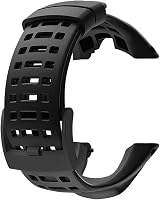
The Picowe Watch Band Strap is not a ScanWatch 2 charging cable and is not identified for Withings devices. It is a soft rubber replacement band compatible with Suunto Ambit 1, 2, 2S, 2R, 3 Sport, 3 Run, and 3 PEAK watches.
It has 15 adjustment holes and includes 1 black watch band strap and 1 screwdriver. The screws are not included, so an existing screw must remain usable for the replacement.
Choose it only for one of the compatible Suunto Ambit models. It should not be treated as a charging fix or as a confirmed Withings ScanWatch 2 accessory.
What if the band needs replacement after charging is fixed?
Replace a band only after confirming the watch itself charges normally. A new band cannot repair charging contacts, a cable, a power source, or a battery.
Measure the watch lug width before choosing a replacement band. The band must fit the watch physically, and compatibility should be confirmed for the exact model.
Who should consider the Fullmosa leather watch band?
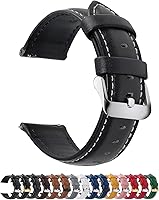
The Fullmosa 12/14/16/18/19/20/21/22/24mm Quick Release Leather Watch Band is a leather band offered in several widths. Its listed 22 mm version fits various Samsung, Garmin, Huawei, Amazfit, Fossil, TicWatch, Suunto, and other watches, but the supplied compatibility details do not identify Withings ScanWatch 2.
It includes 1 leather watch band, 1 spring bar tool, and 1 quality control card. The 22 mm version has 11 adjustment holes and is designed for wrists measuring 4.25 in plus dial length to 6.81 in plus dial length.
Choose it only after measuring the lugs and confirming the exact watch model. Its quick-release design may make band changes easier on a compatible device, but it does not address charging performance.
What should you do if the battery is fully drained?
Leave the watch connected after checking contact, cable, and power source. A fully drained device may need time before the display shows a charging response.
Keep the watch still while it charges. Repeatedly lifting and replacing it can make it harder to tell whether the connection is stable.
If there is no response after trying a clean connection, another compatible cable, and another USB source, stop repeating the same test. Contact Withings support and describe what you checked.
The Withings ScanWatch 2 setup guide can help you return to normal setup steps after the watch powers on. If charging works but health data does not transfer, see why your ECG app may not be syncing with your monitor.
When is the problem likely hardware-related?
The problem may be hardware-related when the watch stays unresponsive across clean contacts, compatible cables, and multiple power sources. Physical damage, worn contacts, or a battery fault needs manufacturer assessment.
Do not open the watch or try to repair the battery yourself. Keep notes on which cable and power sources you tested, and mention whether the watch became warm or showed any intermittent response.
Charging trouble is separate from ECG use. Once the watch works again, the Withings ScanWatch ECG guide explains the steps for using its ECG features.
For phone connection problems on another device, see why KardiaMobile may not be connecting to your phone.
What is the quickest fix for a ScanWatch 2 that will not charge?
Start with clean, dry contacts and careful alignment, then test another USB power source. If the watch still does not respond, a compatible replacement cable is the most direct accessory check.
The TUSITA cable is the relevant product here because it specifically identifies Withings ScanWatch 2 compatibility. The Picowe and Fullmosa bands are replacement accessories for other listed watches and should not be used as ScanWatch 2 charging solutions.
If several clean, compatible charging tests fail, contact Withings rather than forcing the connection or opening the watch.
Frequently asked questions
Why is my Withings ScanWatch 2 not charging?
The most common causes are dirty charging contacts, poor alignment, a damaged or unsuitable cable, a weak USB power source, or a battery that is fully drained. Clean and dry the watch and charger, reseat the watch carefully, then try a different power source.
If there is still no response, contact Withings support.
How long should I leave a dead ScanWatch 2 charging?
Leave the watch connected for a reasonable charging period before deciding that it has failed, especially if the battery was completely empty. Check the display after reseating it and try another compatible cable or power source.
If the watch stays unresponsive, the problem may need manufacturer support.
Can a replacement cable fix a ScanWatch 2 that will not charge?
Yes, a replacement cable can help if the original cable is damaged, loose, or failing to maintain contact. Choose one that specifically lists Withings ScanWatch 2 compatibility, then check that the watch sits correctly on the charging connection.
A cable cannot fix damaged watch contacts or a failed battery.
Should I clean the ScanWatch 2 charging contacts?
Yes, clean the watch and charger contacts carefully if dirt, sweat, or moisture may be preventing a connection. Disconnect power first, use a soft dry cloth, and let every surface dry fully before reconnecting.
Do not scrape the contacts or apply liquid inside the charging area.