ECG Monitor vs Printout: What Is the Difference? (October 2026)
An ECG monitor shows or records heart signals digitally, while a printout is a saved trace on paper. A screen can help you review a recording, but a paper copy can be easier to share or keep.
On this page (8 sections)
- ECG monitor vs printout: what is the difference?
- When is a screen view more useful?
- When is a printout more useful?
- Does printing change the ECG result?
- Which format should you choose?
- Which monitor fits these recording needs?
- How should you store a saved ECG?
- ECG monitor vs printout: which should you use?
An ECG monitor shows or records heart signals digitally, while a printout is a saved trace on paper. A screen can help you review a recording, and paper can make a copy easier to carry, file or discuss.
The important difference is the format, not whether the heart signal is more or less real. A saved printout comes from a recording; it does not turn the trace into a separate measurement.
Monitor screens and printouts can also show different views of the same recording. Display settings, paper size and print quality may affect how easy the trace is to read.

ECG monitor vs printout: what is the difference?
An ECG monitor presents a recording on a device or in software, while a printout puts a saved trace on paper. One is a digital view; the other is a physical copy.
A monitor may show a live or recently recorded signal, depending on the device. Some home devices also store recordings so you can review them later.
A printout is useful when you need a paper record for an appointment, personal files or a clinician who has asked for one. It is only as useful as the trace and labels that appear on the page.
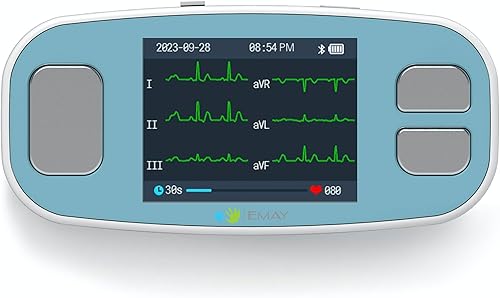
The EMAY 6L Portable ECG Monitor records and stores ECG signals and displays heart rate. Its phone and PC software includes case review, and it connects to a PC with USB or a phone with Bluetooth.
WITHINGS BeamO records a 1-lead ECG in 30 seconds and works with iOS and Android through the Withings app. Its Health Link feature supports sharing data with healthcare professionals.
When is a screen view more useful?
A screen view is useful when you want to review or share a saved recording digitally. It can keep the ECG file together with the app or software used to access it.
Digital review can be practical when the device stores cases, or when a phone app provides a sharing option. The EMAY software for phone and PC includes case review, while BeamO supports sharing through Health Link.
A screen may also let you adjust how a trace is displayed. EMAY software includes sample mode and time setting, so check its instructions to understand what those controls change.
What does a screen setting change?
A display setting changes the way you see information on screen; it doesn't replace the recorded signal. When reviewing a trace, note any settings that could affect its appearance and use the device guidance.
Avoid judging a recording from a cropped image or a view with unclear scale information. If you're sending a digital file, ask the recipient which format and labels they need.
For a basic overview of device types, see what an ECG monitor is. The right device depends on how you record, review and share results.
When is a printout more useful?
A printout is useful when you need a paper copy to bring to a visit or keep in a folder. It can be read without opening an app, as long as the trace and its labels are clear.
Paper can also work when a clinic asks you to bring a report. Confirm what they want before printing, since a paper trace may not include the digital context or details they need.
A printout's usefulness depends on legibility. Faint lines, cut-off labels, small print or a skewed page can make a saved trace harder to review.
How can you make a paper ECG easier to read?
Use the device's supported export or print steps, and check the page before you share it. Make sure the trace, labels and any date or time information are visible.
If you need help with setup, follow the steps for connecting an ECG machine to a computer and printer. For a phone based workflow, see whether you can print an ECG from an iPhone.
A photocopy can lose detail if the original is faint or the machine scales the page poorly. These tips on photocopying ECG reports clearly can help you keep a paper copy legible.
Does printing change the ECG result?
Printing changes the format, not the recording itself. A paper trace is a copy of saved ECG information, so print settings can affect appearance without changing what the device recorded.
The paper may look different if the print scale changes, the page is cropped or the printer produces faint lines. Keep the original digital recording when possible, and avoid treating a poor-quality copy as a new or different reading.
If you are comparing copies, check that the same recording and time range are shown. A printout without clear labels can be difficult to match to its source.
Which format should you choose?
Choose a screen or digital file for quick review and sharing, and choose paper when you need a physical record. If a clinician requests a specific format, follow that request.
Use a screen when you are checking a recent recording in the app or software. Use a printout for a folder, an in-person appointment or another situation where a paper copy is easier to handle.
Some people may want both: keep the digital original and print a clear copy when needed. The best choice depends on the receiving clinician, the device's export options and how you plan to store the record.
What should you check before sharing?
Check that the trace belongs to the right recording and that the labels are readable. Keep the original file or report, and share it through a method the recipient accepts.
For phone data, this guide explains how to export ECG data from Google Health. Confirm that the instructions match your device and app version.
A home monitor is not a replacement for a hospital diagnostic ECG device. EMAY says its monitor is not intended for that use and advises people with an implanted pacemaker not to use it.
Which monitor fits these recording needs?
The EMAY 6L Portable ECG Monitor fits PC and phone review, while WITHINGS BeamO combines a short 1-lead ECG recording with app based sharing. Neither description alone guarantees that a device can create the exact paper report a clinician wants.
Check the device instructions for export and printing steps before choosing based on paper workflow. For older adults comparing home devices, see ECG monitor options for seniors.
How should you store a saved ECG?
Keep the original recording and any printout together with clear date and device details. That makes it easier to identify which copy belongs to which session.
Store paper away from moisture, heat and direct sunlight so the lines and labels remain readable. For digital files, use the device's supported storage and sharing options, and follow its privacy guidance.
If you have a new or worsening symptom, seek appropriate medical care rather than relying on a screen or printout to decide what it means. A home recording can be useful information to share, but it cannot provide a full clinical assessment.
ECG monitor vs printout: which should you use?
Use a monitor screen or digital file for convenient review, and use a printout when a paper copy is needed. Choose based on the recipient's preference and keep the original recording when possible.
If you need computer or printer setup, start with the ECG connection guide. If your next step is copying or sharing a saved report, keep the trace clear and include the context requested by your clinician.
Frequently asked questions
Is an ECG printout the same as a monitor reading?
A printout can show a saved ECG trace that was recorded by a monitor, but it is a paper copy rather than the live screen view. The signal comes from the recording; the screen and paper are two ways to view or share it.
Can I use a phone ECG app without printing?
Yes. Many phone based ECG workflows let you review or share a saved recording digitally, depending on the device and app.
If you need paper, check whether the app can export or print the specific report before relying on it.
Does a printout diagnose a heart problem?
A printout shows an ECG trace, but interpreting it and making a diagnosis are different tasks. Don't use a home recording or paper copy as a substitute for medical advice, especially if you have symptoms or concerns.
Can I change how an ECG trace looks on screen?
Some ECG software offers display settings such as sample mode and time settings. Those controls affect how you review the recording, so keep the original saved signal and follow the device instructions when changing a view.
Which format should I share with a clinician?
Ask the clinician what format they can review. A digital file may be convenient for remote sharing, while a clear printout can help at an in-person visit; include the recording context and follow their instructions.