How to Replace Pulse Oximeter Batteries
Replace pulse oximeter batteries by opening the battery cover, removing both old cells, matching the new batteries to the diagram, and closing the cover firmly. Check the display before using the device again.
On this page (9 sections)
- What do you need for pulse oximeter battery replacement?
- How do you replace pulse oximeter batteries step by step?
- What should you check after installing the batteries?
- Which pulse oximeter can help with routine battery changes?
- Which Zacurate model helps with portable battery use?
- Which model offers an OLED display and extra pulse information?
- What if the pulse oximeter will not turn on?
- How should you store spare batteries and the device?
- What is the safest pulse oximeter battery replacement routine?
Replace pulse oximeter batteries by removing both old cells, matching the new batteries to the polarity diagram, and closing the compartment fully. This suits most fingertip devices and avoids the common errors that leave a screen blank after a change.
Most devices in this guide use 2 AAA batteries, but your model's manual and compartment markings take priority. Battery size and direction can vary, so check the label inside the cover before you buy or insert new cells.
Battery replacement can restore a device with a dim screen or one that will not start. Weak batteries often cause flickering, slow startup, or a fading display, and fresh cells can restore brightness and response.
Work over a clean, dry surface so the cover and cells stay free from dust and moisture. A tray or shallow dish keeps small parts together and stops a battery rolling off the table.
Keep the cover, cells, and small parts away from children and pets. Store spares where they cannot be swallowed, chewed, or mixed with coins and keys.
Replace both batteries at the same time, even if only one looks flat. Two fresh cells of the same type give steadier power and make it easier to tell whether a startup problem comes from the device or from mismatched batteries.
Read the polarity diagram before closing the compartment. The two cells may need to face opposite directions, and the printed symbols matter more than copying another model.
After the cover clicks shut, press the power button and watch the screen. A clear startup display suggests correct seating, while a blank screen means reopen the compartment and check direction and contact.
What do you need for pulse oximeter battery replacement?
You need 2 compatible batteries, the pulse oximeter manual, and a clean work surface. Check the battery compartment or manual for the required size before opening a new package.
The products covered here use 2 AAA batteries. The Santamedical Generation 2 includes 2 AAA batteries, and both Zacurate models list 2 AAA batteries as required.
Have a small container ready for the old batteries. Do not throw loose batteries where children or pets can reach them, and recycle or dispose of them according to local rules.
If you are still choosing a device, the pulse oximeter device buying guide explains the main features to compare. Readers shopping for different users can also review the best pulse oximeter for seniors or the best pulse oximeters for kids.
How do you replace pulse oximeter batteries step by step?
Open, remove, match, close, and test is the correct order for most fingertip devices. Follow the model manual if its instructions differ.
- Turn off the pulse oximeter and remove any lanyard or silicone cover that blocks the battery door.
- Find the battery compartment, usually on the lower or rear section of the device.
- Open the cover without forcing it. Some covers slide, while others lift from a small tab.
- Remove both old batteries and place them in your recycling or disposal container.
- Check the polarity diagram inside the compartment.
- Insert the new batteries in the marked directions.
- Close the cover until it sits securely.
- Press the power button and check that the screen starts normally.
Use two batteries of the same type and similar age. Mixing a fresh battery with an older one can reduce performance and make troubleshooting harder.
Why does battery direction matter?
Battery direction matters because the positive and negative ends must match the device's internal contacts. The two cells may face opposite directions, even when the springs appear to be on the same side.
The Santamedical product information specifically warns that its two batteries must be installed in opposite directions. Use the diagram inside your own device rather than copying the direction from another pulse oximeter.
If the compartment has no clear diagram, stop and check the manual or contact the manufacturer. Do not guess, bend the contacts, or force a battery into place.
What should you check after installing the batteries?
After pulse oximeter battery replacement, confirm that the device turns on, the display is readable, and the battery cover is closed. A startup check can identify a placement problem before you need the device.
Press the power button once and wait for the screen. If the device has an automatic shutoff, that feature may turn it off after a short period when no finger is inserted.
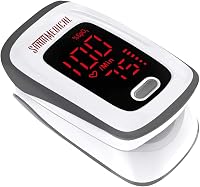
The Santamedical Generation 2 has an automatic power-off feature after 10 seconds. Its bright OLED display shows pulse rate, a pulse rate bar, and SpO2 information, according to its product details.
Do not treat a successful startup as proof that every reading is suitable for a medical decision. The FDA's pulse oximeter basics guidance explains why readings should be considered with symptoms and other information.
Which pulse oximeter can help with routine battery changes?
A device with clearly stated AAA battery use and included batteries can make routine replacement simpler. These 3 options all use 2 AAA batteries and include batteries with the device.
The Santamedical Generation 2 also has a display that can show readings in 4 directions. Its product details say it accommodates a wide range of finger sizes and includes a 1-year warranty.
Choose it if you want a simple fingertip device with a compact design and a lanyard. Follow the battery diagram carefully because correct direction is especially important for this model.
Which Zacurate model helps with portable battery use?
The Zacurate Pro Series 500DL uses 2 AAA batteries and includes a silicone cover and lanyard. Its product details state that the battery life is 30 hours and that the device is intended for sports and aviation use.
The 500DL has a large digital LED display that faces the user. It is designed for ages 12 and above, so check the intended use before choosing it for a younger child.
For operation guidance after changing the batteries, see how to use a Zacurate pulse oximeter. That guide can help you prepare the device for a reading after the startup check.
Which model offers an OLED display and extra pulse information?
The Zacurate 500 Series Fingertip Pulse Oximeter Blood uses 2 AAA batteries and includes a silicon cover, batteries, and lanyard. Its product details identify the model as 500C and the color as Mystic Black with an OLED display.
The 500C product details also describe a plethysmograph for pulse strength, adjustable display brightness, and audible alerts for readings beyond set limits. It is intended for sports and aviation use rather than as a medical device.
Choose this model if those display and alert features fit your routine. Always follow the manual for battery installation and device operation.
What if the pulse oximeter will not turn on?
If the device will not turn on, remove the batteries and check the type, direction, contact points, and cover position. Most startup problems after a battery change come from one of these basic issues.
Try this order:
- Confirm that both batteries are the required size.
- Check that neither battery is old, damaged, leaking, or corroded.
- Match every positive and negative symbol to the compartment diagram.
- Make sure both cells are seated under the contacts.
- Close the cover completely.
- Press the power button again.
Do not scrape contacts with a sharp tool or use a leaking battery. If the device still does not start, contact the manufacturer using the support details in the manual.
For related monitor maintenance, see how to replace an ECG monitor battery and how to change batteries in your EKG monitor. Those devices may use different battery types and compartment designs, so do not assume their instructions match a pulse oximeter.
How should you store spare batteries and the device?
Store spare batteries in their original packaging in a cool, dry place. Original packaging shows size and expiry information and keeps terminals from touching metal objects.
Keep spares away from keys, coins, paper clips, and other metal items that can cause unwanted contact. A drawer, box, or battery case works better than a loose handful in a bag.
This suits households that want a spare pair ready for a dim screen or sudden failure. It also helps travelers carrying a device in a gym bag, car, or carry on case.
If you will not use the oximeter for a long time, check the manual about removing the batteries. Removing them can reduce leakage risk during storage, especially in warm or humid conditions.
When you remove batteries for storage, keep them in a separate labelled container rather than loose in the device case. That keeps the compartment clean and stops a spare cell shifting against the contacts.
Keep the device dry and protect the battery compartment from dirt and grit. Wipe the exterior with a dry, soft cloth and avoid water, household cleaners, or damp storage boxes.
If you use a lanyard or cover, make sure it does not press against the battery door or power button in storage. A cover that pushes on the door can trap dust or stop the compartment closing fully.
Store the device with the display protected from knocks and pressure. A hard case or padded pouch can help, provided it stays dry and does not squeeze the battery cover while the oximeter sits unused.
What is the safest pulse oximeter battery replacement routine?
For pulse oximeter battery replacement, use the correct battery size, follow the polarity diagram, replace both cells together, and test the device before relying on it. If the screen stays off, stop and check the manual rather than forcing the cover or contacts.
Choose the Santamedical Generation 2 for a compact 2-AAA device with a lanyard and automatic shutoff. Choose the Zacurate 500DL for its LED display and included cover, or the Zacurate 500C for its OLED display and described pulse-strength features.
After replacing batteries, use the device according to its manual and keep your old batteries out of reach. For another non-electronic measurement option, see best analog bathroom scales.
Frequently asked questions
How do you replace pulse oximeter batteries?
Open the battery compartment, remove both old batteries, and insert two fresh batteries that match the required type and the polarity diagram. Close the cover completely, press the power button, and confirm that the screen turns on before taking a reading.
Which batteries do pulse oximeters use?
Many fingertip pulse oximeters use 2 AAA batteries, but you should confirm the requirement in your device manual or battery compartment. Do not mix old and new cells, and do not replace the specified battery type with a different size.
Why will my pulse oximeter not turn on after a battery change?
Check that both batteries are fresh, seated correctly, and facing the directions shown inside the compartment. Some devices require the two batteries to face opposite directions, even when the springs appear to be on the same side.
How often should pulse oximeter batteries be replaced?
Replace batteries when the screen becomes dim, the device shuts off, or it stops turning on. Battery life depends on use and the device, so keep a spare pair available and remove batteries before long-term storage if the manual recommends it.